–
12
–
EN
The following show examples of connections commonly used to connect the DVD/VCR to TV and other components.
NOTES
• Be sure to turn off the power to all components in the system before connecting another component.
• Refer to the Instruction Manuals for your TV, stereo system and any other components to be connected to the DVD/VCR.
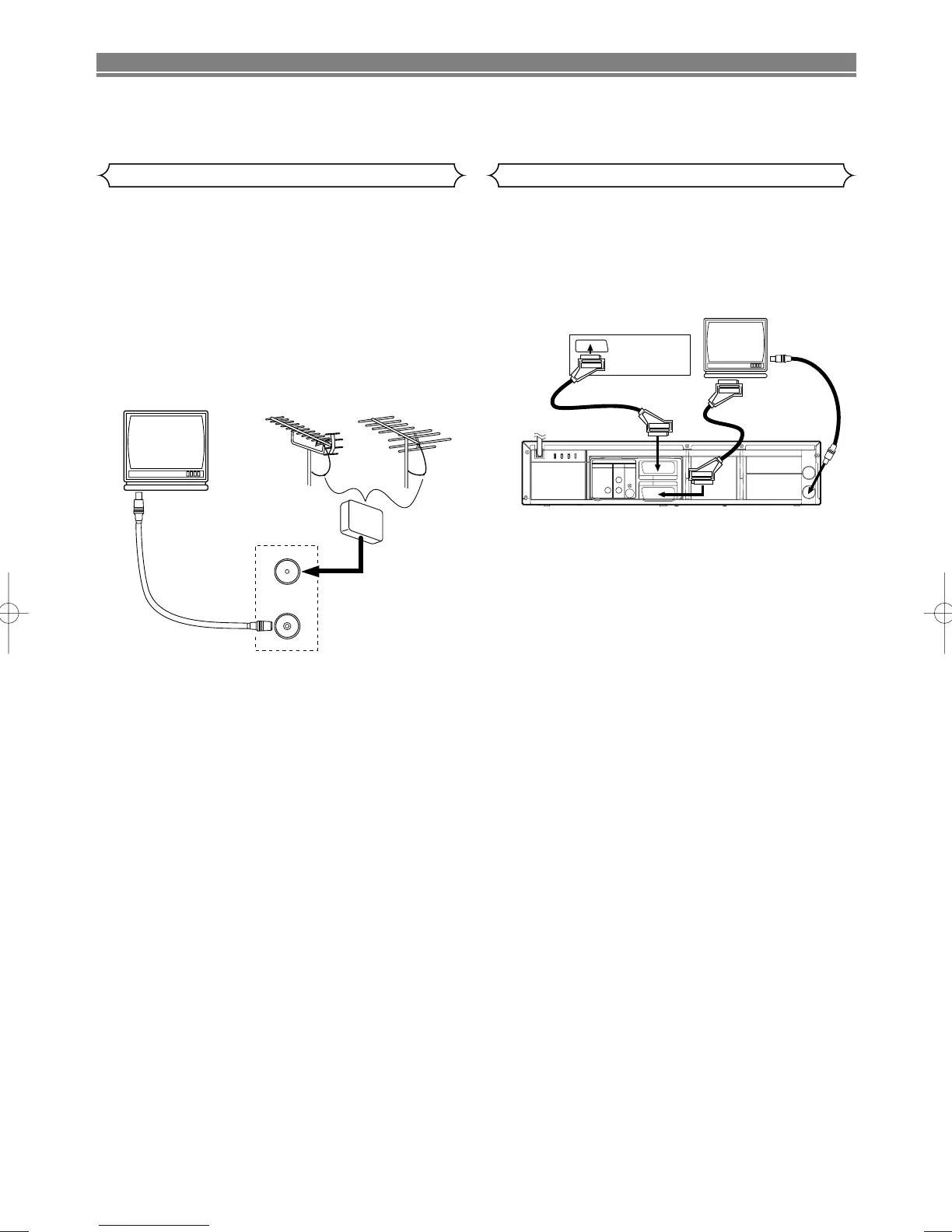
1. Disconnect the TV’s power cord from the AC outlet.
2. Disconnect the VHF/UHF TV aerial cable from the TV.
3. Connect the VHF/UHF TV aerial cable to the DVD/VCR.
4. Connect the DVD/VCR to the TV using the aerial cable
(supplied).
5. Plug the Power cords of the DVD/VCR and TV into the AC
outlets.
EURO SCART (AV) SOCKETS
Your DVD/VCR is provided with two Scart sockets which you
may connect to other external devices with Scart sockets.
We recommend this connection to ensure a better audio and
picture quality.
A2 or NICAM stereo sound is only achieved when using a
SCART lead.
Euro Scart cables are obtainable at your dealer.
AV1 (TV) CONNECTION TO TV
If your TV has Scart sockets, you may connect your
DVD/VCR’s AV1 (TV) scart socket to the Scart socket on the
back of your TV. Please see the instruction manual for your
TV.
AV2 (DECODER) CONNECTION FOR OTHER EXTERNAL
DEVICES
The second Scart socket AV2 (DECODER) is designated for
other external devices, e.g. decoder, another VCR, video
camera and so on.
NOTE:
• If you want to connect a TV with Scart socket to your
DVD/VCR, the TV must be connected to the DVD/VCR
through AV1 (TV). A connection to AV2 (DECODER) will
not function correctly.
EXTERNAL INPUT MODE
To receive the signal from an external input (decoder, video
camera, another VCR etc.), connect to the AV2 (DECODER)
socket, and press PROG (o/p) or enter “002” with the
number buttons to show “AV2” on the TV screen. (“L2” will
appear on the DVD/VCR display panel.)
If you use the AV1 (TV) socket, press PROG (o/p) or enter
“001” with the number buttons to appear “AV1” on the TV
screen. (“L1” will appear on the DVD/VCR display panel.)
If you use the front AUDIO/VIDEO IN Jacks, press PROG
(o/p) or enter “003” with number buttons to show “AV3” on
the TV screen. (“L3” will appear on the DVD/VCR display
panel.)
CONNECTIONS
DVD/VCR to TV Connection
Other Connections



 To Next Page