2-8
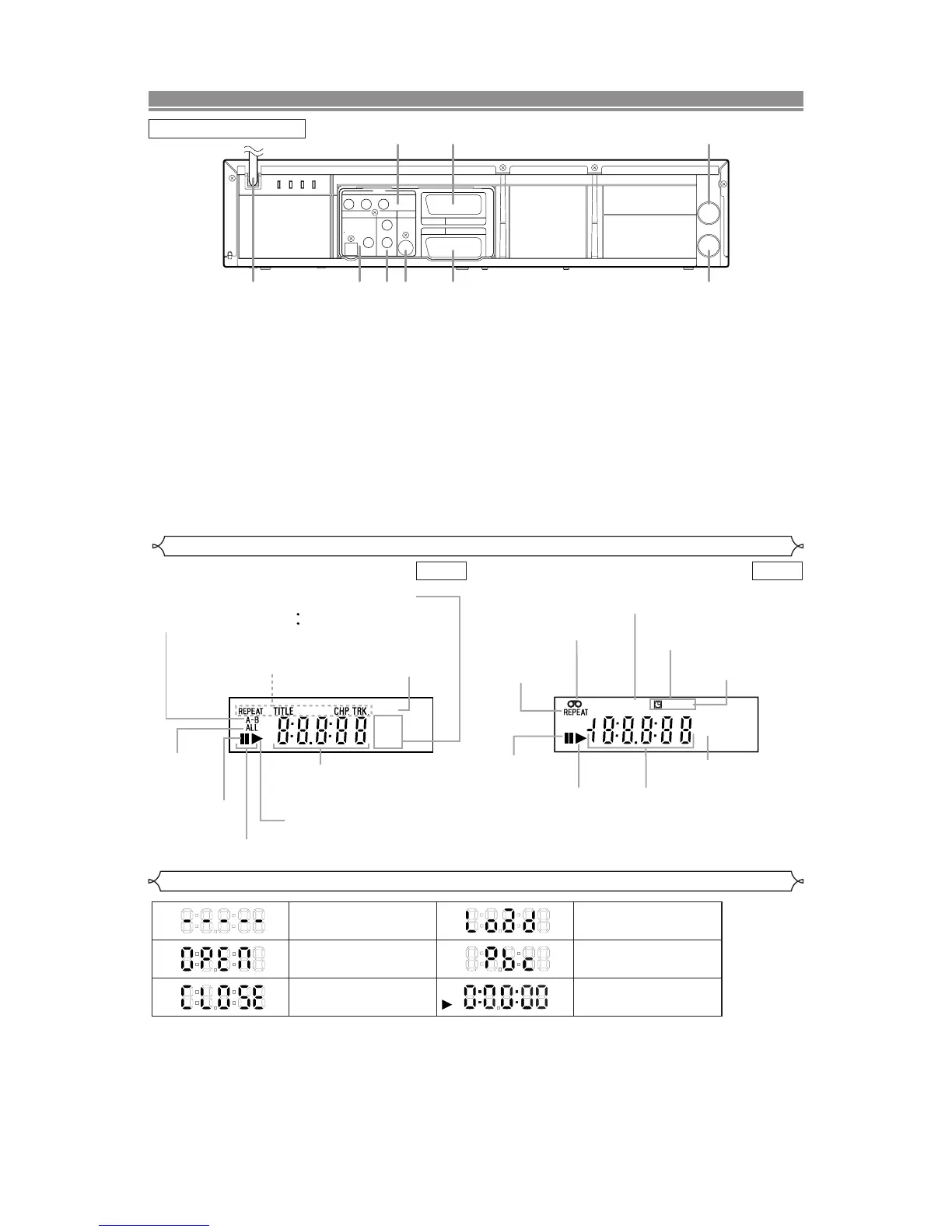
Displays During Operation
Tray open
Tray closed
When a disc is being
played back
DVD
Loading the Disc
Lights up when the playback
control is activated
No disc inserted or cannot
read
1. MAIN (AC Power Cord)
Connect to a standard AC plug.
2. DIGITAL AUDIO OUT JACKS
Use either an optical or coaxial digital cable to connect
to a compatible Dolby Digital receiver. Use to connect to
a Dolby Digital decoder, DTS decoder or MPEG
decoder.
3. AUDIO OUT JACKS (ANALOG Left/Right)
Connect to the Audio input jacks of A/V-compatible TV
or wide screen TV, Stereo system.
4. S-VIDEO OUT JACK (DVD Only)
Use the S-Video cable to connect this jack to the S-
Video jack on your A/V-compatible TV or wide screen
TV for a higher quality picture.
5. COMPONENT VIDEO OUT JACKS (DVD Only)
Use these jacks if you have a TV with Component
Video in jacks. These jacks provide C
R
/P
R
, C
B
/P
B
and Y
video. Together with S-Video, Component Video pro-
vides the best picture quality.
6. EURO AV2 (DECODER) JACK
Use the Euro Audio/Video cable to connect this jack to
the 21 pin scart jack on your decoder.
7. EURO AV1 (TV) JACK
Use the Euro Audio/Video cable to connect this jack to
the 21 pin scart jack on your A/V-compatible TV or wide
screen TV for a best quality picture.
8. AERIAL Jack
Connect your antenna, Cable Box, or Direct Broadcast
System.
9. RF OUT Jack
Use the supplied aerial cable to connect this jack to the
ANTENNA IN Jack on your TV.
Caution: Do not touch the inner pins of the jacks on the rear
panel. Electrostatic discharge may cause perma-
nent damage to the DVD/VCR.
Lights up when the inserted
disc is being played back.
Displays a type of the disc
which is inserted on the tray.
DVD: DVD disc
CD:Audio CD, MP3
Lights up when the
inserted disc comes
to a pause.
Lights up when the
A-B repeat function
is on.
Lights up when the
repeat function is on.
Lights up when playing back
in slow mode. (DVD)
Displays how long the current title
or track has been played back. When
a chapter or track is switched, the
number of a new title, chapter or
track is displayed.
Lights up when
the ALL repeat
function is on.
GROUP P .SCAN
DVD
CD
Lights up when the
progressive scan
system is activated.
Works as a tape counter
(hour,minute,second).
Also displays a channel number,
tape speed, remaining time for OTR or
current time.
VCR REC
PM
Lights up when a tape is
in the DVD/VCR.
Lights up when the DVD/VCR is in VCR position.
This light does not appear when the DVD/VCR is in TV position.
Lights up during a recording.
Flashes when a recording
is paused.
Lights up when
current time is P.M.
Lights up when
the timer recording or an
OTR recording has been set.
Lights up when the inserted
cassette is being played
back.
Lights up when
the playback is
in still or slow mode.
Lights up during
playback when
the repeat function
is on.



 To Next Page