English
116
[When using Macintosh]
1 Turn the Macintosh on, and insert the
provided CD-ROM into the CD-ROM drive of
Macintosh.
2 Double-click the DVDCAM3000 icon
displayed on desktop.
3 Double-click the icon of “ImageMixer for
DVDCAM.pkg” displayed on screen.
The installer will start: Click “Continue”.
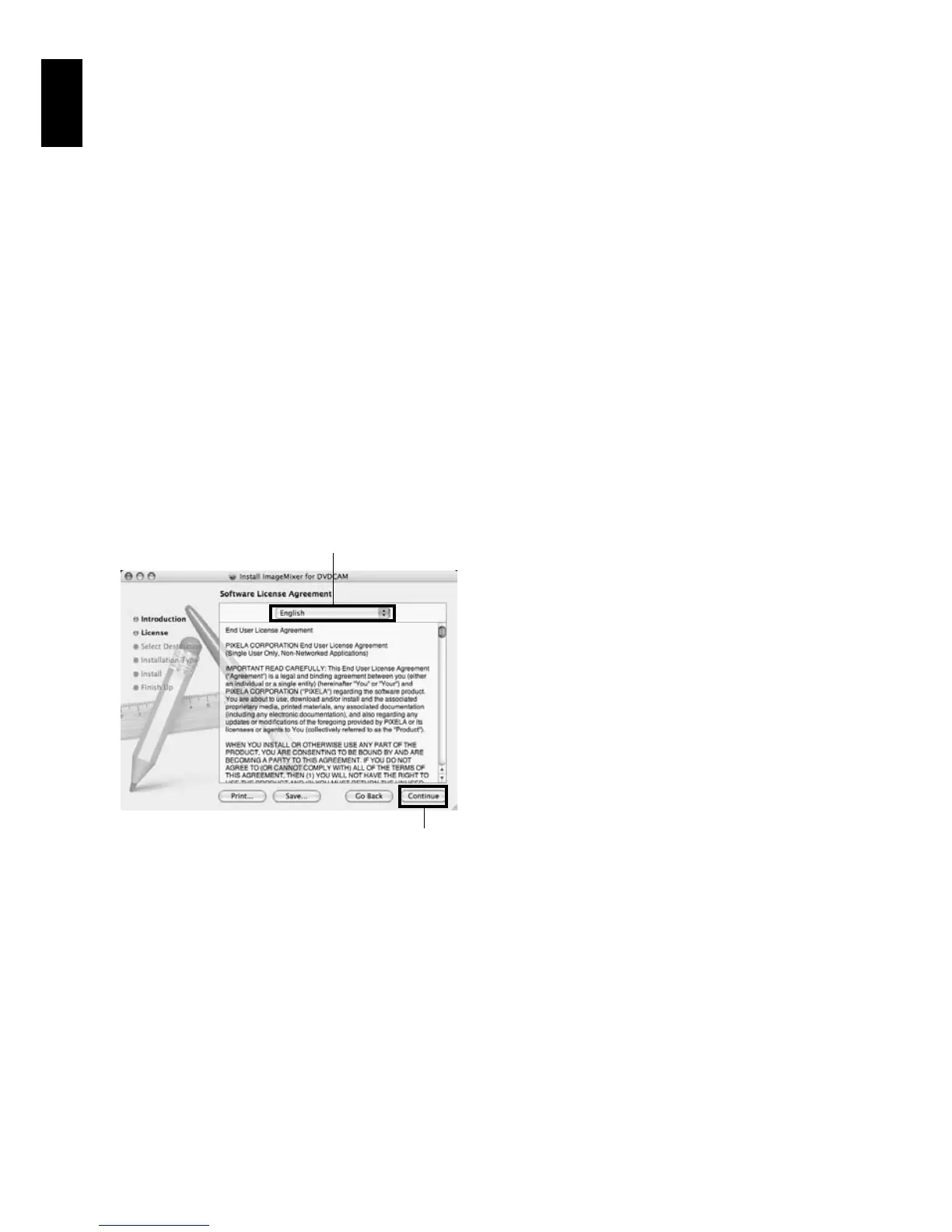
4 Checking license agreement:
The license agreement screen will appear.
Set the language to be used when installing
the software, and then carefully read the
license agreement: If you agree with the
contents, choose “Continue”. If you accept
the license agreement, click “I agree”.
* With the provided software for Macintosh, the
language used with OS will automatically be
installed.
5 Choosing the installation destination and
type of installation:
Follow the instructions on screen for
operation: Installation will start.
6 After installation is finished, the screen for
exit will appear: Click “Close”.
The screen for installation will close and
installation will be complete: Remove the
CD-ROM.
Click
Setting language
when installing






 To Next Page