Chapter 14 Operation Examples
14-3
S T E P
2 Initialization
Settings for the CPU type, memory type and I/O assignment are performed.
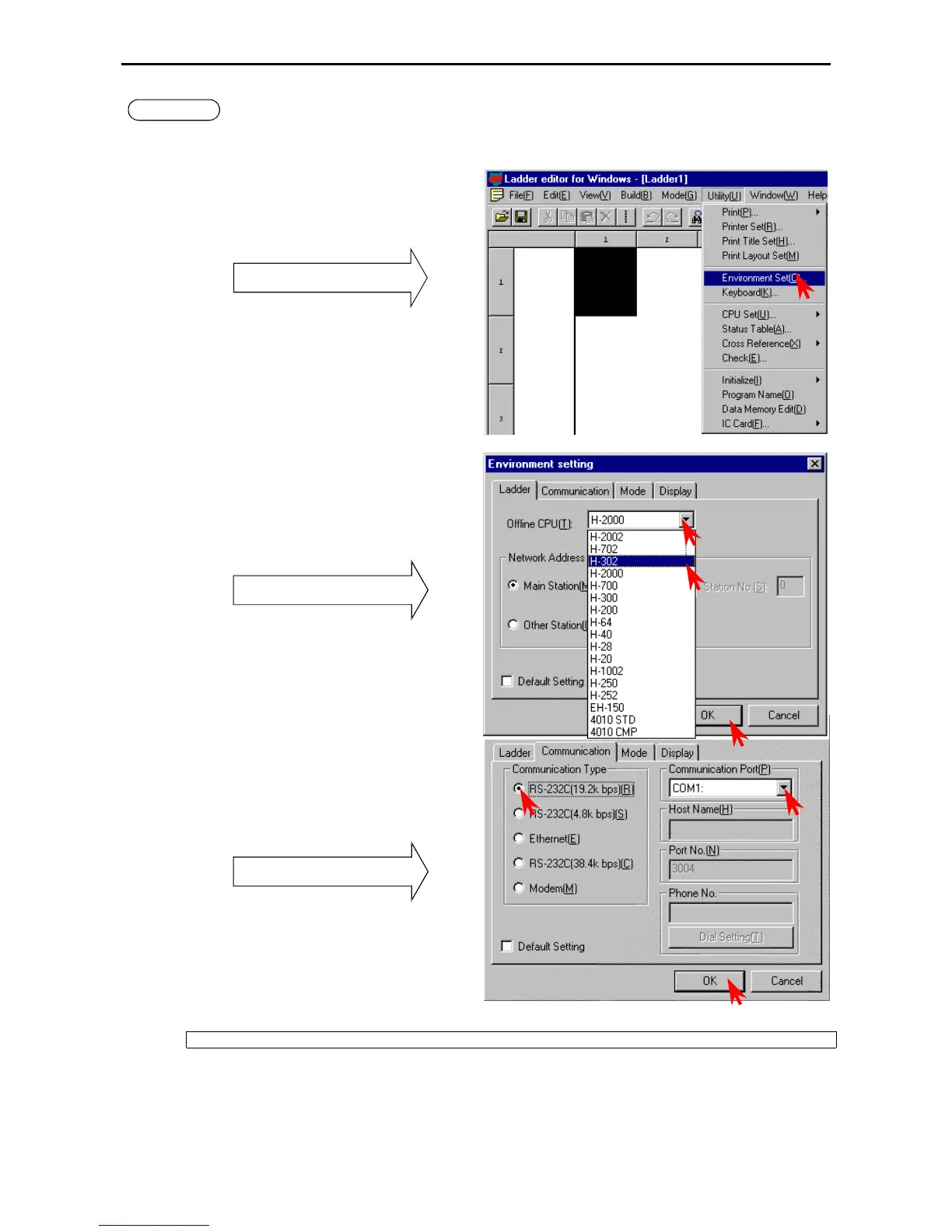
1. Setting the CPU type
Click [Utility] → [Environment Settings] in
the Menu bar.
Pull-down menu
The Environment Setting dialogue box is displayed.
Specify the CPU type from the Ladder tag.
• Click the W of the Offline CPU field to show the
available CPU types in the pull-down display.
Select the CPU type.
• Click the [OK] button.
Pull-down display of CPU types
Specify the transmission speed from the
Communication tag.
• Select the transmission speed set with the DIP
switches of the MICRO-EH main unit (in case of
the 10-point type CPU, the transmission speed is
fixed at 4800 bps).
• Specify the communication port.
• Click the [OK] button.
Pull-down display of CPU types
Select “H-302” for the CPU type setting.



 To Next Page