Chapter 14 Operation Examples
14-4
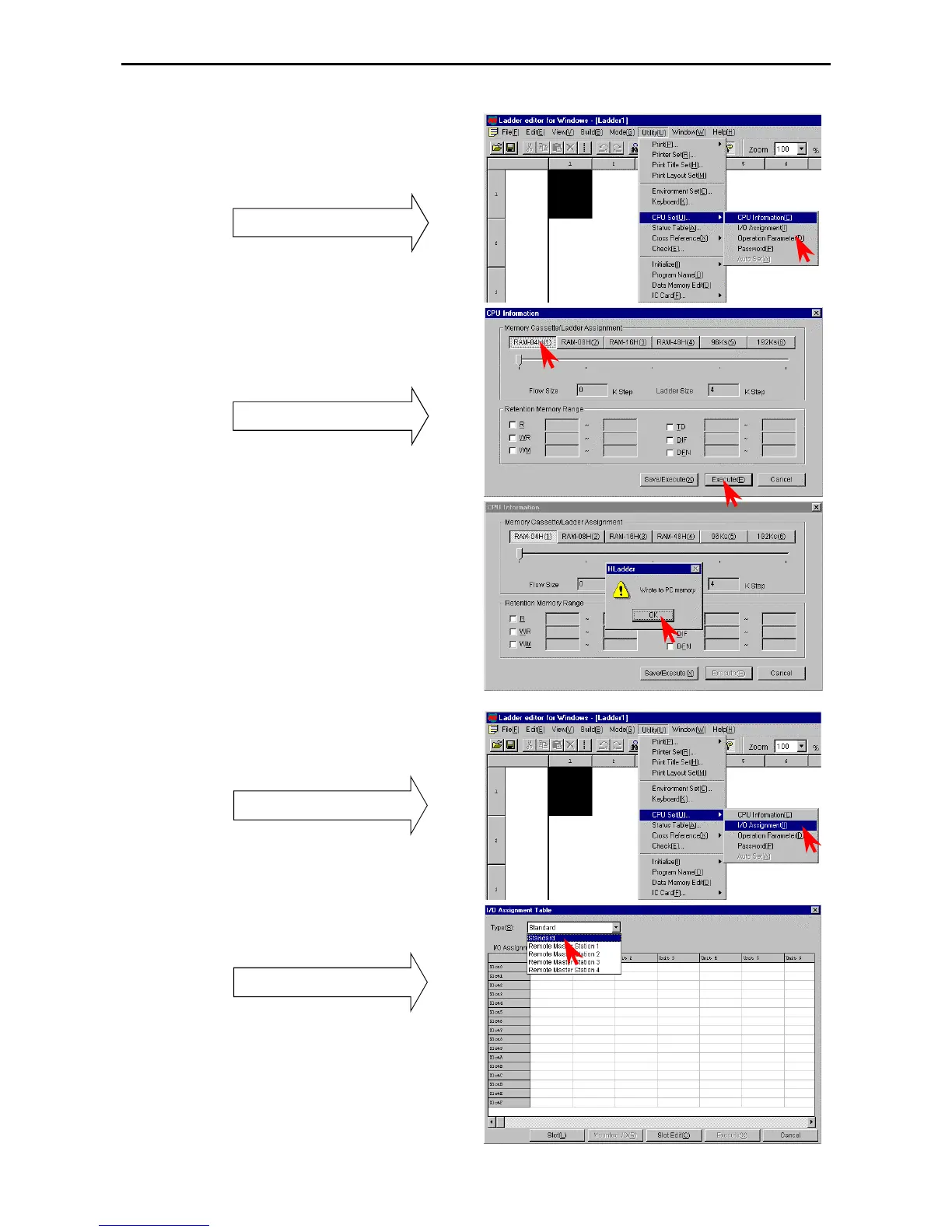
2. Setting the memory type
Click [Utility] → [CPU Setting] → [CPU
Information] in the Menu bar.
The CPU Information dialogue box is displayed.
Pull-down menu
• Click the Memory Cassette/Ladder Assign button
and select the memory cassette size.
• Click [Execute] or the [Memory/Execute]
button.
CPU Information dialogue box
• Click the [OK] button in the confirmation
dialogue box.
Set the memory cassette size to RAM-04H.
[Execute]: Save to the PC memory
[Memory/Execute]: Save to the PC memory and
Window registry.
3. Assigning I/O
Click [Utility] → [CPU Setting] → [I/O
Assign] in the Menu bar.
Pull-down menu
The I/O Assign List dialogue box is displayed.
Click the W of the Types field and select
[Standard] from the pull-down display.
I/O Assign List dialogue box
There are two setting methods for the subsequent
procedures.
• From the I/O Assign List
• From the I/O Assign List → Slot Setting Status



 To Next Page