Chapter 14 Operation Examples
14-13
S T E P
6 Program Transfer to CPU
Write the program that has been input, to the CPU. However, verify the following:
• The CPU and the personal computer connection cable are properly connected.
• The CPU power is on.
• CPU mode switch is set to “STOP.”
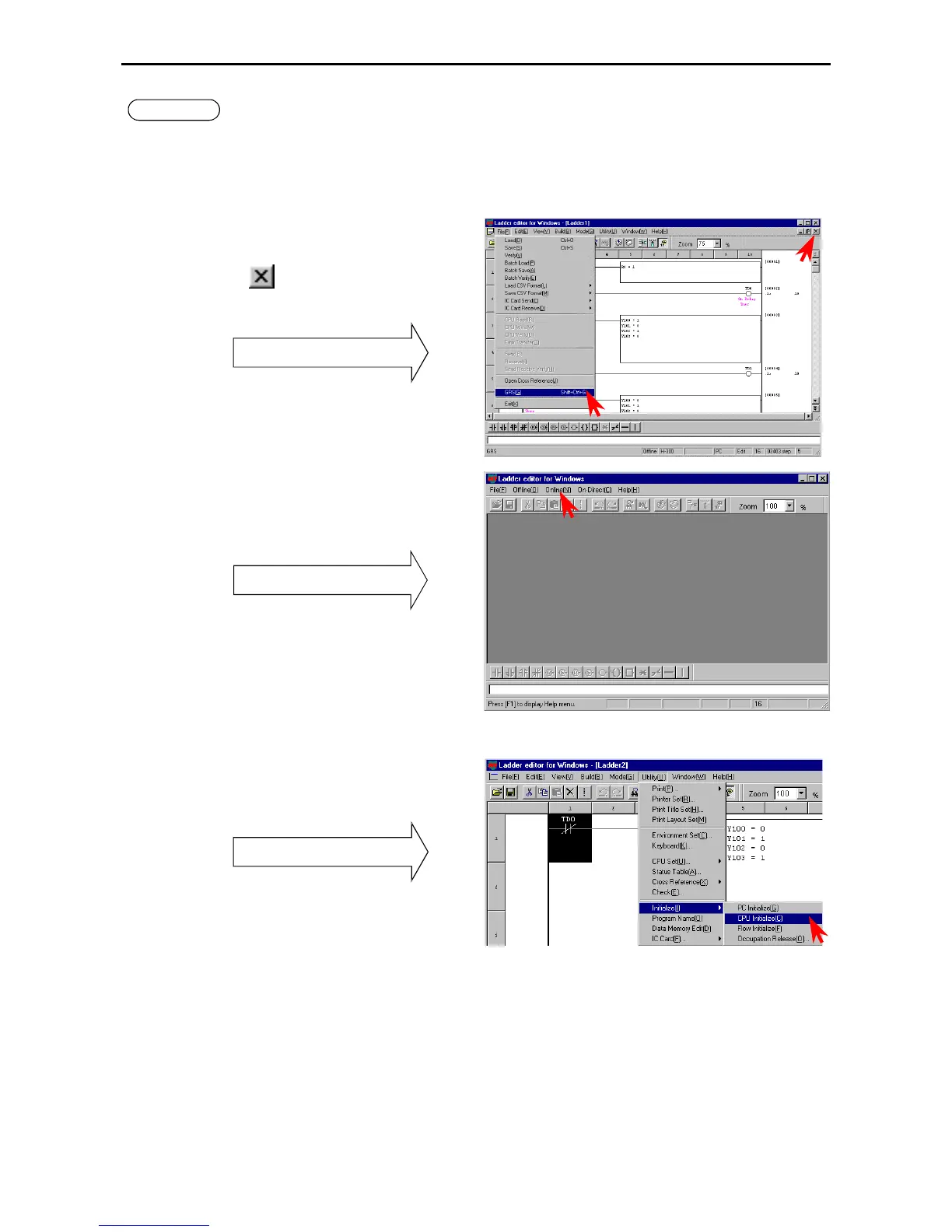
1. Switching to online mode.
Move to the GRS screen from the offline mode.
This can be done in two ways.
1] Click [File] → [GRS] in the Menu bar.
2] Click
(lower button) on the upper right of
the screen.
GRS screen
In the GRS screen, click the [Online] item in the
Menu bar.
The Read/Edit screen of the online mode is
displayed.
GRS screen
Note: Verify again that the DIP switches are set to
the transmission speed selected in the
Environment Setting in step 2. (For the 10-
point type, it is fixed to 4800 bps.)
2. Initializing the CPU
Click [Utility] → [Initialize] → [CPU initialize]
in the Menu bar.
Pull-down menu
Note: Please note that programs etc. in the personal
computer will be erased if [PC initialize] is
selected.



 To Next Page