15
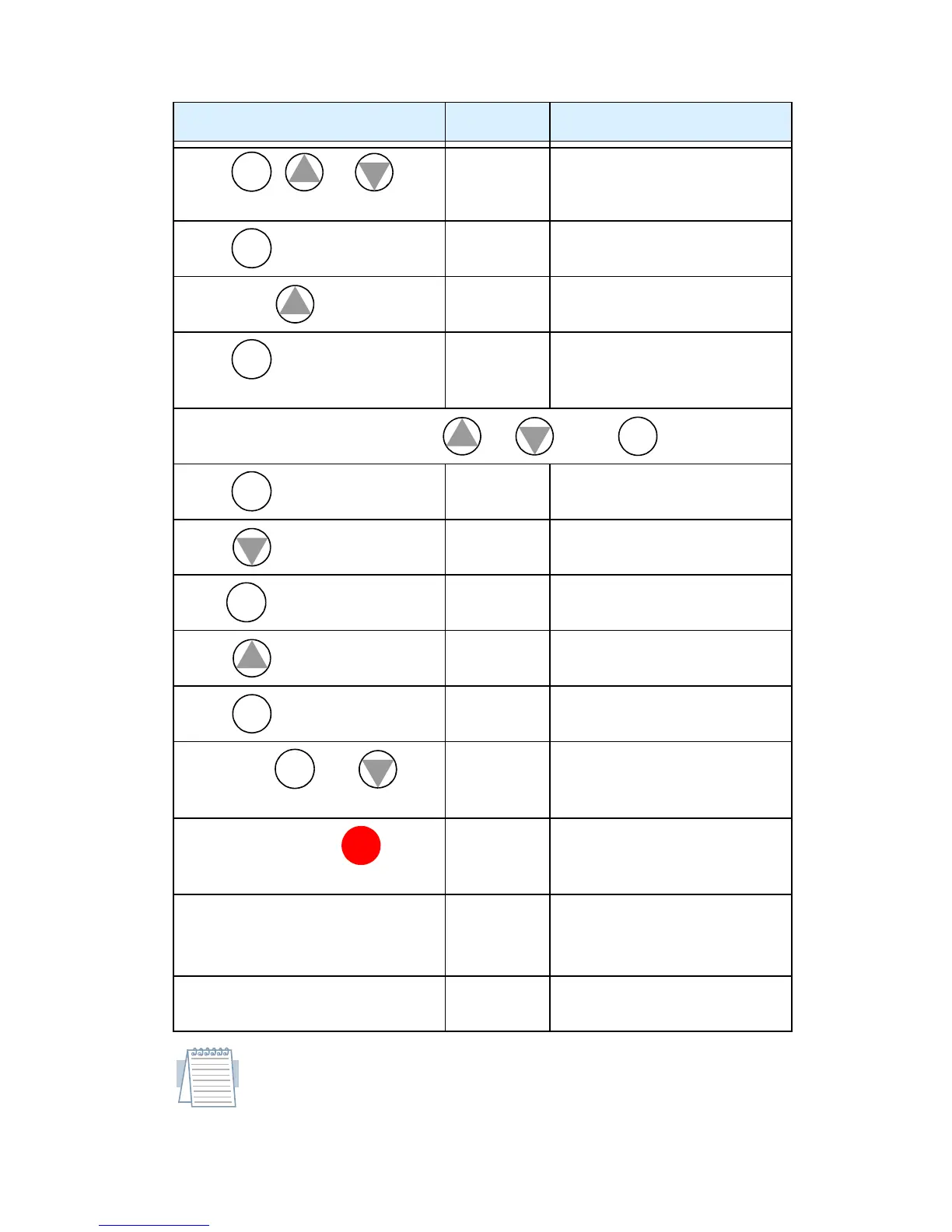
Restoring Factory Default Settings
Note: After initializing the inverter, use the Powerup Test on
page 12 to get the motor running again.
Action Display Function/Parameter
Press , or as
needed.
b
---
“B” Group selected
Press .
b
001
First “B” Group parameter
Press/hold until...
b
085
Country code for
initialization selected
Press . If setting is
correct, then skip next step.
02
00 = Japan
01 = Europe
02 = USA
To change country code, press
or to set; to store.
Press .
b
085
Country code for
initialization selected
Press .
b
084
Initialization function
selected
Press .
00
00 = disable initialization,
clear trip history only
Press .
01
01 = enable initialization
Press .
b
084
Initialization now enabled
to restore all defaults
Press/hold and
keys. Do not release yet.
b
084
First part of key sequence
Press and hold the key
for 3 seconds and then release.
d
000
Final part of key sequence;
display is blinking
After the display “D000” is
blinking, only then release all
the keys.
EU
USA
Default parameter country
code shown during initial-
ization
Initialization is complete.
d
001
Function code for output
frequency monitor shown
FUNC .
1
2
FUNC .
1
FUNC .
1
2
STR
FUNC .
2
FUNC .
1
STR
FUNC .
2
STOP
RESET


 To Next Page
 Loading...