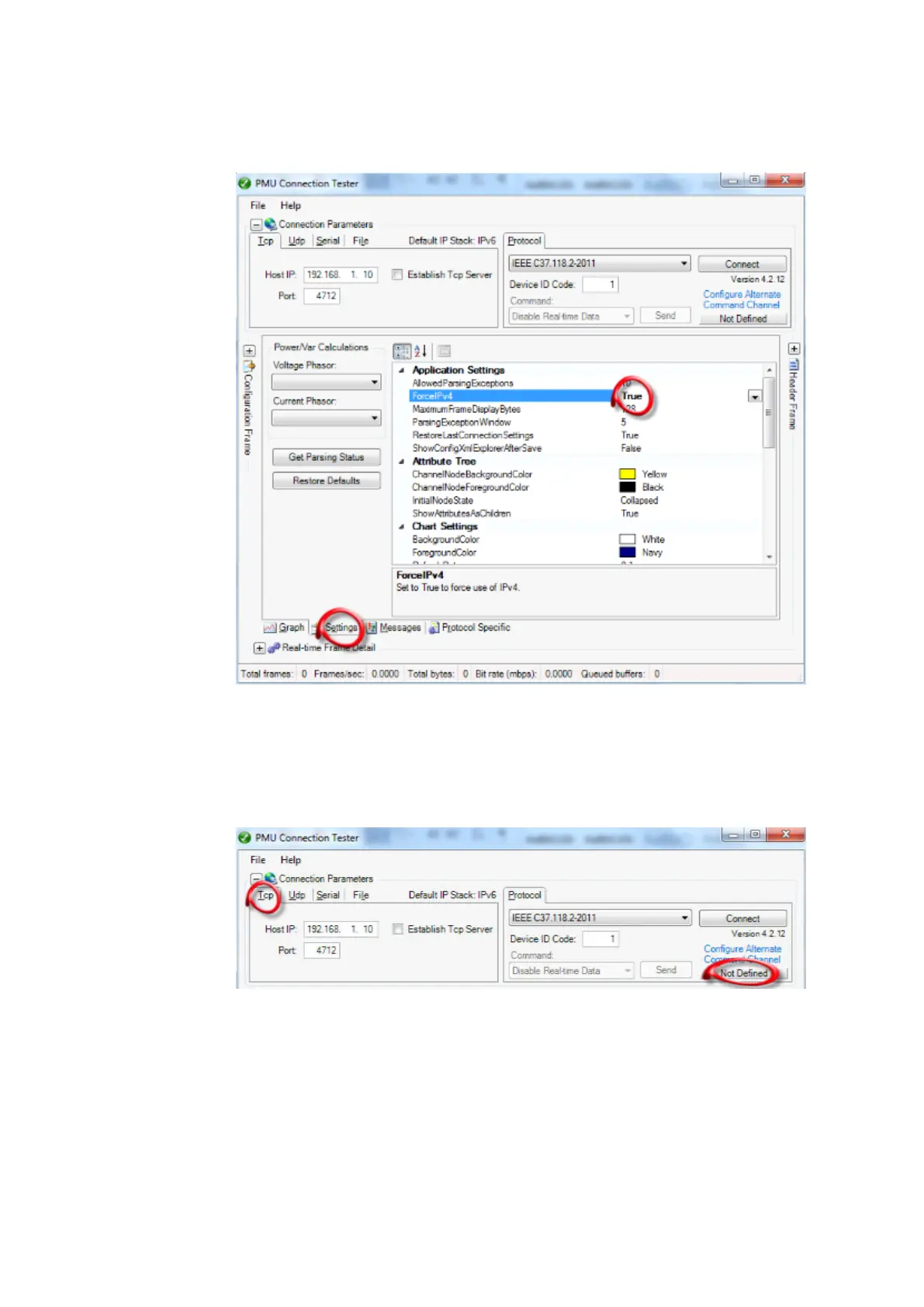
1. Set the IP stack on PMU Connection Tester to IPv4. Note that the default IP stack on PMU
Connection Tester tool is IPv6.
IEC140000134 V1 EN-US
1.1. Navigate to the Settings tab.
1.2. Force the IP stack to IPv4 by setting the parameter ForceIPv4 to True.
2. Set the Connection Parameters on PMU Connection Tester for TCP communication according
to the PMU configuration.
IEC140000135 V1 EN-US
2.1. Set Host IP to the PMU IP address configured for the port in use. Here the LANAB:1
IPAddress (192.168.1.10) is set.
2.2. Set Port to the IED's TCP port set in the PMU under parameter C37.118TCPport (4712 is
default). Alternatively, in order to make an IEEE1344 communication, the 1344TCPport
parameter setting can be used (4713 is default).
2.3. Set the Protocol as IEEE C37.118.2-2011.
1MRK 505 378-UEN Rev. K Section 9
Establishing connection and verifying the IEEE C37.118/1344 communication
Line differential protection RED670 69
Commissioning manual
© 2017 - 2022 Hitachi Energy. All rights reserved



 To Next Page