WHEN USING WITH THE BATTERY (provided)
I_!OTE: The battery must be charged before it can be used for the first time. Refer to
i CHARGING THE BATTERY, on page 14:
1. Open the case.
Refer to "WATER-RESISTANT" on page 8.
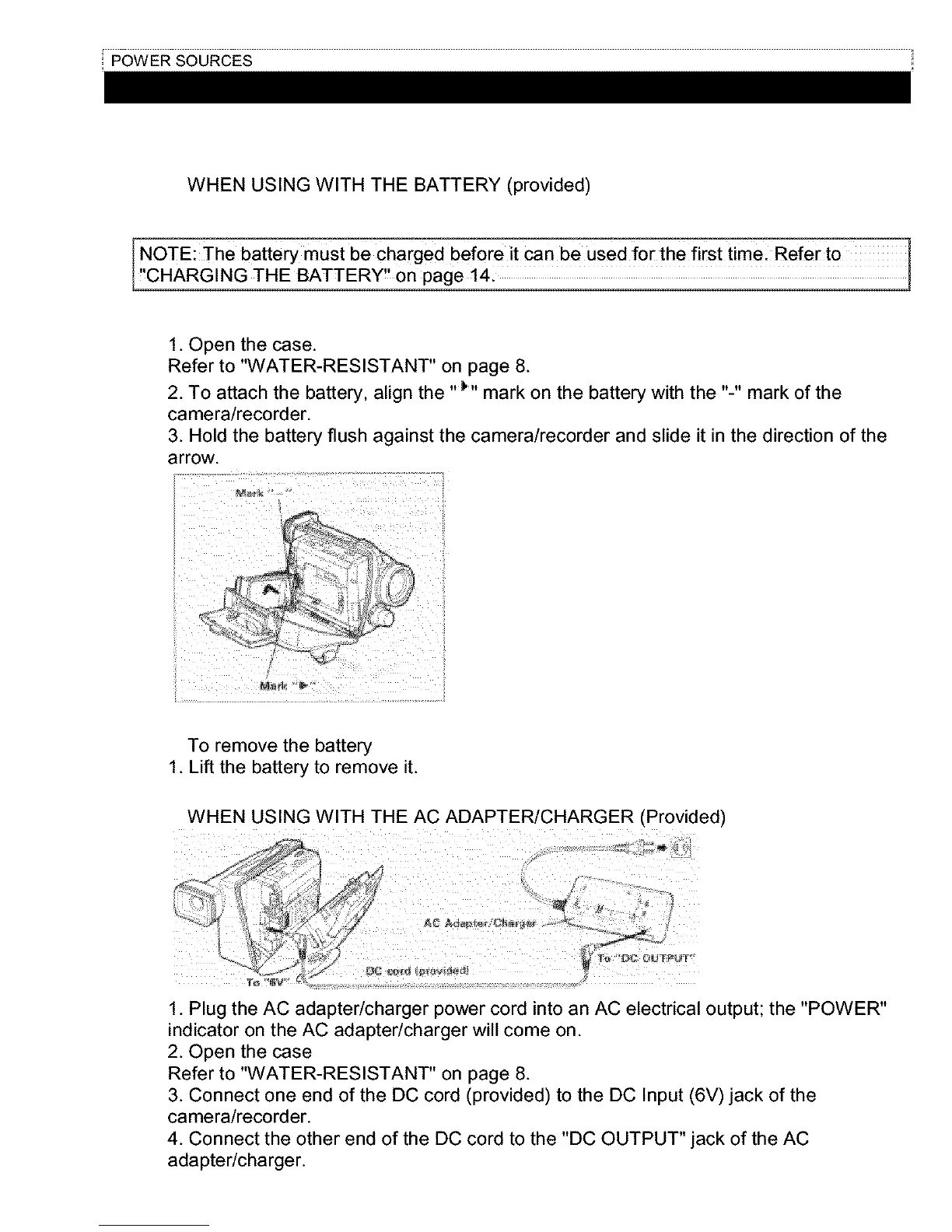
2. To attach the battery, align the "_'' mark on the battery with the "-" mark of the
camera/recorder.
3. Hold the battery flush against the camera/recorder and slide it in the direction of the
arrow.
I
ii
/ .........
To remove the battery
1. Lift the battery to remove it.
WHEN USING WITH THE AC ADAPTER/CHARGER (Provided)
:'ml,yC _ .-v
/' ,,_ld;di
y_
1. Plug the AC adapter/charger power cord into an AC electrical output; the "POWER"
indicator on the AC adapter/charger will come on.
2. Open the case
Refer to "WATER-RESISTANT" on page 8.
3. Connect one end of the DC cord (provided) to the DC Input (6V) jack of the
camera/recorder.
4. Connect the other end of the DC cord to the "DC OUTPUT" jack of the AC
adapter/charger.



 To Next Page