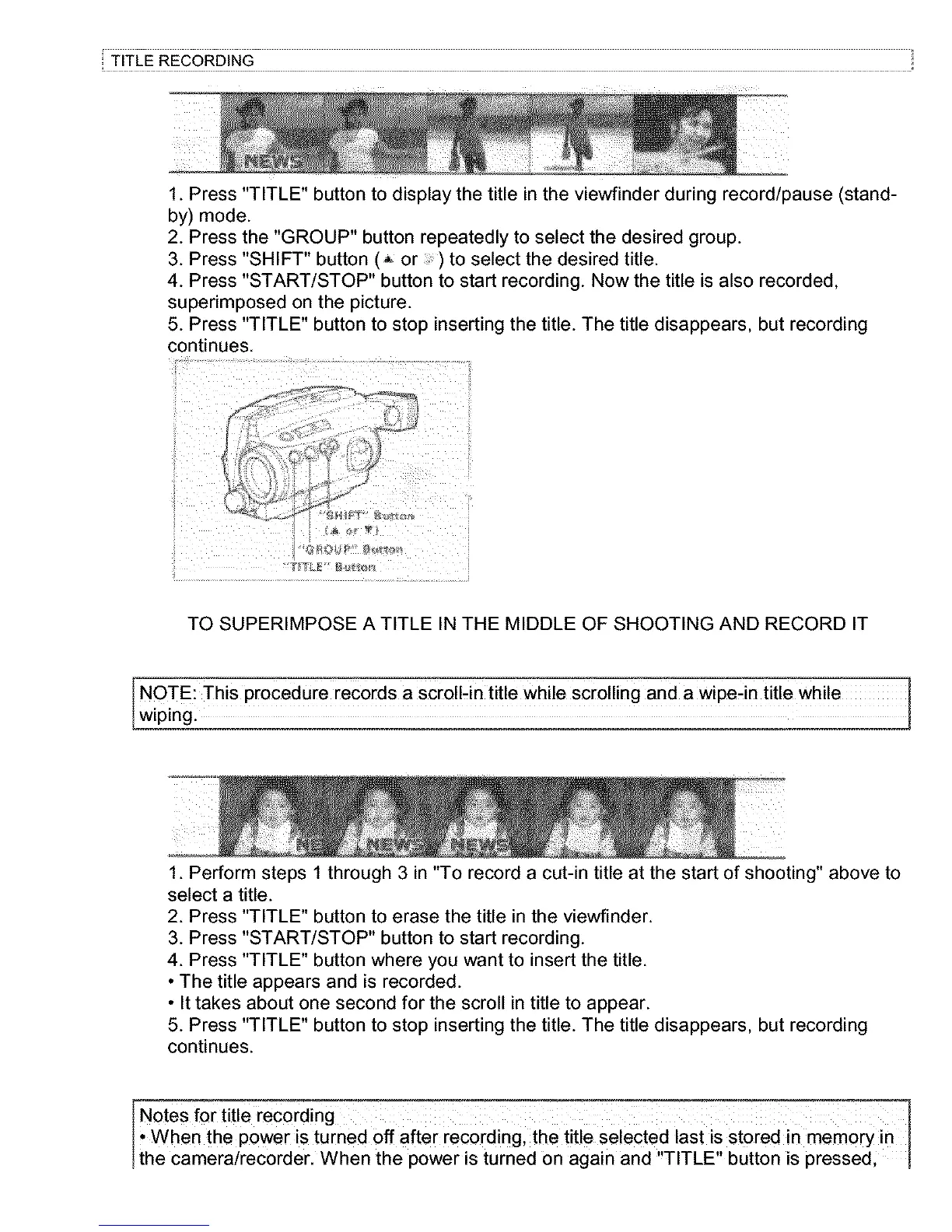
1. Press "TITLE" button to display the title in the viewfinder during record/pause (stand-
by) mode.
2. Press the "GROUP" button repeatedly to select the desired group.
3. Press "SHIFT" button (_ or :) to select the desired title.
4. Press "START/STOP" button to start recording. Now the title is also recorded,
superimposed on the picture.
5. Press "TITLE" button to stop inserting the title. The title disappears, but recording
continues.
TO SUPERIMPOSE A TITLE IN THE MIDDLE OF SHOOTING AND RECORD IT
NOTE: This procedure records a ScrolNn title while scrolling and a wipe-in title while
wipingl
1. Perform steps 1 through 3 in "To record a cut-in title at the start of shooting" above to
select a title.
2. Press "TITLE" button to erase the title in the viewfinder.
3. Press "START/STOP" button to start recording.
4. Press "TITLE" button where you want to insert the title.
• The title appears and is recorded.
• It takes about one second for the scroll in title to appear.
5. Press "TITLE" button to stop inserting the title. The title disappears, but recording
continues.
Notes for title recording
When the power is turned off after recording, the title selected last is st0red in memory in [
the camera/recorder. When the power is turned on again and "TITLE" button is pressed,



 To Next Page