OPERATION
Wearing the Headset
Attach the Headset Band to the Headset
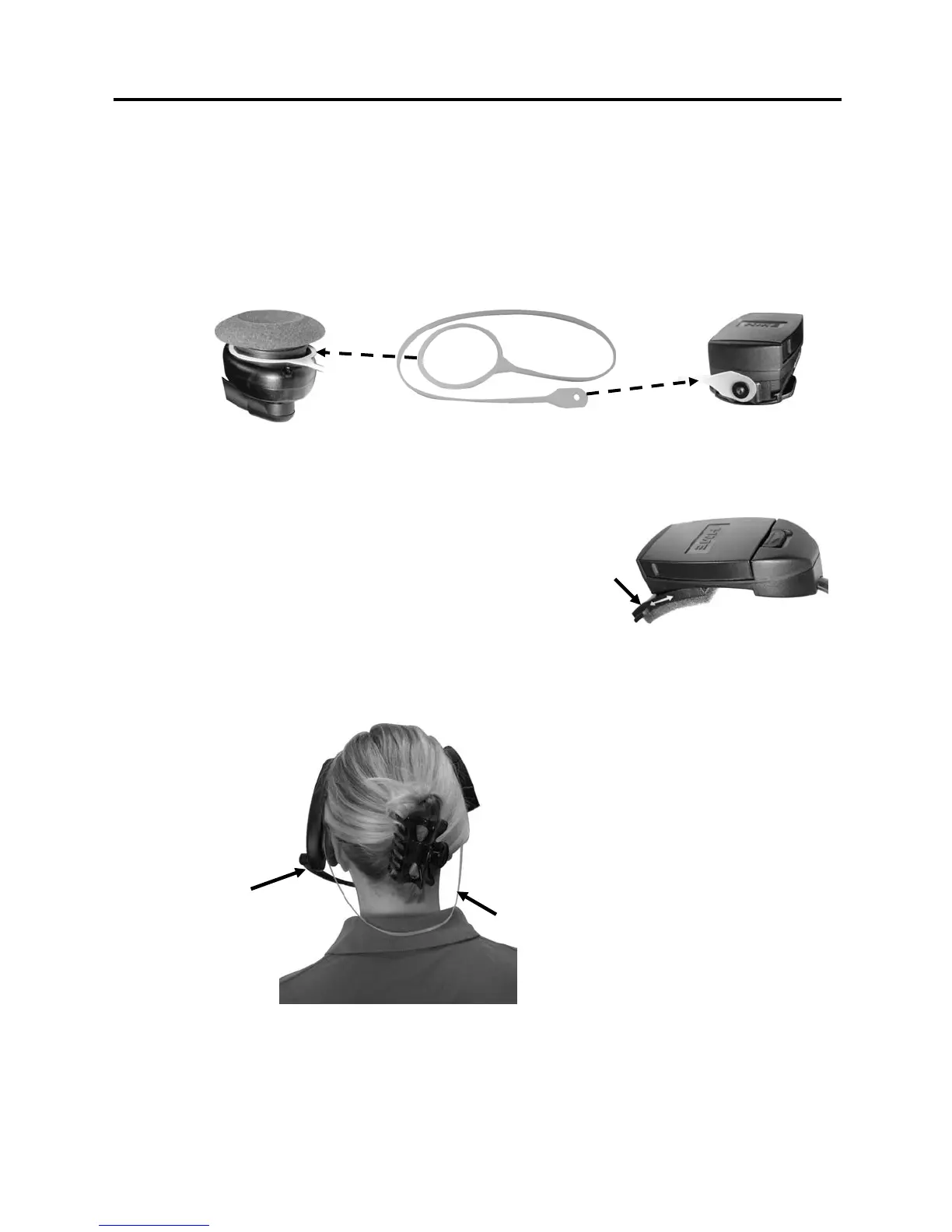
Locate the white, elastic headset band enclosed with the HS6000. Stretch the large loop at one end
of the band over the headset earpiece as shown at #1 in Figure 5. Stretch the small hole in the
opposite end of the headset band over the “button” at the bottom of the battery holder on the other
end of the headset as shown at #2 in Figure 5.
Battery holder
Headset earpiece
Headset band
2
1
Figure 5. Headset band attachment
Adjust the Headset to Your Head Size
Adjuster
You can adjust the head size of HS6000 for best fit.
Adjustments are made by sliding the adjuster behind
the battery holder as show in Figure 6. The adjuster
slides on a track to fit almost any head size.
Figure 6. Headset size adjustment
Put the Headset on
• The headset can be worn
with the microphone and
controls on either side of
your head.
Hold microphone
boom here to adjust
microphone position.
Headset band
• Put the headset on your
head, with the headset band
behind your neck as shown
in Figure 7.
• Hold the microphone boom
at its base and adjust it so
the microphone is near the
side of your mouth and you
can see its tip out of the
corner of your eye.
Figure 7. Correct wearing of the headset
4



 To Next Page