Talking to Customers
With your fingertip (not your fingernail), press and release either the A1 or the A2 button and speak into
the microphone. When you have finished talking to the customer, press the A1 or A2 button again. The
headset will automatically stop transmitting when the car drives away.
Talking to Other Crewmembers
Press and hold the B button and speak into the microphone. Release the button when you finish
speaking.
Battery-release
latch
Changing Batteries
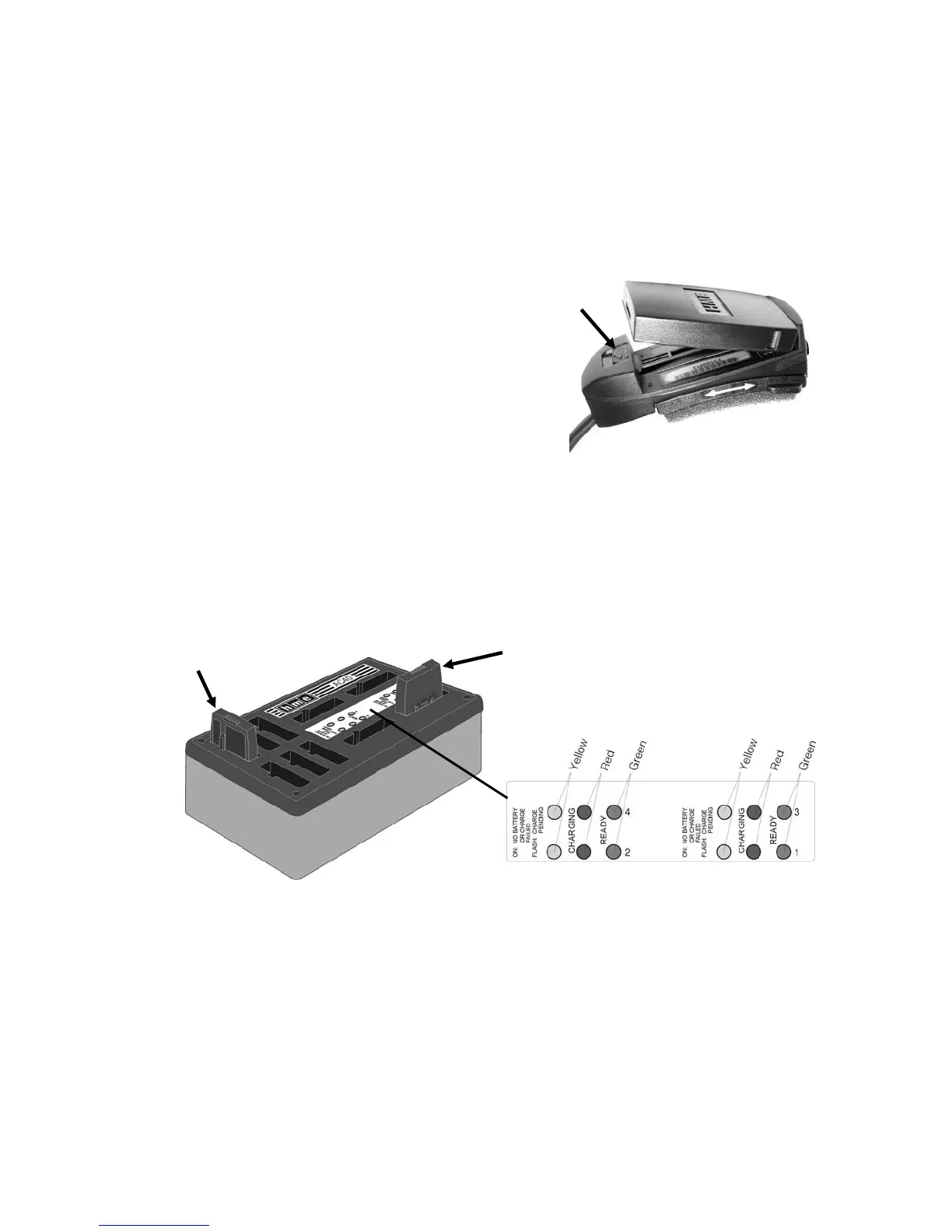
When a battery is becoming weak, a voice in the
earpiece will say “Change battery.” When this
happens, remove the battery from the headset by
carefully sliding the battery-release latch shown in
Figure 8. Pull up on the end of the battery near
the battery-release latch and lift the battery out.
NOTE: The HS6000 headset will accept only
batteries with a red label. Other batteries will not
fit this unit.
Figure 8. Battery removal
Recharging Batteries
Place a battery in one of the four charging ports as shown in Figure 9. When the battery is charging, the
red CHARGING light next to it will be on. When a battery is fully charged, the green READY light next to
it will be on. Battery charging time is approximately 2 hours. When a battery is fully charged, it can be
stored in one of the six storage ports on the battery charger.
Charged
battery in
storage port
Battery
charging
Figure 9. Battery charger
5



 To Next Page