T
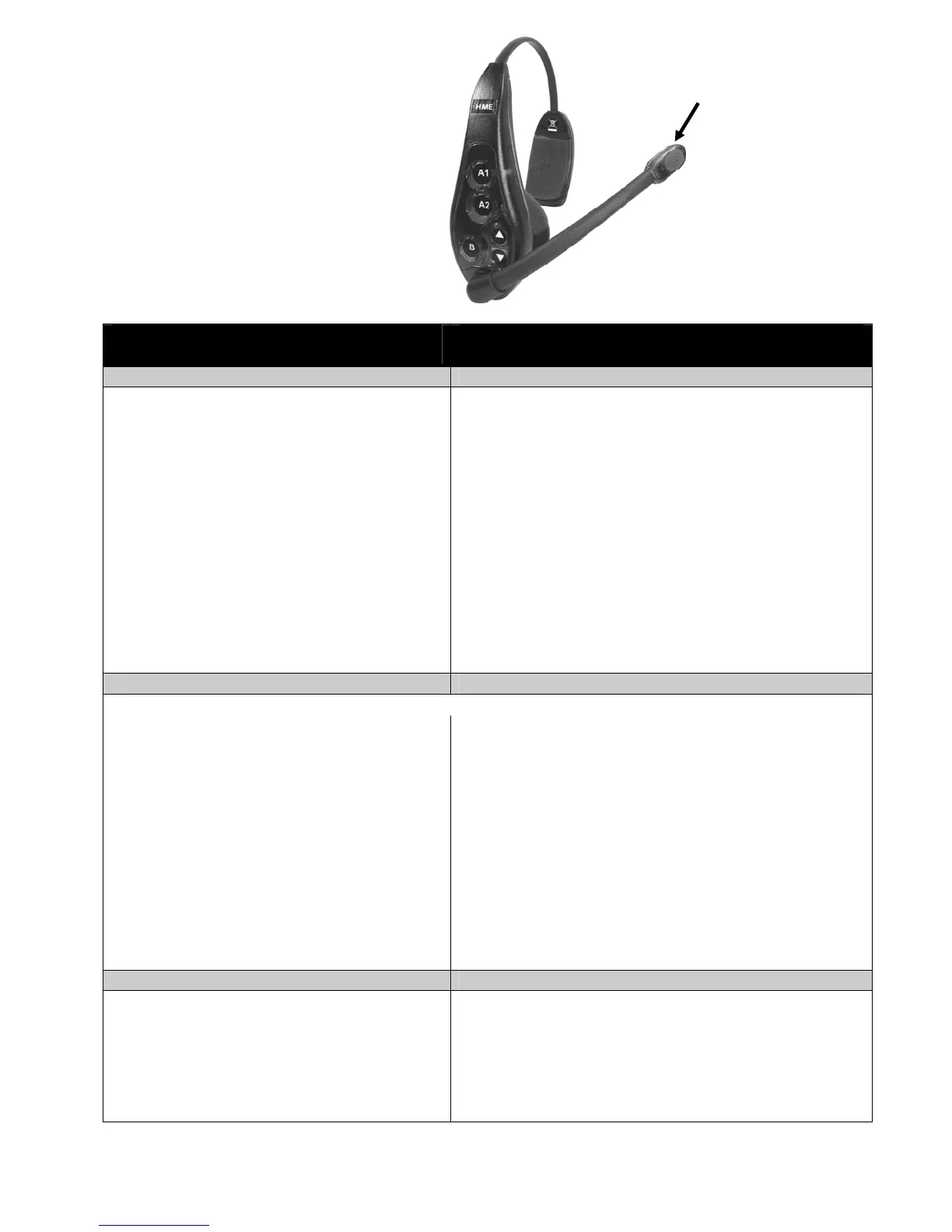
Figure 10. Headset operation controls
and indicator light
ransmit light on tip of
micro
hone boo
Routine Operation
SINGLE-LANE OPERATION
(one base station for one speaker post)
DUAL-LANE OPERATION
(two base stations for two speaker posts)
Hands-Free (HF) Mode: Hands-Free (HF) Mode:
• Alert tone (single beep) sounds in headset, then
customer at speaker post or menu board can be heard.
• Adjust customer’s voice level with up and down
arrows on headset if necessary.
• Press and release A1 or A2 button to speak and
listen to customer. You will see tip of microphone
boom light up when headset is transmitting.
• Press and release A1, A2 or B button to end
communication with customer. Light on tip of
microphone boom will go out.
• Press and release A1 or A2 button if you want to
speak to the customer again. You will see tip of
microphone boom light up.
• If customer drives away from speaker post or
menu board, headset automatically stops
transmitting, light on tip of microphone boom will
go out.
• Alert tone (single beep for Lane 1, double beep for Lane 2)
sounds in headset, then customer at speaker post or menu board
can be heard.
• Adjust customer’s voice level in headset if necessary.
• Press and release A1 button for Lane 1, A2 for Lane 2, to
speak and listen to customer. You will see tip of microphone
boom light up.
• Press and release A1, A2 (depending on lane) or B button to
end communication with customer. Light on tip of microphone
boom will go out.
• Press and release A1 button for Lane 1 or A2 for Lane 2, to
speak to the customer again. You will see tip of microphone
boom light up.
• To change lanes, press and release the opposite A button. A
voice in the headset will say “Lane 1” or “Lane 2.”
• If customer drives away from speaker post or menu board,
headset automatically stops transmitting. Light on tip of
microphone boom will go out.
Auto Hands-Free (AHF) Mode: Auto Hands-Free (AHF) Mode:
NOTE: Only one headset can be set for Auto Hands-Free at a time.
• Alert tone (single beep) sounds in headset, then
customer at speaker post or menu board can be heard.
• Adjust customer’s voice level with up and down
arrows on headset if necessary.
• Speak and listen to customer without pressing any
buttons. You will see tip of microphone boom is lit.
• Press and release A1, A2 or B button to end
communication with customer. Light on tip of
microphone boom will go out.
• Press and release A1 or A2 button if you want to
speak to the customer again. You will see tip of
microphone boom light up when headset is
transmitting.
• If customer drives away from speaker post or menu
board, headset automatically stops transmitting.
Light on tip of microphone boom will go out.
• Alert tone (single beep for Lane 1, double beep for Lane 2)
sounds in headset, then customer at speaker post or menu board
can be heard.
• Adjust customer’s voice level in headset if necessary.
• Speak and listen to customer without pressing any buttons.
You will see tip of microphone boom is lit.
• Press and release A1, A2 (depending on lane) or B button to
end communication with customer. Light on tip of microphone
boom will go out.
• Press and release A1 button for Lane 1 or A2 for Lane 2, to
speak to the customer again. You will see tip of microphone
boom light up.
• If customer drives away from speaker post or menu board,
headset automatically stops transmitting. Light on tip of
microphone boom will go out.
Push-To-Talk (PTT) Mode: Push-To-Talk (PTT) Mode:
• Alert tone (single beep) sounds in headset, then
customer at speaker post or menu board can be heard.
• Adjust customer’s voice level with up and down
arrows on headset if necessary.
• Press and hold A1 or A2 button to speak to
customer. You will see tip of microphone boom light
up when headset is transmitting.
• Alert tone (single beep for Lane 1, double beep for Lane 2)
sounds in headset, then customer at speaker post or menu board
can be heard.
• Adjust customer’s voice level in headset if necessary.
• Press and hold A1 button to speak to customer in Lane 1; A2
to speak to customer in Lane 2.
• To change lanes, press and release the opposite A button.
A voice in the headset will say “Lane 1” or “Lane 2.”
NOTE: Pressing A1, A2 or B and talking when someone else is talking will not stop them from being heard, but
you and the other person will be heard at the same time.
6


 To Next Page
 Loading...




