How to configure an Anybus AS-Interface Master module
SCM-7032-036
Rev 1.02
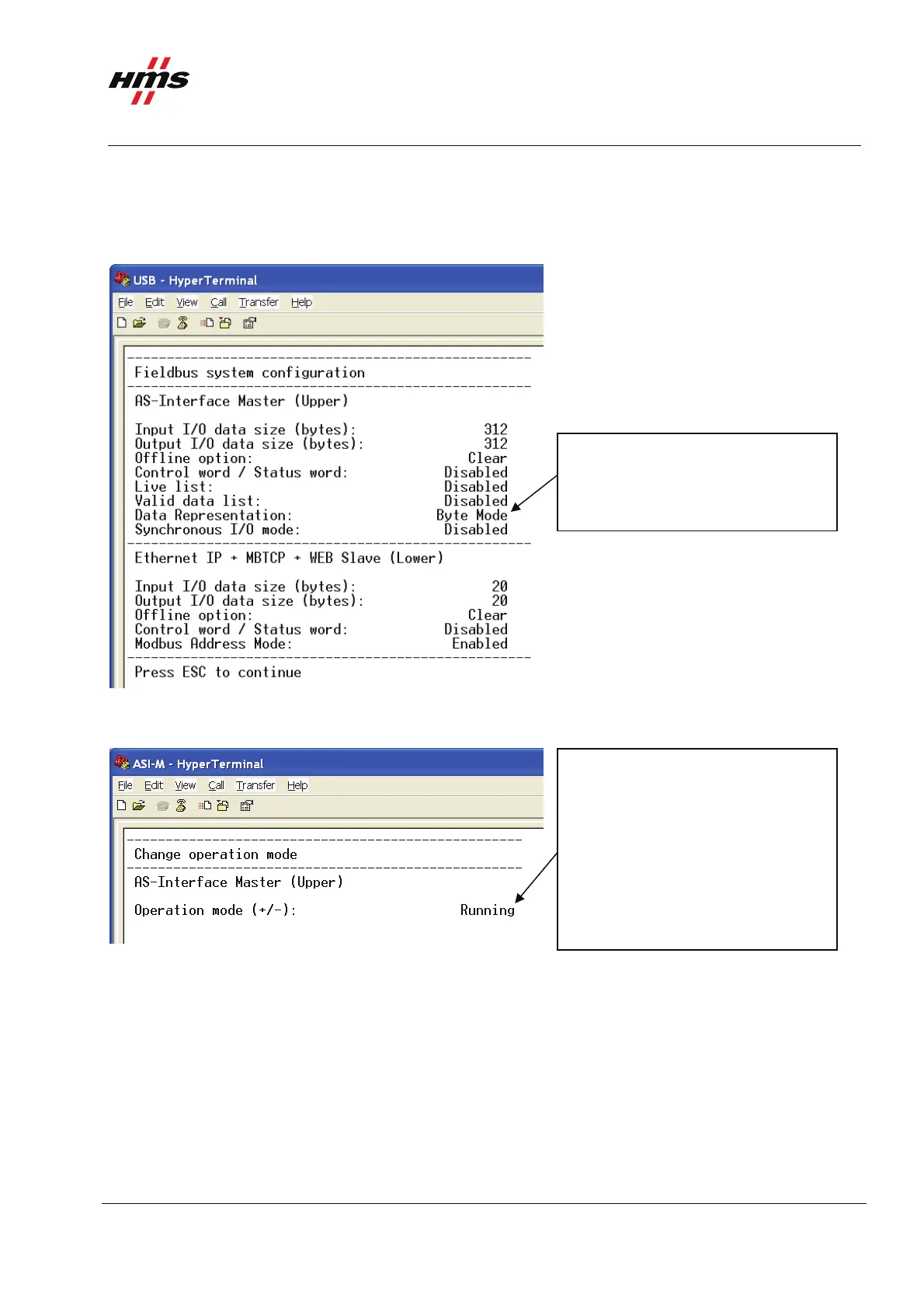
The figure below shows an example; in this case an AS-Interface Master to Modbus-TCP Slave X-gateway is
used. 20 bytes of I/O data on the Modbus-TCP side and 312 bytes of I/O data on the AS-Interface side are
configured. Also byte mode is used in this configuration.
Note: The Input and Output data size is always set to 312 bytes and cannot be changed.
Data Representation:
This mode can be set to Byte Mode
or Nibble Mode.
Figure 4 The X-gateway configuration.
The next step is to set the X-gateway in running mode.
Running: AS-Interface network is
running and exchanging data.
Idle DE Active: AS-Interface
network is idle, but the
communication is still active.
Idle DE Inactive: AS-Interface
network is idle and no data exchange
messages are issued.
Figure 5 Changing Operation mode of the X-gateway.
Choosing 9 from the main menu the X-gateway can be set to Running, Idle DE Active or Idle DE Inactive.
Set the Operation Mode to Running.
www.anybus.com HMS Industrial Networks AB
Page 8 (19)



 To Next Page