How to configure an Anybus AS-Interface Master module
SCM-7032-036
Rev 1.02
4.2 Anybus X-gateway configuration
Use the HyperTerminal on a PC to configure the X-gateway. Connect a serial cable between the PC and the
config port on the X-gateway (make sure that it is not connected to the AS-Interface Master). Start the
HyperTerminal and open the “File” menu and click on new, choose the desired COM port and then click on
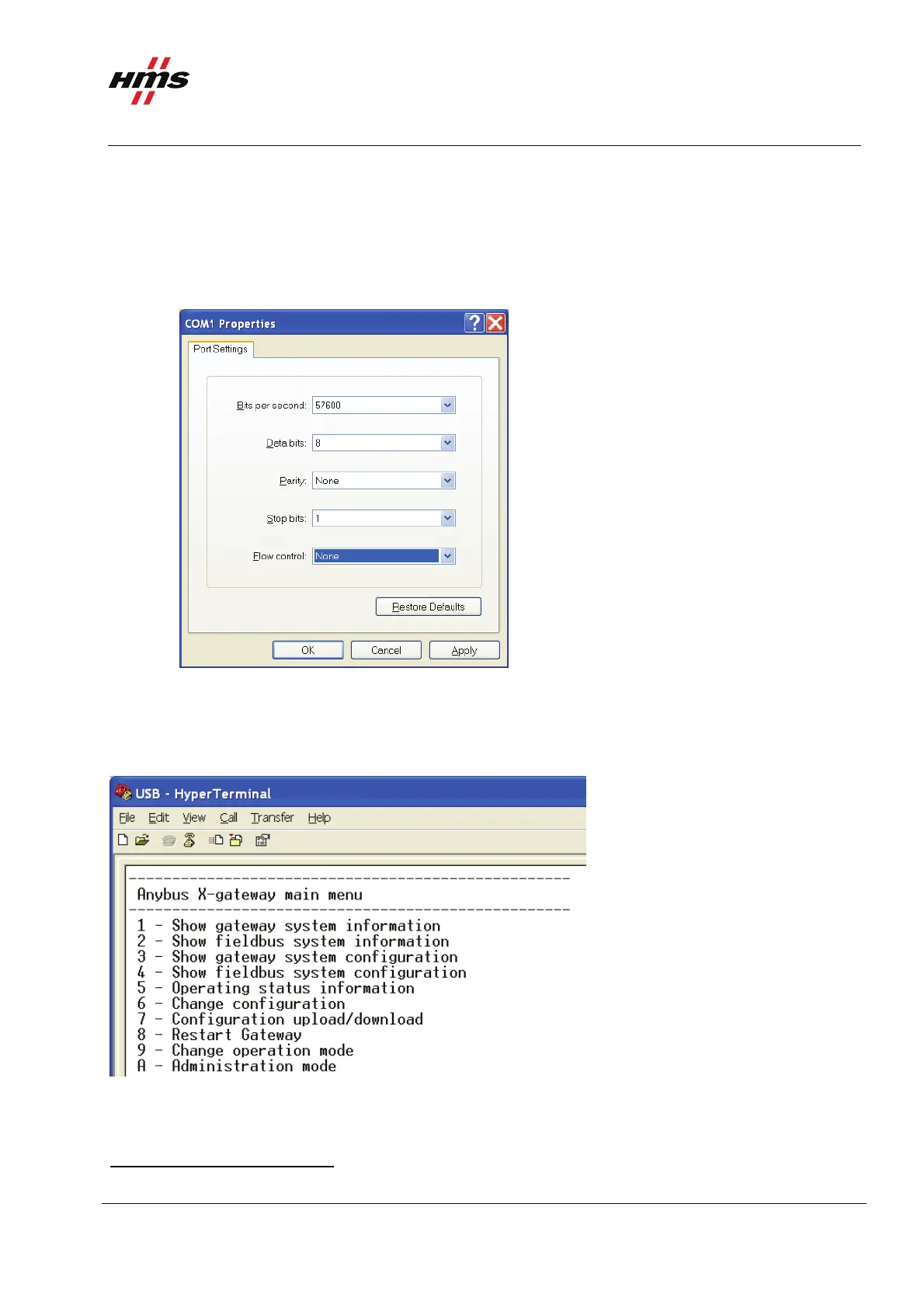
OK. The following window will appear.
Figure 2 Configuring the connection in the HyperTerminal.
Make sure the settings are identical to those shown in the window above. Alternatively download a
HyperTerminal session file from the HMS website
1
, double click on it and select COM port.
Connect and press ESC and the following menu will appear.
Figure 3 Anybus X-gateway main menu.
Press 6 and enter the desired configuration.
1
www.anybus.com
www.anybus.com HMS Industrial Networks AB
Page 7 (19)



 To Next Page