Quick Start Guide
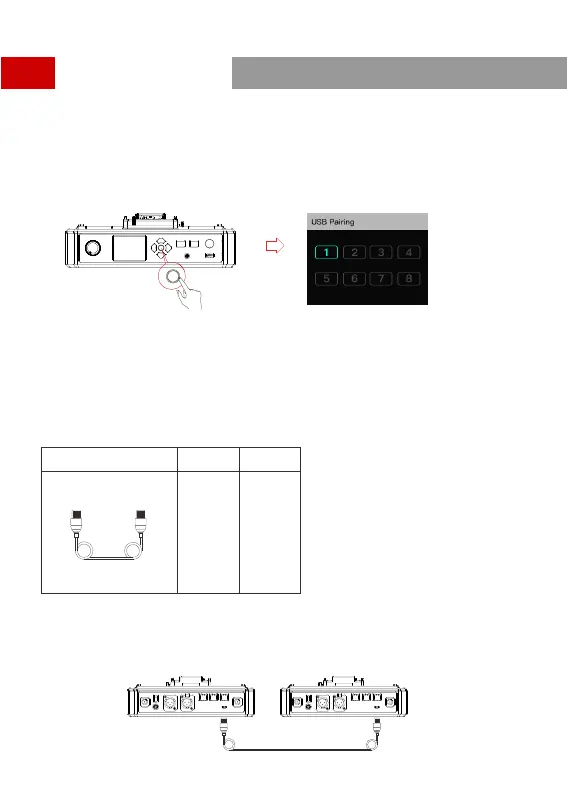
Headset(s) Number Setting via HUB Base
When re-pairing and numbering the headset, be sure to turn on all the headsets to avoid selecting
duplicate numbers, which may lead to connection failure with other headsets.
In case of wrong numbering of a headset, simply connect it to the HUB with the USB cable and operate
the pairing and numbering process again.
Cascade Connections
Multiple intercom systems can be cascaded to expand the number of intercom headsets. The Solidcom C1
HUB Base supports two cascading methods, 4-wire analog and IP digital signal cascading. Generally,
using 4-wire analog mode to cascade is recommended when cascading two intercom systems. If three or
more sets are cascaded, it is recommended to use IP digital signal cascade.
It is recommended to use CAT5e super five network cable and RJ45 crystal head with 568B sequence
standard for cascade connection.
Stan dard N etwork Cable
Cabl e Spec
Max. L ength
CAT5e
CAT 6e
300m
Two Systems Cascade via 4-Wire Interface
Use a standard network cable to connect two HUB bases through the 4W interface. The network cable is
generally up to 300 meters long.
300m network cable
9


 To Next Page