Product Interfaces
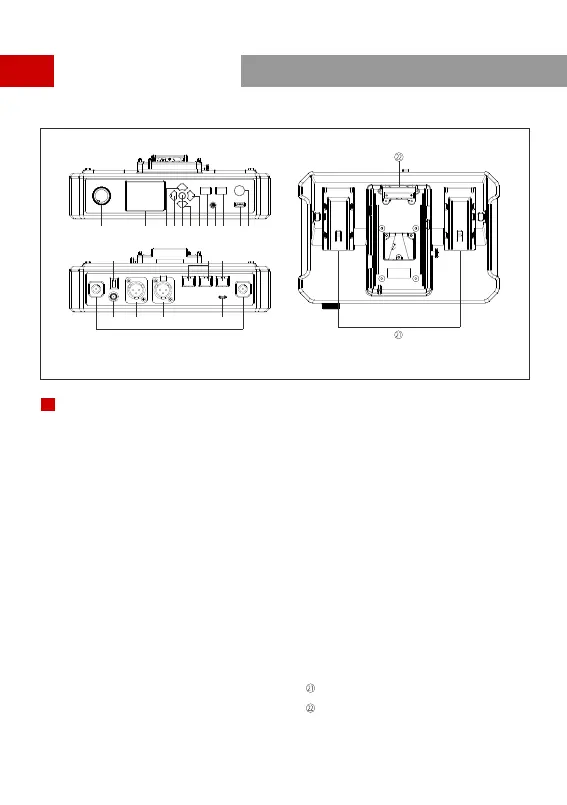
①HUB Headset Volume Knob
②Display
④LEFT Arrow Key
③UP Arrow Key
HUB Base Interfaces
A
⑤Menu/Confirm Button - Long press to enter the
main menu/press once to confirm
⑥DOWN Arrow Key
⑦RIGHT Arrow Key
⑧Join/Exit Group A Button for the 3.5mm HUB
Headset - The indicator turns off when the HUB
Headset exit Group A’s conversation, and turns
on in orange after joining in
⑨ 3.5mm Headphone Jack
⑩Join/Exit Group B Button for the 3.5mm HUB
Headset - The indicator turns off when the HUB
Headset exit Group B’s conversation, and turns
on in orange after joining in
A
⑫ANNOUNCE Button - Press and hold the button
while making an ANNOUNCE, release the button
when finished
⑭Power Switch
⑬RF Antenna Interface
⑮DC Power Interface
⑯ PGM Audio Input Interface
⑰2-wire Audio Input & Output Interface
⑱ RJ45 Network Port
⑲4-wire Audio Input & Output Interface
(RJ45 network socket)
⑳ UAC Interface
NP-F Battery Bay
① ② ③④⑤⑥⑦
⑧⑨⑩ ⑪⑫
⑬
⑭
⑱ ⑲
⑳
⑮ ⑯ ⑰
⑪USB Interface
V-Mount/G-Mount Battery Plate (Subject to the
actual product you purchased)
2


 To Next Page