6 of 24 7 of 24
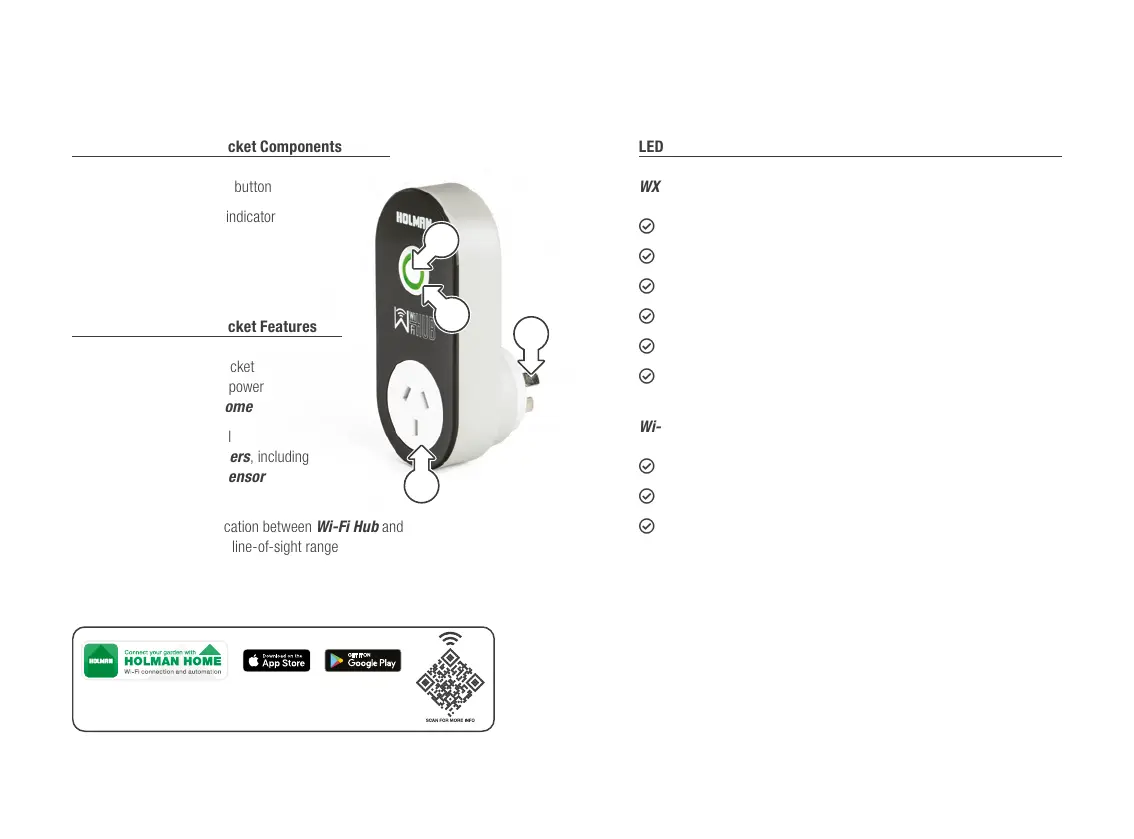
Wi-Fi Hub and Power Socket Components
1. Wi-Fi Hub provisioning button
2. Wi-Fi Hub green LED indicator
3. AC power plug
4. Wi-Fi Socket
Wi-Fi Hub and Power Socket Features
L Use the Wi-Fi power socket
to control a nominated power
outlet from Holman Home
L Pair up to 4× additional
HOLMAN WX Tap Timers, including
1× Smart Moisture Sensor
for each outlet added
L 917 MHz RF communication between Wi-Fi Hub and
WX2 Tap Timer–50m line-of-sight range
L 2.4 GHz Wi-Fi connection only
L For indoor use only, and must be within Wi-Fi network range
LED Status
WX2 Tap Timer
L OFF: Valve is closed
L ○ WHITE QUICK FLASH: Ready for pairing to a Wi-Fi Hub
L ○ WHITE SLOW FLASH: Searching for a Wi-Fi Hub
L ○ RED INTERMITTENT FLASH: Low battery warning
L ○ RED PULSE: Water leak when valve is closed
L ○ RED: When searching for a Smart Moisture Sensor; cannot find
Wi-Fi Hub and Power Socket
L ○ OFF: Power socket is off
L ○ GREEN: Power socket is on
L ○ GREEN FLASH: Wi-Fi Hub is ready for pairing with Wi-Fi
4
3
2
1
Overview (continued) Overview (continued)
Control your garden from anywhere in the world, day or night, with
Holman Home Wi-Fi control. Enjoy complete control of your irrigation
and garden lighting, wherever internet access is available.



 To Next Page