12 of 24
Operation
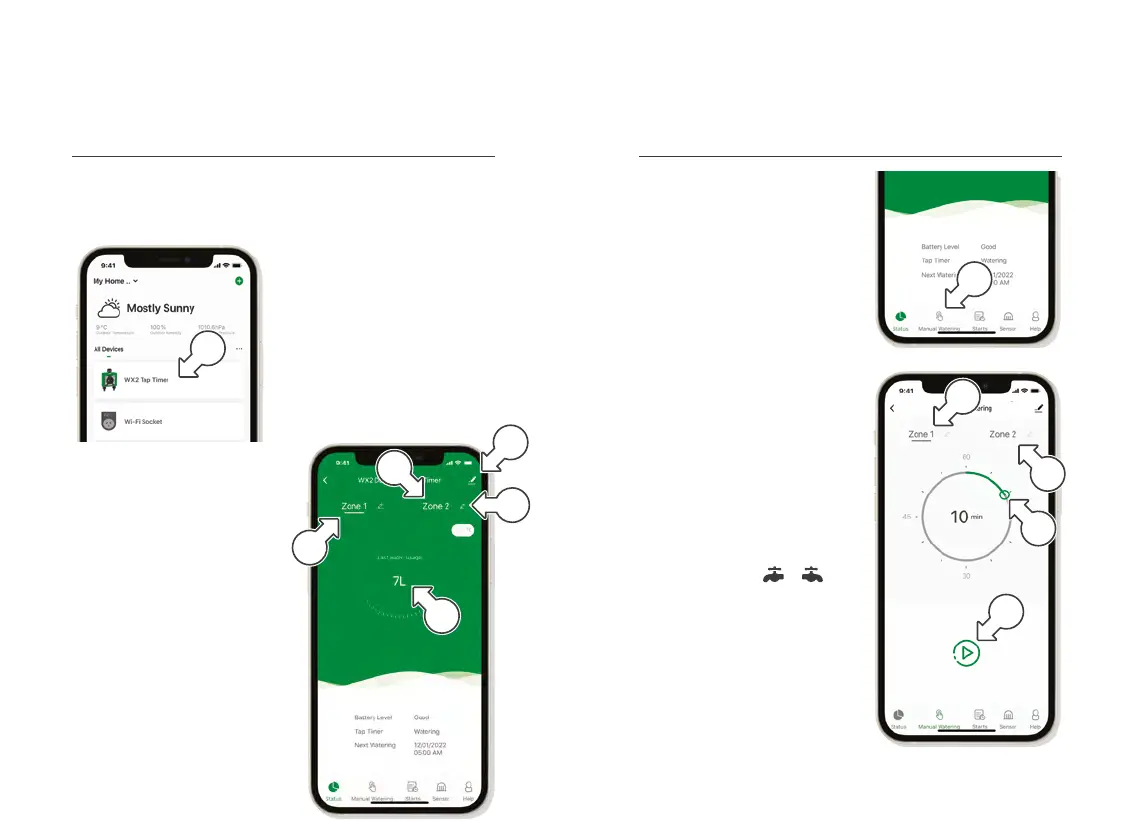
WX2 Tap Timer Status
1. Tap WX2 TAPTIMER[a]
on the HOME screen
devices list
® This displays
WX2 Tap Timer
controls and settings
® By default, Holman Home
will display the data and
controls for ZONE 1
2. Tap the ZONE 1 [b]
or ZONE2 [c] to
switch between zones
on each screen
® Custom names can be
applied to each zone
by tapping [d] next
to the desired zone
3. LAST WATER USAGE
[e] uses built-in flow
meters within your WX2
4. For additional information
about your WX2 Tap Timer,
tap [f] in the top
right hand corner
WX2 Tap Timer Manual Controls
® MANUAL WATERING is for
one-off watering durations
1. Within the
WX2 Tap Timer controls,
tap MANUALWATERING[a]
to access manual
watering controls
2. Tap ZONE 1 [b] or
ZONE2[c] to select
as desired
3. Move the hollow green circle
[d] on the dial to set the
desired watering duration
4. Press [e] to start
watering and to stop
® Manual watering can also be
stopped or started for each
zone by pressing or
on your WX2 Tap Timer
Operation (continued)
a
a
b
c
d
e
f
b
c
d
e



 To Next Page