15 of 24
WX2 Tap Timer Scheduling
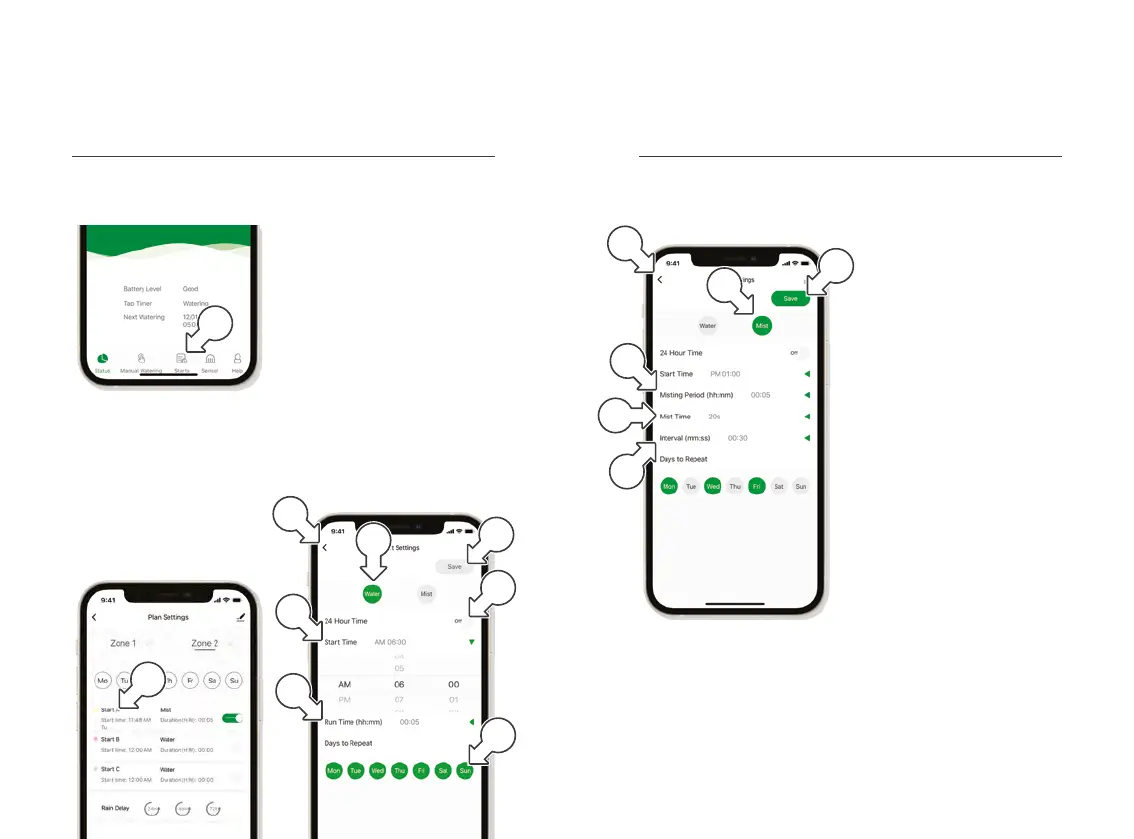
1. Within the WX2 Tap Timer
controls, tap STARTS[a]
® This displays the STARTS
screen for watering schedules
2. Tap START A [b] to set one
of three schedules as desired
® This reveals START
SETTINGS in WATER[c]
mode by default
3. Toggle between 24hr and
AM/PM time with the 24
HOUR TIME switch [d]
4. Tap START TIME [e] to open
the clock and set a start time
5. Tap RUN TIME [f] to
open the timer and set
a watering duration
6. Tap each of the days
[g] as required to toggle
watering days on or off
7. Tap SAVE [h] to set the
desired schedule or [i]
to return without saving
Operation (continued) Operation (continued)
8. Within the START
SETTINGS, tap MIST [j]
for shorter burst intervals
® This displays MIST timing
9. Use MISTING PERIOD [k]
to set the overall duration
of the misting program
10. Use MIST TIME [l] to
set the duration for
each burst of misting
11. Use INTERVAL [m] to
set the amount of time
between each burst
12. Tap SAVE [n] to set the
desired schedule and
return to the STARTS
screen, or tap [o] to
return without saving
WX2 Tap Timer Scheduling (continued)
a
e
i
f
d
h
g
c
b
m
l
k
j
o
n



 To Next Page