16 of 24 17 of 24
Operation (continued)
WX2 Tap Timer Scheduling (continued)
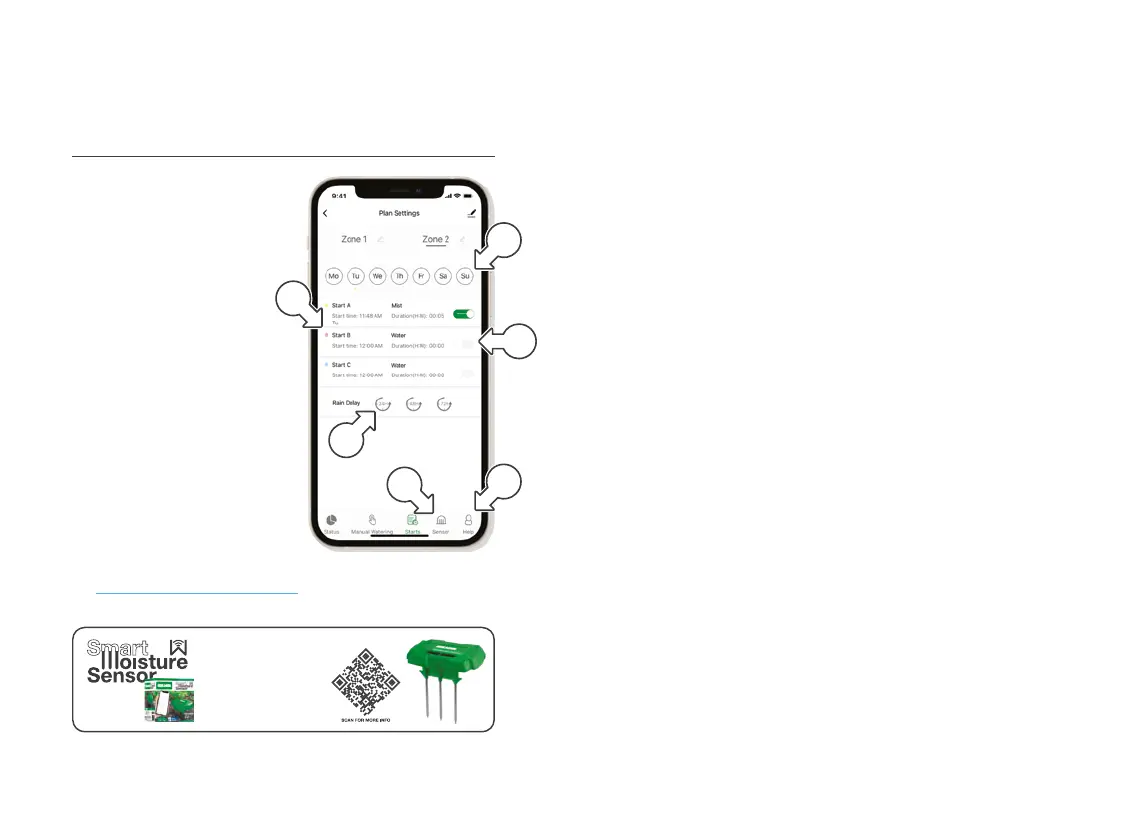
13. Set additional STARTS for
B and C [m] as desired
14. As START SETTINGS are
saved, the scheduled times
will show on each START
15. Watering days are indicated
at the top of the screen [n]
16. To manually toggle
each START switch [o]
on or off as desired
17. Suspend watering by tapping
24H, 48H or 72H under
RAINDELAY [p] as desired
® For additional data from a
Smart Moisture Sensor
[WXMS] tap SENSOR [q]
® For additional support, tap HELP [r] or visit
support.holmanindustries.com.au
m
q
n
r
o
Know your garden better
than ever by connecting a
Smart Water Sensor. This
keeps track of soil
temperature and moisture,
and allows for autmatic
water restrictions based
on moisture sensitivity.
p



 To Next Page