8 of 24 9 of 24
Installation
Installing Holman Home
1. Download Holman Home
to your mobile device
via the App Store
or Google Play
2. Open Holman Home
on your mobile device
® You may be prompted to
allow notifications–the
app can still function if
you choose to opt out
3. Tap SIGN UP
4. Read our User Agreement
and Privacy Policy
and tap AGREE if you
wish to proceed
5. Follow the prompts to
register a Holman Home
account with your email
address
Á Ensure your country
details are correct
at this stage
® You may be prompted to
allow access your location.
This allows the app to
show weather information-
it will still function if you
choose to opt out
Installation (continued)
Add the Wi-Fi Hub to Holman Home
1. For the setup process,
plug your Wi-Fi Hub
to a power source near
your Wi-Fi router
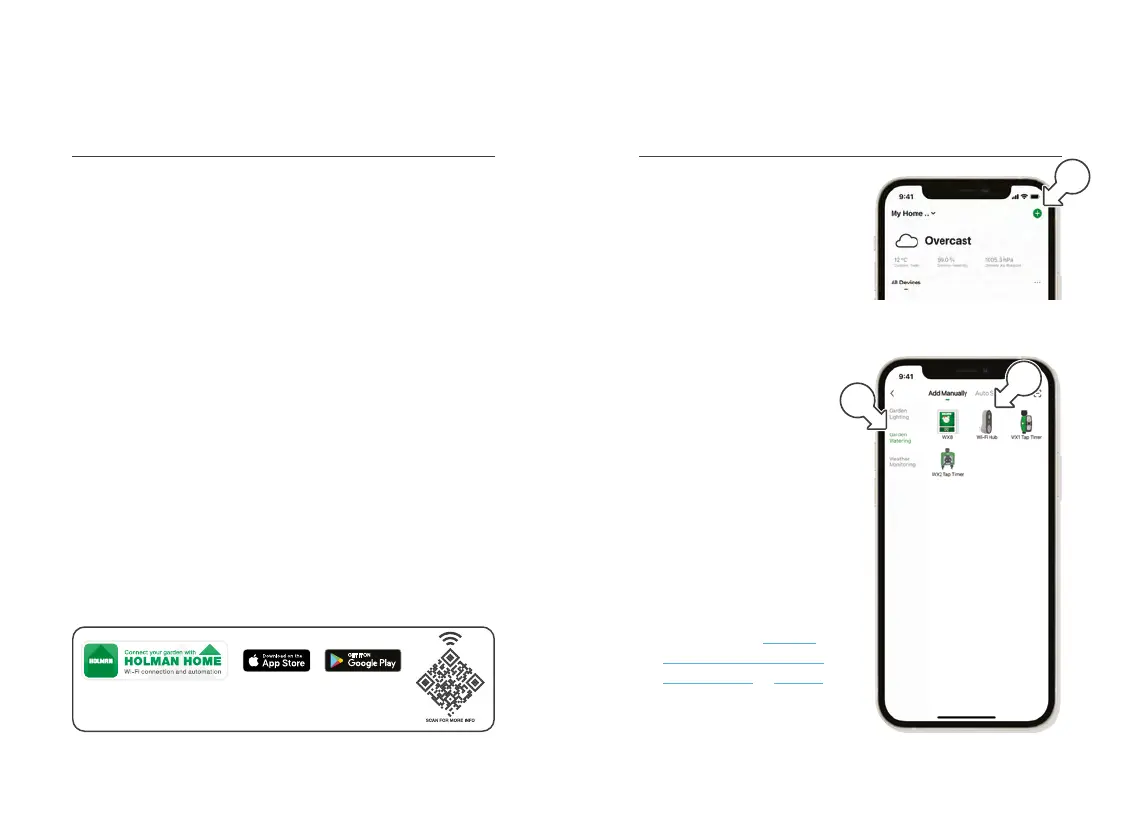
2. Open Holman Home and
add a new device by tapping
+ [a] on the HOME screen
3. Tap GARDEN
WATERING [b] and
choose Wi-Fi HUB [c]
4. Follow the prompts from
Holman Home to work
through the Wi-Fi Hub
setup process
® This process does
not include adding
the Wi-Fi Socket
® The Wi-Fi Socket will be
added to Holman Home
as part of the WX2 pairing
process–refer to Add the
WX2 and Wi-Fi Socket to
Holman Home on page 10
for more information
a
b
c
Control your garden from anywhere in the world, day or night, with
Holman Home Wi-Fi control. Enjoy complete control of your irrigation
and garden lighting, wherever internet access is available.



 To Next Page