11 of 24
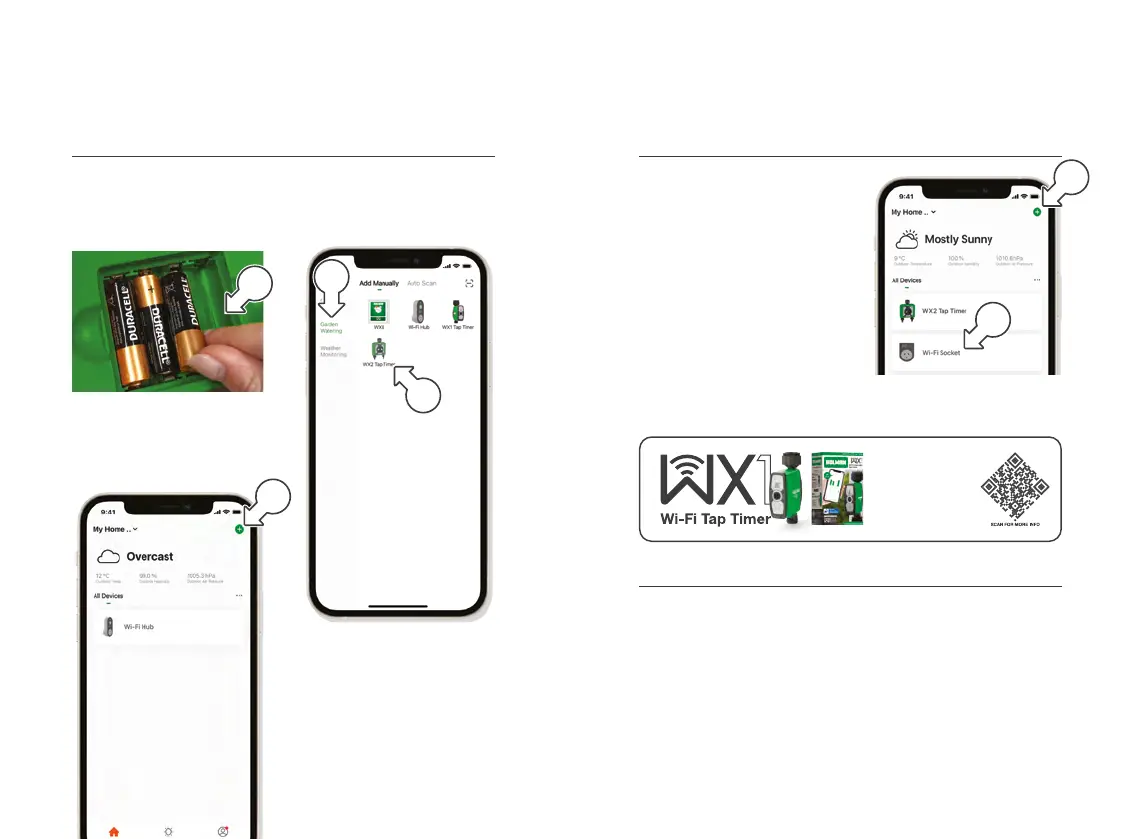
Add the WX2 and Wi-Fi Socket to Holman Home
1. Install 4x 1.5v AA batteries
into the WX2, as indicated in
the battery compartment [a]
2. Using Holman Home,
return to the HOME
screen and tap + [b]
3. Tap GARDEN WATERING
[c] and choose WX2
TAP TIMER [d]
4. Follow the prompts
from Holman Home
to work through the
WX2 setup process
® After following the prompts,
the Wi-Fi Socket [e]
should have also been
added to Holman Home
as part of this process
® To add an additional
WX Tap Timer, return to the
HOME screen and tap +
[f] to select the next device
and repeat the process
® An additional three WX Tap Timers can be added to the Wi-Fi Hub
Installation (continued) Installation (continued)
c
d
Add the WX2 and Wi-Fi Socket to Holman Home (continued)
Positioning your Wi-Fi Hub and WX2 Tap Timer
1. Unplug your Wi-Fi Hub and move to your planned location
Á This must be indoors and within your home Wi-Fi range
2. Mount your WX2 onto the desired tap with the reducing bush if needed
Á The WX2 uses 917MHz RF to communicate with the
Wi-Fi Hub, and must be within a 50m range, line-of-sight
b
a
e
f
Our single outlet WX1
Wi-Fi Tap Timers are
the perfect companion
to your Wi-Fi Hub. Water
all around your garden
from Holman Home.



 To Next Page