Continued
401
uuBluetooth® HandsFreeLink® uHFL Menus
■
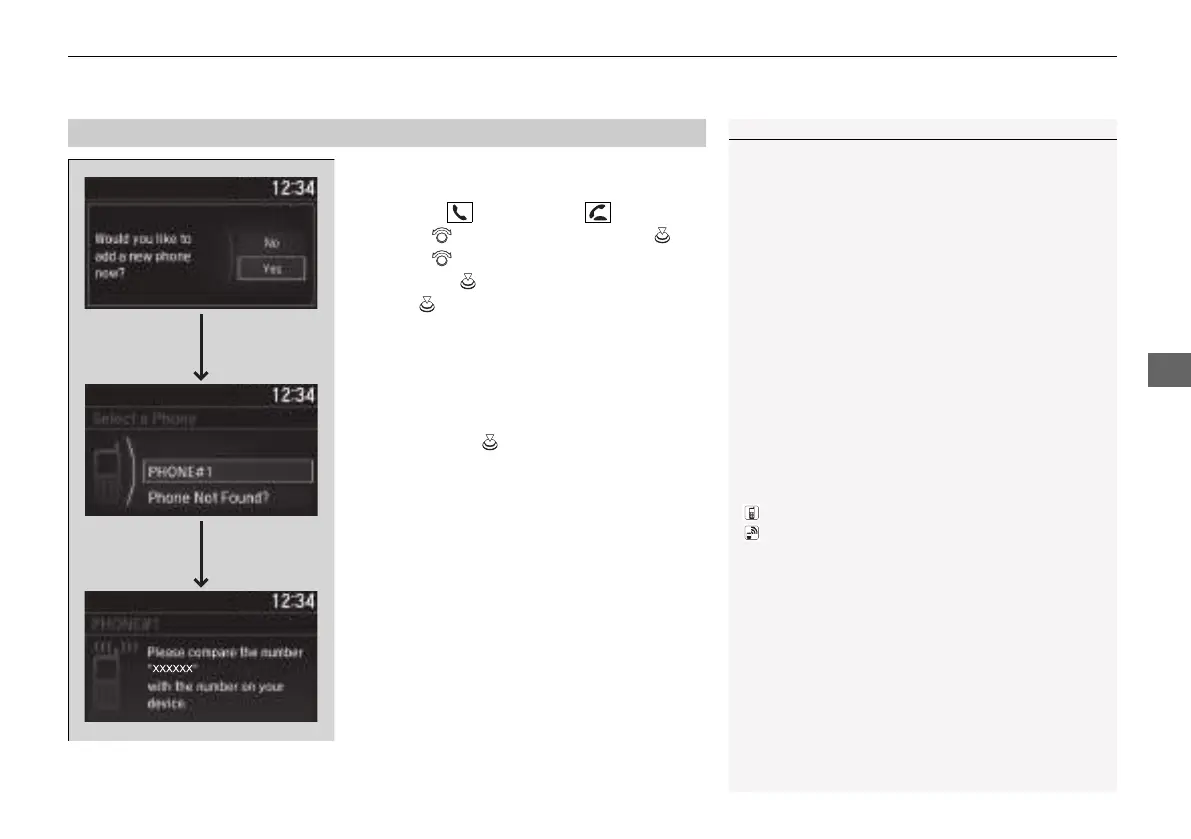
To pair a cell phone (No phone has
been paired to the system)
1. Press the button or the button.
2. Rotate to select Yes, then press .
3. Rotate to select Add New Device,
then press .
4. Press to select OK.
5. Make sure your phone is in search or
discoverable mode.
u HFL automatically searches for a
Bluetooth® device.
6. When your phone appears on the list, select
it by pressing .
u If your phone doesn’t appear, select
Phone Not Found? and search for
Bluetooth® devices using your phone.
From your phone, select
HandsFreeLink®.
7. The system gives you a pairing code on the
audio/information screen.
u Confirm if the pairing code on the screen
and your phone match.
This may vary by phone.
8. A notification appears on the screen if
pairing is successful.
■
Phone Setup
1Phone Setup
Your Bluetooth-compatible phone must be paired to
HFL before you can make and receive hands-free
calls.
Phone Pairing Tips:
• You cannot pair your phone while the vehicle is
moving.
• Up to six phones can be paired.
• Your phone’s battery may drain faster when it is
paired to HFL.
• If your phone is not ready for pairing or not found
by the system within 30 seconds, the system will
time out and return to idle.
Once you have paired a phone, you can see it
displayed on the screen with one or two icons on the
right side.
These icons indicate the following:
: The phone can be used with HFL.
: The phone is compatible with Bluetooth® Audio.
21 INSIGHT-31TXM6200.book 401 ページ 2020年2月5日 水曜日 午前10時0分














 To Next Page