Continued
519
uuHonda Sensing® uLane Keeping Assist System (LKAS)
The system can be used when the following conditions are met.
• The lane in which you are driving has detectable lane markers on both sides, and
your vehicle is in the center of the lane.
• The vehicle is traveling between about 45 and 90 mph (72 and 145 km/h).
• You are driving on a straight or slightly curved road.
• The turn signals are off.
• The brake pedal is not depressed.
• The wipers are not in continuous operation.
■
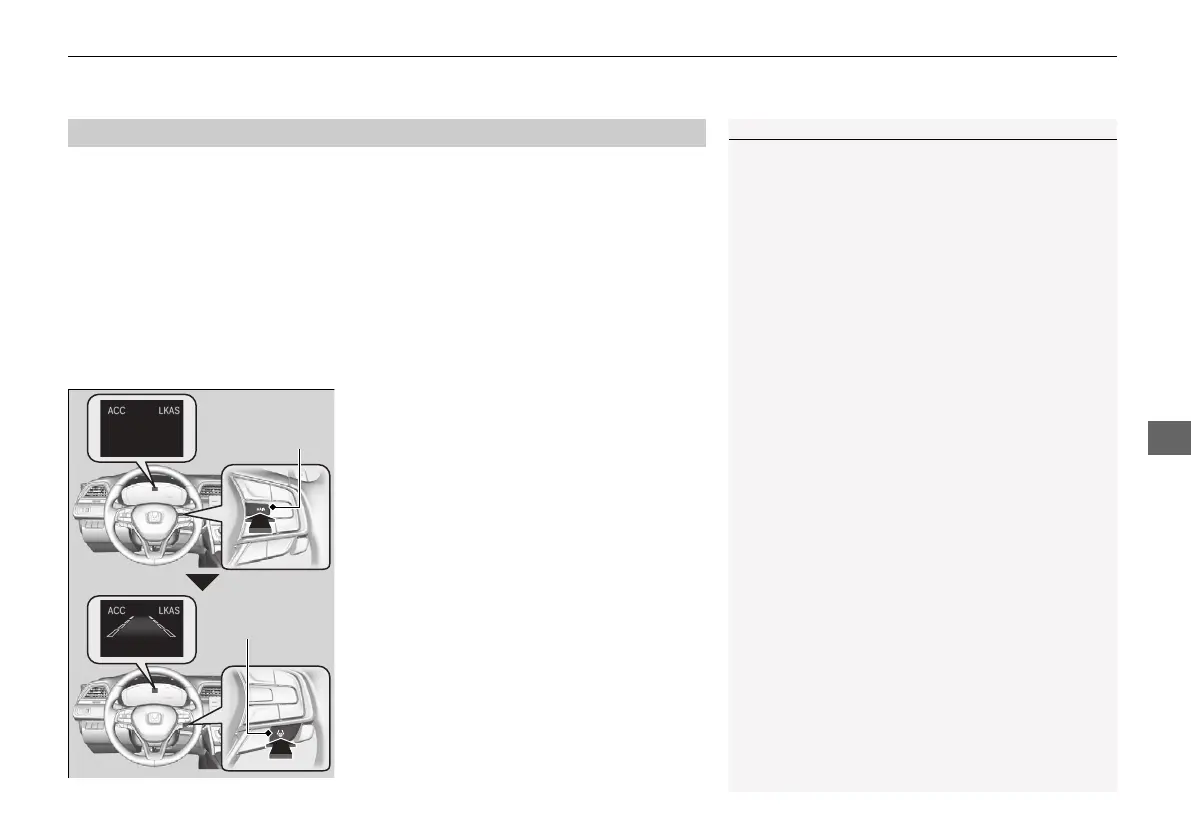
How to activate the system
1. Press the MAIN button.
u The LKAS is on in the driver information
interface.
The system is ready to use.
2. Press the LKAS button.
u Lane outlines appear on the driver
information interface.
The system is activated.
■
When the System can be Used
1When the System can be Used
If the vehicle drifts toward either left or right lane line
due to the system applying torque, turn off the LKAS
and have your vehicle checked by a dealer.
21 INSIGHT-31TXM6200.book 519 ページ 2020年2月5日 水曜日 午前10時0分














 To Next Page