EasyManua.ls Logo

Honeywell Horizon 7600 - User Manual

Honeywell Horizon 7600
64 pages
Print Icon
To Next Page IconTo Next Page
Loading...
Horizon7600
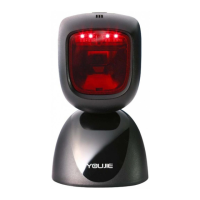
Presentation Laser Imager
Installation and User’s Guide

Questions and Answers

  • C
    Cynthia PaceAug 20, 2025
    How to fix a Honeywell Barcode Reader with no LEDs, beep, or motor spin?
    • T
      Thomas BurnsAug 20, 2025
      No power is being supplied to the scanner. Check the transformer, outlet, and power strip. Make sure the cable is plugged into the scanner.
  • K
    kenneth15Aug 22, 2025
    Why is the data transmitted to the host incorrect from my Honeywell Horizon 7600 Barcode Reader?
    • M
      Mary SheppardAug 22, 2025
      The scanner’s data format may not match the host system requirements. Verify that the scanner’s data format matches what is required by the host and that the scanner is connected to the proper host port.
  • J
    judy16Aug 25, 2025
    What to do if Honeywell Horizon 7600 Barcode Reader powers up and scans, but doesn't communicate properly to the host?
    • W
      Wendy GonzalezAug 25, 2025
      The com port at the host may not be working or configured properly. Check to make sure that the baud rate and parity of the scanner and the communication port match and the program is looking for “RS-232" data.
  • T
    Timothy Gamble MDAug 26, 2025
    What to do if Honeywell Horizon 7600 scans a bar code, but locks up after the first scan?
    • L
      lowesavannahAug 26, 2025
      The scanner may be configured to support some form of host handshaking but is not receiving the signal. If the scanner is setup to support ACK/NAK, RTS/CTS, XON/XOFF or D/E, verify that the host cable and host are supporting the handshaking properly.
  • B
    Brenda HollowayAug 28, 2025
    Why does the data received by the host from my Honeywell Horizon 7600 look incorrect?
    • D
      dmitchellAug 28, 2025
      The scanner and host may not be configured for the same interface. Check that the scanner and the host are configured for the same interface.
  • L
    Lisa RobinsonAug 30, 2025
    What to do if my Honeywell Horizon 7600 Barcode Reader powers up, but does not beep?
    • J
      johnsonlynnAug 30, 2025
      The beeper may be disabled, no volume is selected, or no tone is selected. Enable the beeper, select a volume, and select a tone.
  • D
    Donna YuAug 31, 2025
    Why does my Honeywell Horizon 7600 Barcode Reader beep for some barcodes but not others of the same type?
    • S
      shawn71Aug 31, 2025
      The print quality of the bar code may be suspect. Check the print mode, as the type of printer could be the problem. Change print settings, for example, change to econo mode or high speed. Also check character length lock and the aspect ratio of the bar code is out of tolerance.
  • T
    tinacarpenterSep 2, 2025
    Why does my Honeywell Horizon 7600 perform multiple scans when presenting a code?
    • A
      Adam LeeSep 3, 2025
      The same symbol timeout is set too short. Adjust the same symbol timeout for a longer time.
  • M
    Maria HinesSep 4, 2025
    What to do if the secondary Honeywell Horizon 7600 Barcode Reader powers up but data is not relayed to the host?
    • C
      Christopher WilliamsSep 4, 2025
      The cable may not be connected to the proper port. Ensure the secondary scanner is connected to the 7600 com port marked “Aux” port. The “Aux” com port may not be operating properly, and the 7600 must be programmed to enable the “Aux” port. Also, the auxiliary input port’s data format must match the main output format of the secondary scanner, so for the Auxiliary interface, choose “HoloTrak Decode”. All remaining parameters will be automatically chosen.
  • B
    Brian MarshallSep 6, 2025
    Why are characters being dropped by my Honeywell Horizon 7600?
    • G
      gruizSep 6, 2025
      Intercharacter delay needs to be added to the transmitted output. Add some intercharacter delay to the transmitted output by using the MetroSelect Programming Guide (PN 00-02407).

Honeywell Horizon 7600 Specifications

General IconGeneral
BrandHoneywell
ModelHorizon 7600
CategoryBarcode Reader
LanguageEnglish

Related product manuals