– 27 –
SECURING THE PREMISES
SECURING THE PREMISESSECURING THE PREMISES
SECURING THE PREMISES
Disarming the System
When an Alarm Occurs
When an alarm has occurred, the touch screen displays the zone number(s) that caused the alarm and the type
of alarm (e.g., “Fire Alarm”). These messages remain displayed until cleared by a user. To clear the display,
note the zone number that is displayed and enter a valid code. If the fault cannot be corrected, notify your
alarm company.
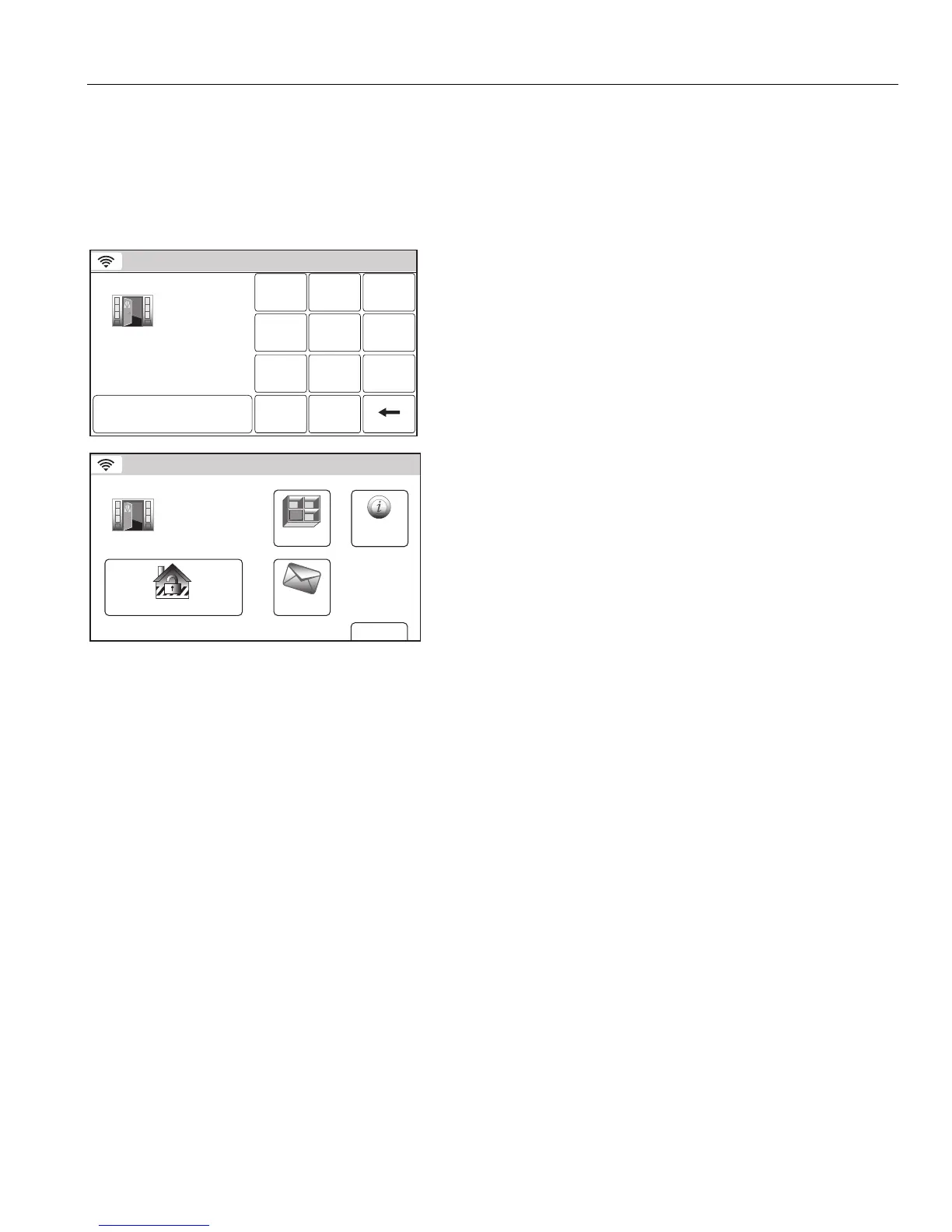
Disarming the System and Silencing Alarms
Alarm
Enter Code:
Cancel
2 31
5 64
0
8 97
Clear
5200-100-088-V0
Alarm 2 Front
Door
1. Enter a valid Code. The system beeps once and announces
“Disarmed Ready to Arm”.
Note: If a valid user code is not entered before the programmed
entry delay occurs, the system remains in alarm mode.
Alarm Cancel
7000-100-026-V0
Alarm 2 Front
Door
More
Message
Zones
Disarm
4:43 PM August 11, 2011
System
2. “Alarm Cancel” is displayed in a red band along with the zone
that caused the alarm. Select the “Disarm” icon and enter a
valid code again to clear the alarm. The system beeps once,
returns to the Security Screen and announces “Disarmed
Ready to Arm”.


 To Next Page
 Loading...