– 51 –
USER FUNCTIONS
USER FUNCTIONSUSER FUNCTIONS
USER FUNCTIONS
Reminders
The Reminder Feature can be used to program/record reminders that can be displayed on the touch screen,
announced by the control.
Programming a Reminder
Arm Away
Ready To Arm
Arm Stay
BackDelay
Settings
10:18 AM June 8, 2010
5200-100-033-V0
Tools
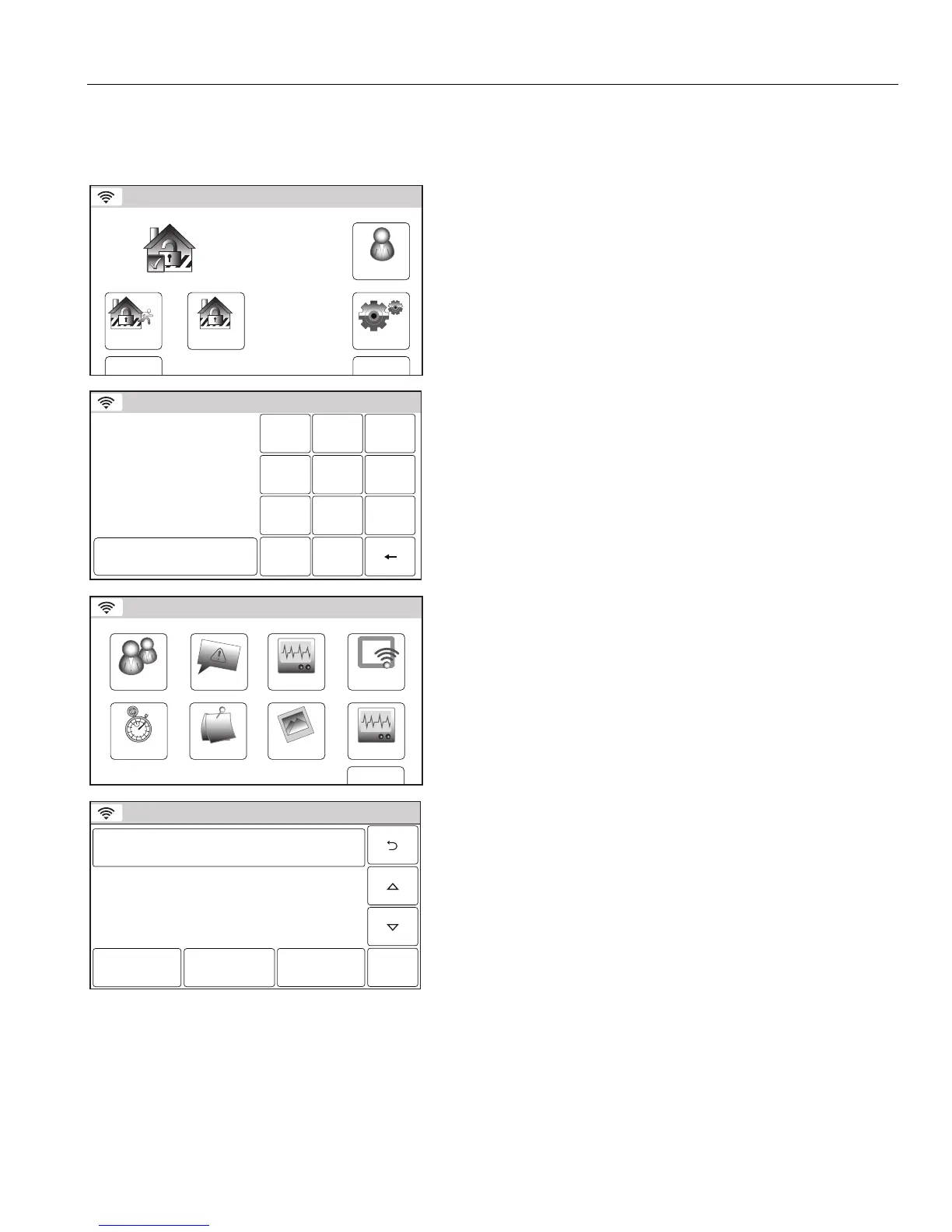
1. With the system in the disarmed state, select the “Tools” icon
from the second page of the Security Screen. The system
displays the Keypad screen.
Ready To Arm
Program the system
Enter Co de:
Ca ncel
5200-100-035-V0
2 31
5
64
0
8
97
Cl ear
2. Enter your 4-digit Master User Code. The system displays the
Master User programming screen.
WiFi ConfigDate Time
Ready To Arm
Events
Back
Reminders
KeypadUsers
5200-100-036-V0
Slide Show
Test
3. Select the “Reminders” icon. The system displays the
Reminders screen.
Ready To Arm
Sav e
5200-100-045-V0
No items to display!
Add New
Delete All
Play
4. Select “Add New”. The system displays the Reminder
programming screen.


 To Next Page
 Loading...