– 52 –
USER FUNCTIONS
USER FUNCTIONSUSER FUNCTIONS
USER FUNCTIONS
Reminders
Ready To Arm
Sav e
5200-100-068-V0
Name
Frequency
None
Voice
No
Acknowledge
No
Ready To Arm
5200-100-069-V0
A
Q
Z
S
W
L
O P
M
K
I
N
J
U
V
G
T
B
H
Y
C
F
R
X
D
E
Cl ea r
Do ne
123!@#
ab c. ..
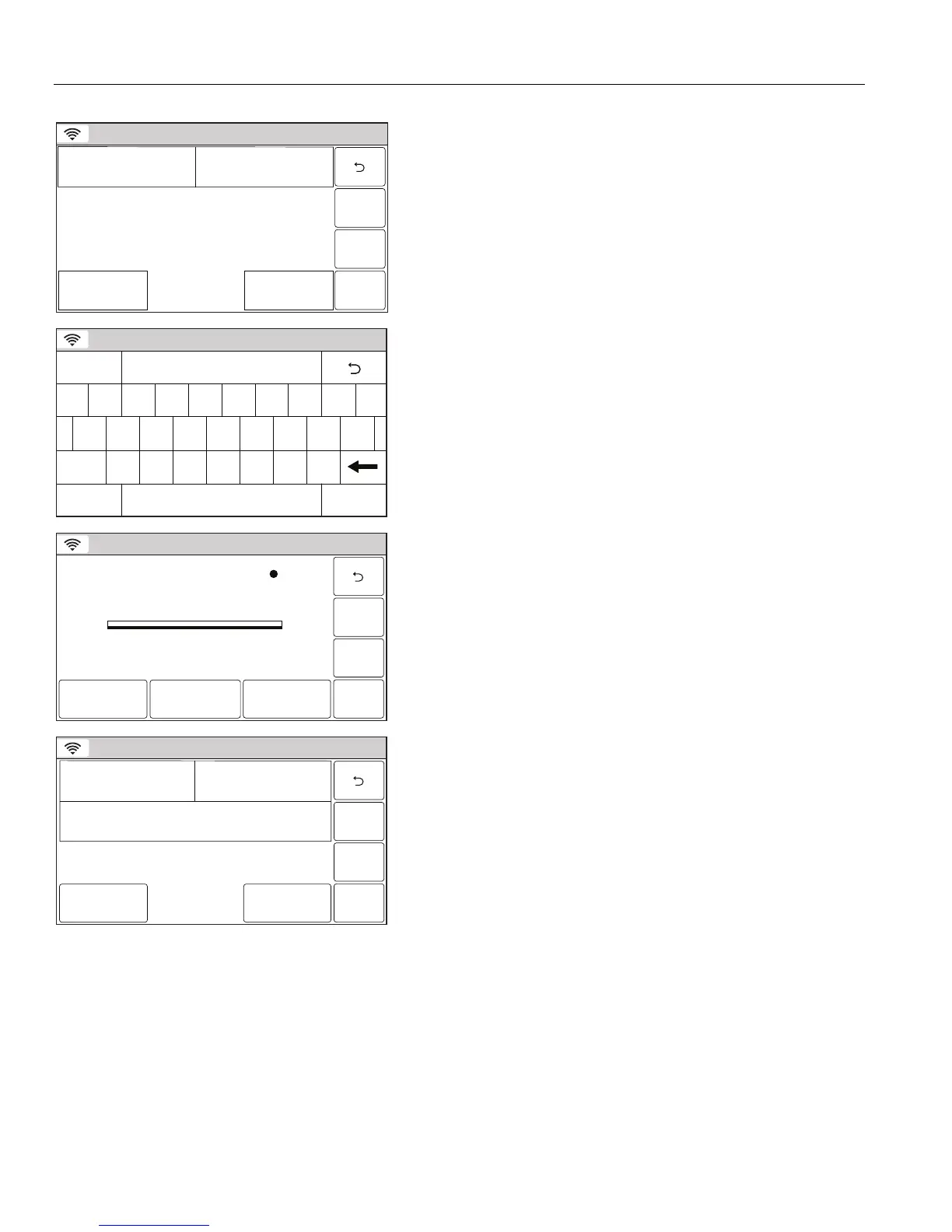
5. Select “Name”. Enter a name for the scheduled function on
the displayed keypad then select “Done”.
6. Select “Frequency” then select one of the following displayed
options:
None Once
Daily Weekday
Weekly Monthly
7. Program the following options based upon the Frequency
selected in step 6:
Once Date/Start Time
Daily Start Time
Weekday Start Time
Weekly Day of the Week/Start Time
Monthly Day of the Month/Start Time
Sunrise Day of the Week/Start Time
Sunset Day of the Week/Start Time
Ready To Arm
5200-100-070-V0
Reminders 1 Stopped
Record DeletePlay
8. If a voice reminder is desired, select “Voice”. The system
toggles between “No” and “Yes”. If yes is selected, the record
reminders screen appears.
9. Select the “Record” button and record your reminder. When
you are finished select the “Stop” button followed by the “”
button. The system returns to the Reminder programming
screen.
Ready To Arm
Sav e
7000-100-033-V0
Start Time
3:00 PM
Date
January 1, 2011
Frequency
Once
Name
Walk Dog
Voice
No
Acknowledge
No
Note: For important reminders you should program the
“Acknowledge” option. When this option is selected, the
reminder will continue to play until it is acknowledged.
10. Select the “Acknowledge” option. The system toggles
between “No and “Yes”.
11. Select “Save” when all applicable options have been
programmed.


 To Next Page
 Loading...