EasyManua.ls Logo

Honeywell MS5145 – 00 - User Manual

Honeywell MS5145 – 00
24 pages
Print Icon
To Next Page IconTo Next Page
Loading...
1
Introduction
Product Overview
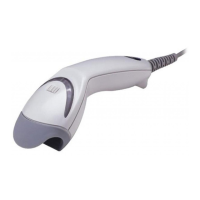
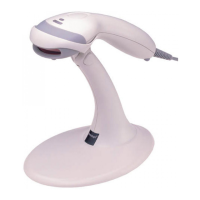
The MS5145 Eclipse is a single-line, hand-held laser scanner.
Equipped with Honeywell’s patented CodeGate® technology,
Eclipse can be used in a wide variety of applications. CodeGate
technology allows the user toeasily target the desired bar code
and complete the data transmission with a simple press of a
button. This combination makes Eclipse a perfect selection for
menu scanning, point-of-sale, document processing and inventory
control.
With state-of-the-art scanning technology embedded inside, the
MS5145 Eclipse has a longer working range and a wider scan field
than a typical CCD. The width of the scan line grows as the
scanner moves further away from bar codes. In addition, the laser
beam pulses, making lining up bar codes easy and when the
scanner senses a bar code (CodeSense® Mode), the laser beam
automatically switches to scan mode and activates CodeGate to
ensure high-speed scanning and accuracy.
Many standard features are included such as: user configurable
Flash ROM, PowerLink user-replaceable cables, MetroSet®2 and
MetroSelect® configuration, and data editing (parsing).
Model Number Interface
MS5145 – 00 Laser Emulation
MS5145 – 11 RS485 , RS232-TXD, RXD, RTS, CTS
MS5145 – 14 RS232 - TXD, RXD, RTS, CTS, DTR, DSR
MS5145 – 38
TTL RS232 Low Speed USB,
Keyboard Emulation or Serial Emulation*
MS5145 – 40 Full Speed USB
MS5145 – 41 RS232/Light Pen Emulation
MS5145 – 47
Keyboard Wedge, Stand Alone Keyboard and TTL RS232
Transmit/Receive
*
Configurable for Keyboard Emulation Mode or Serial Emulation Mode. The default
setting is Keyboard Emulation Mode.
Applicable for IBM® Host applications. Applicable for IBM® Host applications.
TM

Questions and Answers

  • S
    schultzgaryAug 1, 2025
    What to do if my Honeywell Barcode Reader scans but there is no data?
    • S
      shanebakerAug 1, 2025
      If your Honeywell Barcode Reader scans the bar code but there is no data, the unit’s configuration may not be correct. Make sure the scanner is configured for the appropriate mode.
  • P
    Patrick BarberAug 6, 2025
    Why does my Honeywell Barcode Reader scan but transmit incorrect data to the host?
    • J
      James MayAug 7, 2025
      If your Honeywell Barcode Reader scans, but the data transmitted to the host is incorrect, it may be due to a mismatch between the unit’s data format and the host system’s requirements. Verify the unit’s data format matches what the host requires and ensure the unit is connected to the correct host port.
  • C
    Charlene CookAug 13, 2025
    What to do if my Honeywell MS5145 – 00 powers up but doesn't scan or beep?
    • J
      John DoyleAug 13, 2025
      If your Honeywell Barcode Reader powers up but doesn't scan or beep, it could be due to a couple of reasons: * The unit might be trying to scan a symbology that is not enabled. By default, UPC/EAN, Code 39, interleaved 2 of 5, Code 93, Code 128, and Codabar are enabled. Verify that the type of bar code being read has been selected. * The bar code being scanned might not meet the configured criteria for character length lock or minimum length. Check that the bar code being scanned falls into the configured criteria. The scanner defaults to a minimum of three characters for the bar code.
  • R
    Randy RamirezAug 18, 2025
    What to do if my Honeywell Barcode Reader scans a bar code but locks up after the first scan?
    • R
      Robert SmithAug 18, 2025
      If your Honeywell Barcode Reader scans a bar code but locks up after the first scan and the red LED stays on, the unit might be configured to support some form of host handshaking but isn't receiving the signal. If the unit is set up to support ACK/NAK, RTS/CTS, XON/XOFF, or D/E, verify that the host cable and host are properly supporting the handshaking.
  • A
    Ariel MillerAug 26, 2025
    Why does my Honeywell MS5145 – 00 beep for some bar codes but not others of the same type?
    • T
      Taylor RogersAug 26, 2025
      If your Honeywell Barcode Reader beeps at some bar codes but not others of the same bar code symbology, several factors could be at play: * The bar code may have been printed incorrectly; check for check digit/character/or border problems. * The minimum symbol length setting does not work with the bar code; check if the correct minimum symbol length is set.

Summary

Introduction

Product Overview

Overview of the MS5145 Eclipse, a single-line, hand-held laser scanner with CodeGate technology.

Cable Installation and Removal

Installation Procedures

RS232, Light Pen, or Laser Emulation Installation

Steps for installing the scanner using RS232, Light Pen, or Laser Emulation interfaces.

Keyboard Wedge Installation

Keyboard Wedge Installation Steps

Steps for connecting the scanner via a keyboard wedge interface to the host system.

Stand-Alone Keyboard Installation

Stand-Alone Keyboard Installation Steps

Procedure for connecting the scanner as a stand-alone keyboard to the host system.

USB Interface Installation

USB Installation Steps

Steps for connecting the scanner using USB Low Speed and Full Speed interfaces.

Scanner Operation

CodeGate Operation

Explanation of the CodeGate feature, how it works, and how to enable it.

Troubleshooting Guide

Scanner Issues and Interface Specifics

Troubleshooting common scanner symptoms and interface-specific problems across various connection types.

All Interfaces Troubleshooting

Troubleshooting common issues across all interfaces, including power, ROM, RAM, and diagnostic failures.

RS232 Interface Troubleshooting

Troubleshooting specific issues for the RS232 interface, including incorrect data and character transmission.

Regulatory Compliance and Safety

Laser Safety Precautions

Important safety information regarding laser exposure and handling precautions.

Configuration Bar Codes - Basic Settings

Configuration Bar Codes - Decode Features

Configuration Bar Codes - Code Bytes

Configuration Bar Codes - Interface and Country

Configuration Bar Codes - Keyboard Layouts

Configuration Bar Codes - System Type

Honeywell MS5145 – 00 Specifications

General IconGeneral
Scan PatternSingle Line
Light Source650 nm visible laser diode
Scan Speed72 scan lines per second
Weight100 g (3.5 oz)
Operating Temperature0°C to 40°C (32°F to 104°F)
Storage Temperature-40°C to 60°C (-40°F to 140°F)
Humidity5% to 95% relative humidity, non-condensing
Connectivity TechnologyWired
Minimum Bar Width5 mil
Decode Capability1D barcodes
ConnectivityUSB, Keyboard Wedge, RS232
Drop SpecificationDesigned to withstand 1.5 m (5 ft) drops
Electrical SpecificationsInput Voltage: 5 VDC ± 0.25 V; Operating Power: 675 mW; Standby Power: 425 mW
Resolution4 mil

Related product manuals