EasyManua.ls Logo

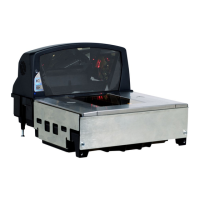
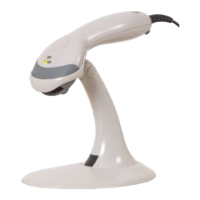
Honeywell ms2420 - User Manual

Honeywell ms2420
88 pages
Print Icon
To Next Page IconTo Next Page
Loading...
MS2420
Bar Code Scanner / Avery Scale
Installation and User’s Guide

Table of Contents

Other manuals for Honeywell ms2420

Questions and Answers

  • E
    ewalkerAug 19, 2025
    What to do if Honeywell Barcode Reader scans but the data transmitted to the host is incorrect?
    • R
      Robert Austin DVMAug 19, 2025
      Verify that the scanner’s data format matches that required by the host and that the scanner is connected to the proper host port. The scanner’s data format may not match the host system requirements.
  • L
    Latasha PerezAug 21, 2025
    What to do if Honeywell ms2420 Barcode Reader powers up OK and scans OK but does not communicate properly to the host?
    • J
      Joyce JohnsonAug 21, 2025
      Check to make sure that the baud rate and parity of the scanner and the communication port match and the program is looking for RS232 data. The com port at the host may not be working or is not configured properly.
  • S
    Shelby DixonAug 23, 2025
    What to do if Honeywell Barcode Reader scans a bar code, but locks up after the first scan?
    • T
      tracy04Aug 23, 2025
      If the scanner is setup to support ACK/NAK, RTS/CTS, XON/XOFF or D/E, verify that the host cable and host are supporting the handshaking properly. The scanner may be configured to support some form of host handshaking but is not receiving the signal.
  • N
    Noah RiveraAug 26, 2025
    What to do if Honeywell ms2420 beeps at some bar codes but NOT for others of the same bar code symbology?
    • A
      Amy StewartAug 26, 2025
      There are several potential reasons for this issue: * The bar code may have been printed incorrectly. Check if it is a check digit, character or border problem. * The scanner is not configured correctly for this type of bar code. Check if check digits are set properly. * The minimum symbol length setting does not work with the bar code. Check if the correct minimum symbol length is set.
  • K
    Kimberly LawsonAug 28, 2025
    How to fix multiple scans upon presentation of code on Honeywell Barcode Reader?
    • G
      Gabriel SullivanAug 28, 2025
      Adjust same symbol timeout for a longer time. The same symbol timeout may be set to short.
  • S
    Steven VazquezAug 30, 2025
    What to do if Honeywell ms2420 unit powers up but does not beep?
    • M
      Meghan SalinasAug 30, 2025
      There are a few possible reasons: * The beeper is disabled. Enable the beeper. * No volume is selected. Select a volume. * No tone is selected. Select a tone.
  • S
    Shelby HicksSep 1, 2025
    Why Honeywell ms2420 has no LEDs, beep or motor spin?
    • A
      Andrew JacksonSep 2, 2025
      Check the transformer, outlet and the power strip. Make sure the power cable is plugged into the scanner. The reason for this is that no power is being supplied to the scanner.
  • N
    Nicole WilliamsSep 4, 2025
    Why Honeywell Barcode Reader has no LEDs and no beep?
    • M
      Michael SmithSep 4, 2025
      Use the power supply included with the scanner. The host system cannot supply enough current to power the MS2420 series scanner.
  • M
    michaelhuffmanSep 6, 2025
    What to do if Honeywell ms2420 drops characters?
    • M
      mark66Sep 6, 2025
      Add some intercharacter delay to the transmitted output by using the MetroSelect Configuration Guide (PN 00-02407x). The intercharacter delay needs to be added to the transmitted output.
  • Y
    ypearsonSep 9, 2025
    What to do if Honeywell ms2420 Barcode Reader secondary scanner powers up but data is not relayed to the host?
    • H
      hernandezjeremiahSep 9, 2025
      Ensure that the secondary scanner is connected to the MS2420 com port marked “Aux” port. Also, the MS2420 series must be configured to enable the auxiliary port. The secondary scanner cable may not be connected to the proper port on the MS2420, or the auxiliary com port may not be operating properly.

Summary

Device Details and Installation

Installation Guide

Steps for site preparation, cable connection, and unit mounting.

Scanner Operation and Features

Scan Zone Overview

Diagrams illustrating the effective scanning range and orientations.

Failure Modes and Diagnostics

Describes error indications, common failures, and diagnostic codes.

Scale Operation and Calibration

Calibration Process

Requirements, methods, procedures, and verification for scale calibration.

Maintenance, Troubleshooting, and Support

Troubleshooting Guide

Solutions for common issues affecting interfaces, scanning, and ports.

Warranty and Support

Details of the product warranty, technical assistance, and service.

Honeywell ms2420 Specifications

General IconGeneral
ConnectivityWired
Connectivity TechnologyUSB
Scan PatternSingle Line
InterfaceUSB
Operating Temperature0°C to 50°C (32°F to 122°F)
Storage Temperature-40°C to 70°C (-40°F to 158°F)
Humidity5% to 95% relative humidity (non-condensing)

Related product manuals