
 Need help?
Do you have a question about the Honeywell QRAE 3 and is the answer not in the manual?
Details about the previous firmware version V2.14 for QRAE 3.
Update to the SO2 sensor baseline compensation algorithm.
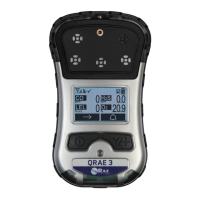
The Honeywell QRAE 3 is a portable gas detection instrument designed for personal safety and environmental monitoring. It is a robust device that helps users identify and measure various gases in their surroundings, providing critical information to prevent exposure to hazardous conditions. The QRAE 3 is engineered for ease of use, with a clear display and intuitive controls, making it suitable for a wide range of industrial and safety applications.
The primary function of the QRAE 3 is to detect and monitor the presence of multiple gases simultaneously. It is equipped with advanced sensor technology that allows it to accurately measure gas concentrations and alert users to potential dangers. The device is designed to be worn or carried by individuals working in environments where gas leaks, oxygen deficiency, or toxic gas buildup might occur.
The QRAE 3 continuously samples the ambient air and displays the real-time concentrations of detected gases on its screen. It can be configured to monitor a variety of gases, depending on the specific sensors installed. When gas concentrations exceed predefined alarm thresholds, the QRAE 3 activates audible, visual, and vibratory alarms to immediately alert the user and those nearby. This multi-alarm system ensures that warnings are not missed, even in noisy or low-visibility environments.
Beyond real-time monitoring, the QRAE 3 also features data logging capabilities. It records gas readings, alarm events, and other operational data, which can be later downloaded and analyzed. This historical data is crucial for compliance reporting, incident investigation, and long-term safety planning. The device can store a significant amount of data, providing a comprehensive record of exposure over time.
The QRAE 3 is designed to be intrinsically safe, meaning it is built to operate in hazardous locations without causing ignition. This makes it suitable for use in industries such as oil and gas, chemical processing, confined space entry, and emergency response, where flammable gases and vapors may be present. Its durable construction ensures reliable performance in harsh industrial environments, resisting dust, water, and impact.
The QRAE 3 is designed with user convenience and operational efficiency in mind. Its compact and lightweight design makes it easy to carry throughout a work shift, either clipped to clothing or worn on a belt. The device features a large, backlit graphical display that provides clear and easy-to-read information, even in low light conditions. The display shows current gas concentrations, alarm status, battery level, and other important operational indicators.
Navigation and control of the QRAE 3 are managed through a simple, intuitive button interface. Users can easily access different menus, acknowledge alarms, and perform basic functions without extensive training. The device's menu structure is designed for quick access to critical information and settings, ensuring that users can operate it effectively in demanding situations.
One of the key usage features is the ability to easily put the device into PC Communications mode. This mode is essential for connecting the QRAE 3 to a computer running ProRAE Studio II software. In this mode, users can download logged data, configure instrument settings, and update the device's firmware. The process involves connecting the QRAE 3 to a PC via a supplied USB cable and travel charger, then navigating through the device's menu to activate the communication mode. This streamlined process ensures that the device can be efficiently managed and kept up-to-date with the latest software enhancements.
The QRAE 3 is powered by a rechargeable battery, offering extended operation time to cover typical work shifts. The battery status is continuously displayed, allowing users to monitor power levels and plan for recharging. The device also includes a robust housing that protects it from the rigors of industrial use, including drops, dust, and water ingress, ensuring its reliability in challenging environments.
The device's alarm system is highly effective, featuring multiple indicators to ensure that warnings are not missed. The loud audible alarm can penetrate noisy environments, while the bright visual alarm, often in the form of flashing LEDs, provides a clear warning in dark or low-visibility areas. The vibratory alarm offers a tactile alert, which is particularly useful in situations where audible alarms might be masked by hearing protection or loud machinery.
Maintaining the QRAE 3 is straightforward, focusing on ensuring its accuracy, reliability, and longevity. Regular calibration is a critical maintenance feature, essential for verifying the accuracy of the sensors. The QRAE 3 can be easily calibrated using calibration gas and the appropriate accessories. This process ensures that the sensors are providing correct readings and that the device will accurately detect hazardous gas levels. Calibration procedures are typically guided by the ProRAE Studio II software, making the process efficient and well-documented.
Firmware updates are another important maintenance aspect. Honeywell regularly releases new firmware versions to improve performance, add new features, and address any reported issues. The QRAE 3 is designed to facilitate easy firmware upgrades through the ProRAE Studio II software. Users can connect the device to a PC, and the software guides them through the process of uploading the latest firmware. This ensures that the QRAE 3 always operates with the most current and optimized software, enhancing its overall functionality and reliability.
The device's modular design often allows for easy replacement of sensors, extending the lifespan of the instrument. If a sensor reaches the end of its operational life or becomes damaged, it can typically be replaced without needing to replace the entire unit. This reduces maintenance costs and downtime, making the QRAE 3 a cost-effective solution for long-term gas detection needs.
Battery management is also a key maintenance consideration. The QRAE 3 uses a rechargeable battery, and proper charging practices are important for maintaining battery health and maximizing its lifespan. The device's charging system is designed to be user-friendly, typically involving a drop-in cradle or a direct cable connection. Regular cleaning of the device, especially the sensor inlets, is also recommended to prevent blockages and ensure optimal airflow to the sensors.
Diagnostic features built into the QRAE 3 and the ProRAE Studio II software help users identify potential issues with the device. These diagnostics can alert users to sensor failures, low battery conditions, or other operational problems, allowing for proactive maintenance and troubleshooting. The data logging capability also serves as a maintenance tool, providing a historical record of device performance and any alarm events, which can be reviewed to assess the device's operational history and identify any recurring issues.
 General
| Display | LCD |
|---|---|
| Gas Sensors | Up to 4 sensors |
| Operating Temperature | -20°C to 50°C (-4°F to 122°F) |
| Sensor Options | O2, LEL, CO, H2S, SO2, NO2, Cl2, NH3 |
| Data Logging | Yes |
| Wireless | Optional |
| Pump | Optional internal pump |
| Alarms | Visual, audible, and vibrating alarms |
| Gas Detection | Multiple gases: Oxygen (O2), Combustible (LEL), Hydrogen Sulfide (H2S), Carbon Monoxide (CO) |
| Connectivity | USB |
| Humidity Range | 0% to 95% relative humidity (non-condensing) |
| Certifications | ATEX, IECEx, UL |



 To Next Page