EasyManua.ls Logo

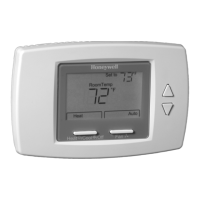
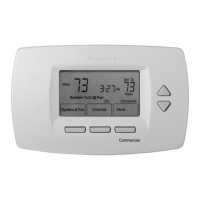
Honeywell TB7220 COMMERCIALPRO - User Manual

Honeywell TB7220 COMMERCIALPRO
24 pages
Print Icon
To Next Page IconTo Next Page
Loading...
PRODUCT DATA
63-2635-03
TB7220 COMMERCIALPRO™
Programmable Thermostat
APPLICATION
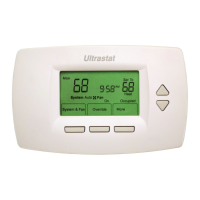
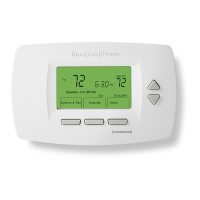
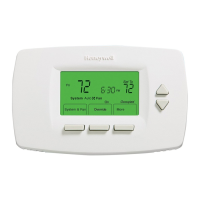
The TB7220 COMMERCIALPRO™ 7000 Programmable
Thermostat is an effortless, seven-day programmable
thermostat that provides universal system compatibility,
precise comfort control and is easy-to-program.
The TB7220 provides temperature control for gas, oil, electric
and heat pumps for up to 2 heat, 2 cool systems.
FEATURES
• Large, clear display with backlight shows the current
and set temperature and time—even in the dark.
• Menu-driven programming make setup effortless.
• Beautiful ergonomic design is smart and sophisticated
to match your customers’ lifestyle.
• Real-time clock keeps time during power failures and
automatically updates to daylight savings.
• “Saving Changes” notification lets you know when the
schedule changes have been saved.
• Change reminders let you know when to replace the
batteries.
• Holiday Override options allow you to override the
program schedule, as desired.
• Speedy same-schedule programming—no need to
copy multiple days.
• Armchair programming allows you to remove the
Contents
Application......................................................................... 1
Specifications .................................................................... 2
Ordering Information ......................................................... 2
Installation ......................................................................... 4
Wiring ................................................................................ 5
Installer Setup ................................................................... 12
Operation........................................................................... 17
Troubleshooting (Table 11) ................................................ 22

Questions and Answers

  • E
    Elaine RoyAug 20, 2025
    Why is my Honeywell TB7220 COMMERCIALPRO Thermostat not turning on heating or cooling?
    • M
      Martin HerreraAug 20, 2025
      Several factors can prevent your Honeywell thermostat from activating the heating or cooling system. First, the thermostat's minimum off-time might be active, so allow up to five minutes for the system to respond. Second, the system selection might not be set to Heat or Cool; ensure it's in the correct position. Finally, the system type selection could be incorrect, so verify ISU 0170 to ensure the correct system type is chosen.
  • K
    Kristin WilliamsAug 22, 2025
    What to do if my Honeywell TB7220 COMMERCIALPRO says 'Wait'?
    • C
      Caitlin JenkinsAug 22, 2025
      If your Honeywell thermostat displays 'Wait', it means the compressor minimum off timer is active. Allow up to five minutes for the cooling or heating (heat pump) equipment to turn on.
  • L
    lmccormickAug 25, 2025
    How to fix Honeywell TB7220 COMMERCIALPRO Thermostat when heat doesn't turn on?
    • X
      xduarteAug 25, 2025
      If the 'Heat On' indicator is solid on your Honeywell thermostat but the heat isn't turning on, it could be due to heating equipment failure. Check for 24 Vac at the equipment on the secondary side of the transformer between power and common. If voltage is absent, inspect the heating equipment. Also, check for 24 Vac between the heat terminal (W) and transformer common. If 24 Vac is present, the thermostat is functional, so inspect the heating equipment. Another possibility is a loose or broken wire connection between the thermostat and heating equipment. Check for 24 Vac between the heat terminal (W) and transformer common. If voltage is not present, check the wire connection.
  • W
    William JohnsonAug 26, 2025
    How to fix Honeywell TB7220 COMMERCIALPRO when cooling doesn't turn on?
    • A
      Alex Thompson Jr.Aug 26, 2025
      If the 'Cool On' indicator is solid on the display but the cooling isn't activating, it could indicate cooling equipment failure. Check for 24 Vac at the equipment on the secondary side of the transformer between power and common. If voltage is not present, check the cooling equipment to find the cause of the problem. Also, check for 24 Vac between the cool terminal (Y) and transformer common. If 24 Vac is present, the thermostat is functional, so check the cooling equipment. Another cause may be a loose or broken wire connection between the thermostat and cooling equipment. Check for 24 Vac between the cool terminal (Y) and transformer common; if voltage is absent, check the wire connection.
  • J
    jjenkinsAug 28, 2025
    What to do if my Honeywell TB7220 COMMERCIALPRO display doesn't come on?
    • A
      Ashley CrawfordAug 28, 2025
      If the display on your Honeywell thermostat is blank, the thermostat may not be receiving power. Check for 24 Vac between the C and Rc terminals. Also, ensure that the AAA batteries are correctly installed and have sufficient charge.
  • J
    John MitchellAug 29, 2025
    What to do if my Honeywell TB7220 COMMERCIALPRO is calling for heat or cool but nothing is running?
    • O
      oericksonAug 30, 2025
      If your Honeywell thermostat indicates it's calling for heat or cool, but the system isn't responding, the heating or cooling equipment itself may not be operating. Check the wiring and verify that ISU 0170 has the correct system type selected. You can also verify the equipment operation in System Test mode.
  • S
    Sara JonesAug 31, 2025
    Why won't my Honeywell TB7220 COMMERCIALPRO temperature settings change?
    • J
      Jesse ZhangAug 31, 2025
      If you're unable to adjust the temperature settings on your Honeywell thermostat, it could be due to a couple of reasons. First, the upper or lower temperature limits might have been reached; check the temperature setpoints and modify ISU 0600 and 0610 as needed. Second, the keypad might be fully locked; check ISU 0670 to change the keypad locked options.
  • K
    Kevin JeffersonSep 2, 2025
    How to fix Honeywell TB7220 COMMERCIALPRO when fan doesn't turn on in heat mode?
    • M
      mario77Sep 2, 2025
      If the fan doesn't activate during a call for heat in an electric furnace, the Fan Control in Heating might be set to Gas or Oil Furnace (Setting 0180). Change the Fan Control in Heating to Electric Furnace (Setting 0180).
  • C
    Catherine LongSep 4, 2025
    Why is my Honeywell Heat Pump blowing cool air in heat mode?
    • C
      Christine SharpSep 4, 2025
      If your heat pump is emitting cool air when in heat mode and warm air when in cool mode, the Changeover Valve (ISU 0190) might not be configured correctly for your heat pump. Set Changeover Valve (ISU 0190) to match the changeover required by the installed heat pump. Also, if the heating equipment is not a heat pump, but the System Type (ISU 0170) is set to Heat Pump, set System Type (ISU 0170) to match the installed heating and/or cooling equipment.
  • W
    wesleyrobinsonSep 6, 2025
    Why is my Honeywell heating equipment running in cool mode?
    • D
      Duane WilsonSep 6, 2025
      If your heating equipment is running in cool mode, it's possible that the heating equipment is not a heat pump but the System Type (ISU 0170) is set to Heat Pump. To resolve this, set the System Type (ISU 0170) to match the installed heating and/or cooling equipment.

Summary

PRODUCT DATA

FEATURES

Highlights key thermostat features like display, programming, and convenience functions.

INSTALLATION AND MOUNTING

CALIBRATION REQUIREMENTS

States no field calibration is required for thermostat and sensors.

WIRING PROCEDURES

TERMINAL DESIGNATION DESCRIPTIONS

Explains the function of each terminal on the thermostat wallplate.

SYSTEM WIRING DIAGRAMS

CONVENTIONAL SYSTEM WIRING

Illustrates typical wiring configurations for conventional HVAC systems.

HEAT PUMP SYSTEM WIRING

Provides typical wiring diagrams for heat pump system configurations.

POWERING AND BATTERY MANAGEMENT

THERMOSTAT POWER OPTIONS

Outlines methods for powering the thermostat, including battery and 24 Vac.

24 VAC COMMON WIRING

Details how to wire the 24 Vac common connection for transformers.

BATTERY INSTALLATION

Step-by-step instructions for installing batteries into the thermostat.

REMOTE SENSOR CONFIGURATION

OUTDOOR SENSOR MOUNTING

Guidance on properly locating and mounting the outdoor temperature sensor.

INDOOR REMOTE SENSOR MOUNTING

Instructions for locating and mounting indoor sensors (T7770A or C7189U).

INSTALLER SETUP OPTIONS

COMPLETE INSTALLER SETTINGS

Accessing the full set of installer configuration options.

INSTALLER SETUP NUMBERS AND SYSTEM TESTS

INSTALLER SYSTEM TEST PROCEDURES

Details on performing system tests for heating, cooling, and fan functions.

MAIN SCREEN NAVIGATION AND PROGRAMMING

HEATING;COOLING SCHEDULE PROGRAMMING

How to set up daily heating and cooling schedules with multiple periods.

TROUBLESHOOTING GUIDE

Honeywell TB7220 COMMERCIALPRO Specifications

General IconGeneral
StagesUp to 2 Heat/2 Cool
Power Source24VAC
Power MethodHardwired
Programmability7-day programmable
Operating Temperature Range (F)32°F to 120°F
Hold OptionYes
TypeProgrammable
DisplayBacklit
Terminal DesignationsR, C, W1, W2, Y1, Y2, G
ChangeoverAuto or Manual
Operating Humidity Range (%RH)10% to 90%

Related product manuals