CookingbyTemperature
For many foods, internal temperature is the best
T%e Temperature Probe
e
test of doneness.
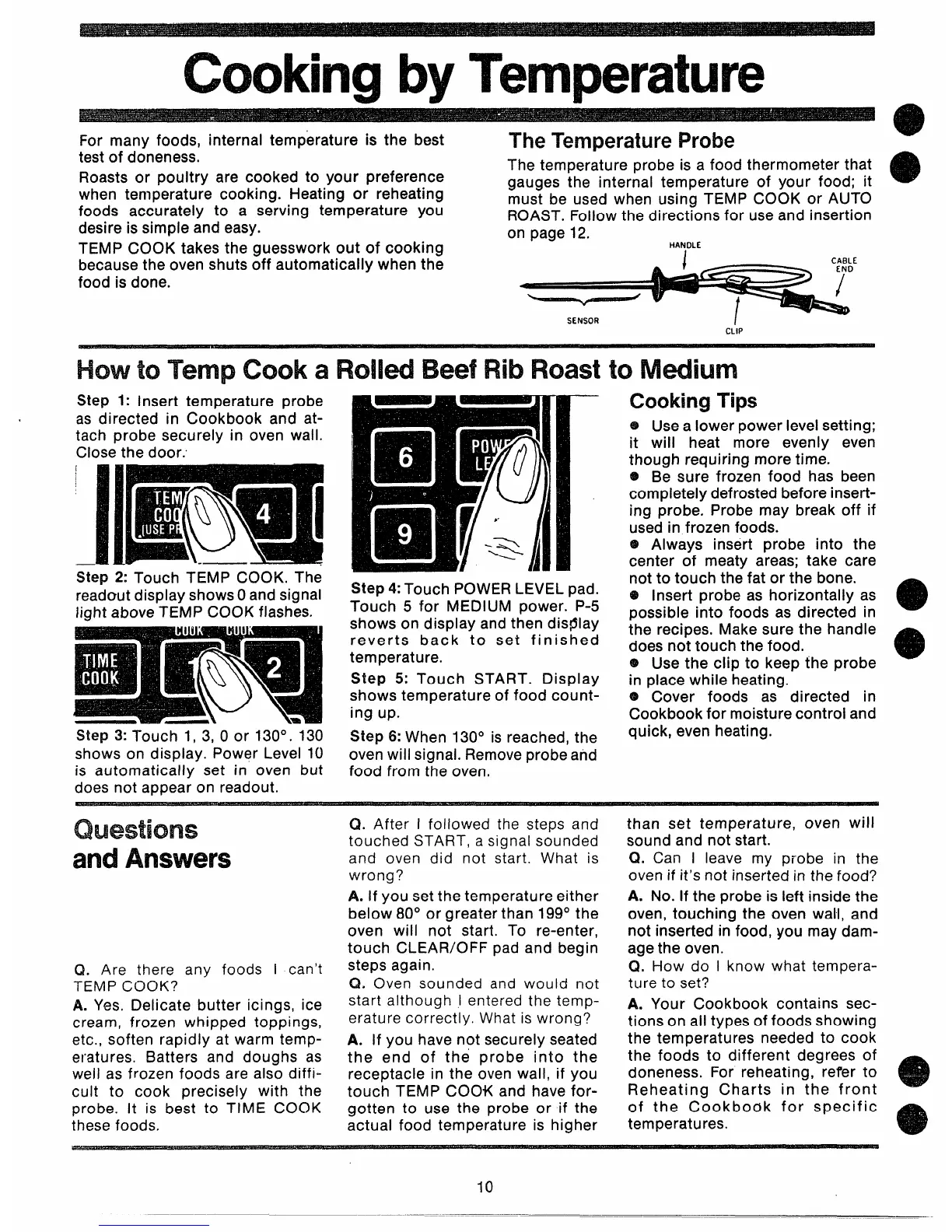
The temperature probe is a food thermometer that
Roasts or poultry are cooked to your preference
gauges the internal temperature of your food; it
o
when temperature cooking. Heating or reheating
foods accurately to a serving temperature you
must be used when using TEMP COOK or AUTO
ROAST. Follow the directions for use and insertion
desire is simple and easy.
on page 12.
TEMP COOK takes the guesswork out of cooking
HANDLE
because the oven shuts off automatically when the
CABLE
food is done.
SENSOR
CLIP
Howto TempCooka Rolld BeefRibRoastto M-ium
Step 1: Insert temperature probe
as directed in Cookbook and at-
tach probe securely in oven wall.
Close the door.
Step 2: Touch TEMP COOK, The
readout display shows Oand signal
light above TEMP COOK flashes.
Step 3: Touch 1, 3, 0 or 130°.130
shows on display. Power Level 10
is automatically set in oven but
does not appear on readout.
Step 4: Touch POWER LEVEL pad.
Touch 5 for MEDIUM power. P-5
shows on display and then dis@lay
reverts back to set finished
temperature.
Step 5: Touch START. Display
shows temperature of food count-
ing up.
Step 6: When 130° is reached, the
oven will signal. Remove probe and
food from the oven,
cooking
-rips
~ Use a lower power level setting;
it will heat more evenly even
though requiring more time.
e Be sure frozen food has been
completely defrosted before insert-
ing probe. Probe may break off if
used in frozen foods.
@ Always insert probe into the
center of meaty areas; take care
not to touch the fat or the bone.
6+ Insert probe as horizontally as
Possible into foods as directed in
e
the recipes. Make sure the handle
does not touch the food.
@ Use the clip to keep the probe
@
in place while heating. - -
e Cover foods as directed in
Cookbook for moisture control and
quick, even heating.
Questions
andAnswers
Q. Are there any foods I can’t
TEMP COOK?
A. Yes. Delicate butter icings, ice
cream, frozen whipped toppings,
etc., soften rapidly at warm temp-
eratures. Batters and doughs as
well as frozen foods are also diffi-
cult to cook precisely with the
probe. It is best to TIME COOK
these foods,
Q. After I followed the steps and
touched START, a signal sounded
and oven did not start. What is
wrong?
A. If you set the temperature either
below 80° or greater than 199° the
oven will not start. To re-enter,
touch CLEAR/OFF pad and begin
steps again.
Q, Oven sounded and would not
start although I entered the temp-
erature correctly. What is wrong?
A. If you have not securely seated
the end of the probe into the
receptacle in the oven wall, if you
touch TEMP COOK and have for-
gotten to use the probe or if the
actual food temperature is higher
than set temperature, oven will
sound and not start.
Q. Can I leave my probe in the
oven if it’s not inserted in the food?
A. No. If the probe is left inside the
oven, touching the oven wall, and
not inserted in food, you may dam-
age the oven.
Q. How do I know what tempera-
ture to set?
A. Your Cookbook contains sec-
tions on all types of foods showing
the temperatures needed to cook
the foods to different degrees of
doneness. For reheating, refer to
Reheating Charts in the front
e
of the Cookbook for specific
temperatures.
e
10



 To Next Page