Microwave OvenTouchControlPanel ~
—
—
_ ___
k
—-
—
KY
-.
—
K{;
~
$2
6?
0
.
.
63
“—
—
—
1
0
i
1.
2.
3.
4.
50
—
—
.
—
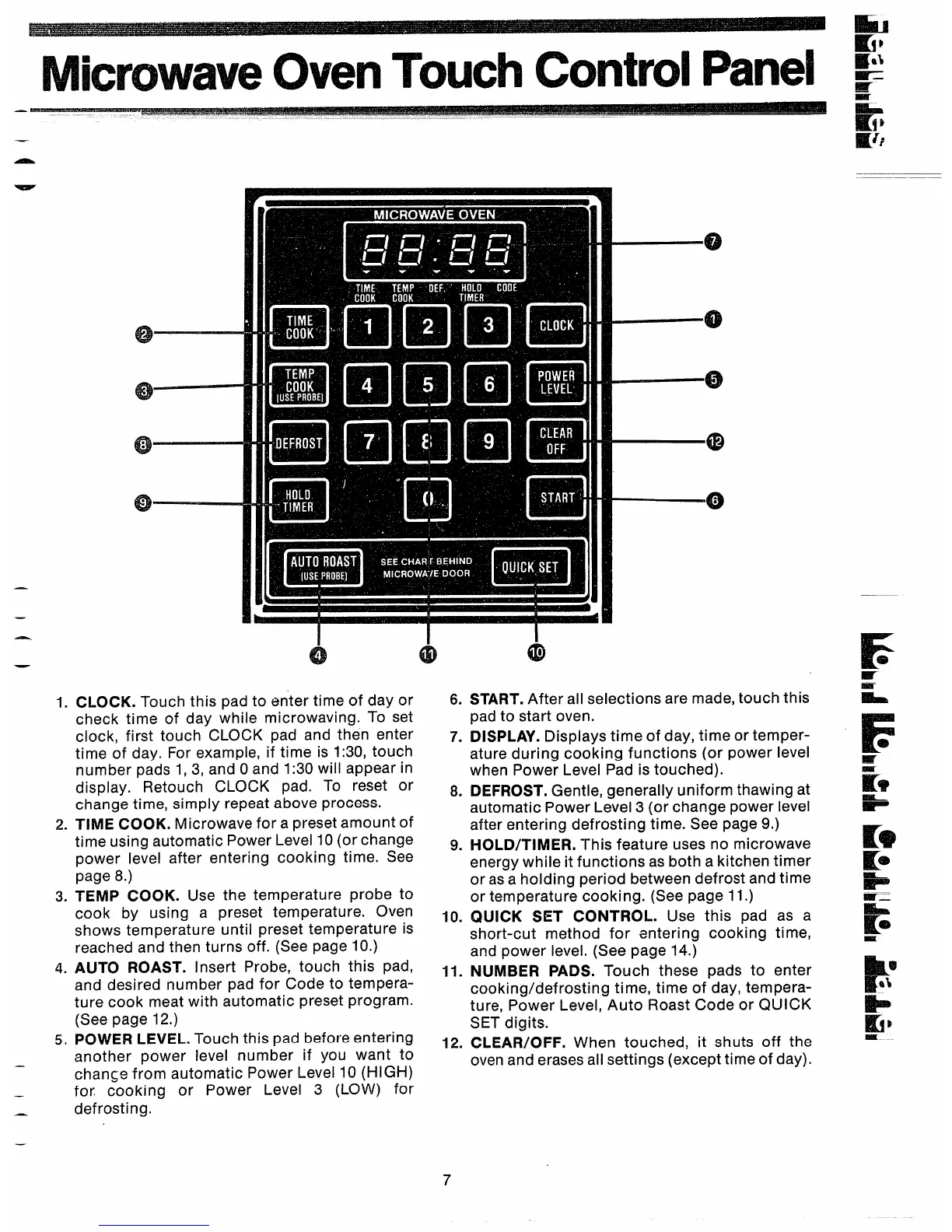
CLOCK. Touch this pad to enter time of day or
check time of day while microwaving. To set
clock, first touch CLOCK pad and then enter
time of day. For example, if time is 1:30, touch
number pads 1, 3, and Oand 1:30 will appear in
display. Retouch CLOCK pad. To reset or
change time, simply repeat above process.
TIME COOK. Microwave for a preset amount of
time using automatic Power Level 10 (or change
power level after entering cooking time. See
page 8.)
TEMP COOK. Use the temperature probe to
cook by using a preset temperature. Oven
shows temperature until preset temperature is
reached and then turns off. (See page 10.)
AUTO ROAST. Insert Probe, touch this pad,
and desired number pad for Code to tempera-
ture cook meat with automatic preset program.
(See page 12.)
POWER LEVEL. Touch this pad before entering
another power level number if you want to
change from automatic Power Level 10 (HIGH)
for cooking or Power Level 3 (LOW) for
defrosting.
6.
7.
8.
9.
10.
11.
12.
START. After all selections are made, touch this
pad to start oven.
DISPLAY. Displays time of day, time or temper-
ature during cooking functions (or power level
when Power Level Pad is touched).
DEFROST. Gentle, generally uniform thawing at
automatic Power Level3 (or change power level
after entering defrosting time. See page 9.)
liOLD/TIMER. This feature uses no microwave
energy while it functions as both a kitchen timer
or as a holding period between defrost and time
or temperature cooking. (See page 11.)
QUICK SET CONTROL. Use this pad as a
short-cut method for entering cooking time,
and power level. (See page 14.)
NUMBER PADS. Touch these pads to enter
cooking/defrosting time, time of day, tempera-
ture, Power Level, Auto Roast Code or QUICK
SET digits.
CLEAR/OFF. When touched, it shuts off the
oven and erases all settings (except time of day).



 To Next Page