FeaturesofYour CookingCenter
Microwavec)ven
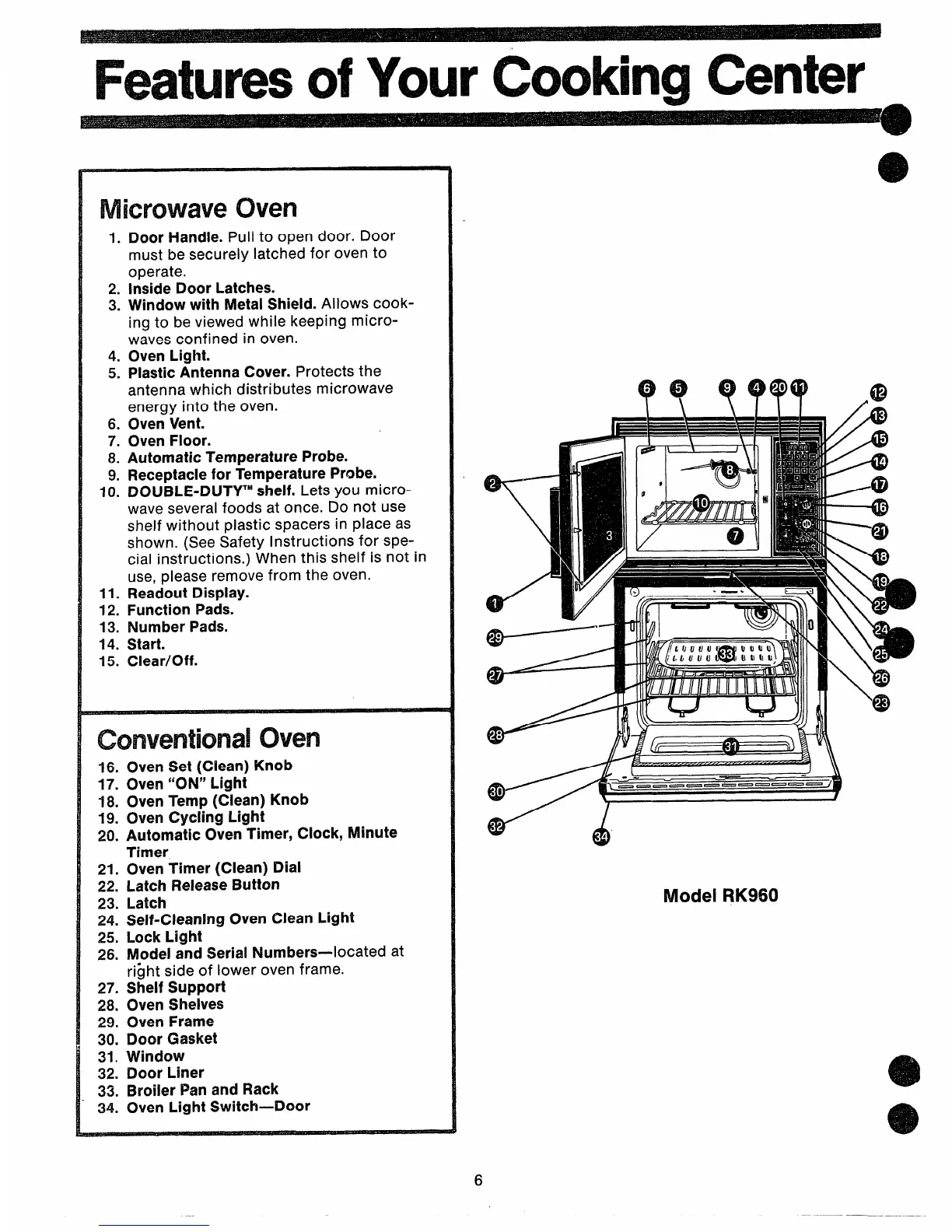
1.Door Handle. Pull to open door. Door
must be securely latched for oven to
operate.
2. Inside Door Latches.
3. Window with Metal Shield. Allows cook-
ing to be viewed while keeping micro-
waves confined in oven.
4. Oven Light.
5. PlasticAntenna Cover. Protects the
antenna which distributes microwave
energy into the oven.
6. Oven Vent.
7. Oven Floor.
8. Automatic Temperature Probe.
9. Receptaclefor Temperature Probe.
10. DOUBLE-DLJTYIMshelf. Lets you micro-
wave several foods at once. Do not use
shelf without plastic spacers in place as
shown. (See Safety Instructions for spe-
cial instructions. ) When this shelf is not in
use, please remove from the oven.
11. Readout Display.
12. Function Pads.
13. Number Pads.
14. Start.
15. Clear/Off.
conventional oven
16. Oven Set (Clean) Knob
17. Oven “ON” Light
18, Oven Temp (Clean) Knob
19. Oven Cycling Light
20. Automatic Oven Timer, Clock, Minute
Timer
21. Oven Timer (Clean) Dial
22. Latch Release Button
23. Latch
24. Self-Cleaning Oven Clean Light
25. Lock Light
26.
ModelandSerialNumbers—-locatedat
ri~ht side of lower oven frame.
27. Shelf Support
28. Oven Shelves
29. Oven Frame
30. Door Gasket
31. Window
32. Door Liner
33. Broiler Pan and Rack
34. Oven Light Switch—Door
43
-0000 — ----- —
W’
d
A
Model RK960
6



 To Next Page