Page 25 Operating Instructions
spa water. Use the jet button marked “CLEAN” to circulate the spa water for a ten-minute period.
9. Rotate the SmartJet
®
lever(s) to next position and let the spa water circulate (using the jet) for 10 minutes. Test the spa
water for Free Available Chlorine (FAC) residual. If the residual is between 3 and 5 ppm on the test strips (found in the
test kit) go on to the next step. If the residual is less than 3 ppm, superchlorinate the spa water by adding 1-1/2
teaspoons of chlorine (sodium dichlor) per 250 gallons of spa water. Then use the jet button marked “CLEAN” to
circulate the spa water for a ten-minute period. Repeat this procedure until all SmartJet
®
lever operating positions have
been tested.
10. Recheck the Total Alkalinity (TA) at 125 ppm, Calcium Hardness (CH) at 150 ppm, then spa water pH at between 7.2
and 7.4.
Operational Note: Make sure you adjust your Total Alkalinity first, as an out-of-balance condition will affect your ability
to adjust the pH correctly, and will prevent the sanitizer from operating effectively.
The spa is ready for use when the
spa water has circulated through each SmartJet
®
lever operating position and the chlorine level remains
between 3 ppm and 5 ppm.
11. The spa temperature is pre-programmed to reach 102°F, and will normally do so within 18 to 24 hours. You may raise
the water temperature by pressing the TEMP (+) button on the control panel, or lower it by pressing TEMP (-) button.
After a few hours, the water temperature will remain within 1-1/2 degrees of your selected temperature. To prevent
tampering, you can lock your desired temperature setting. Refer to the Control Panel section for details.
SMARTJET
®
SYSTEM
With your Hot Spring
®
Spa’s exclusive SmartJet
®
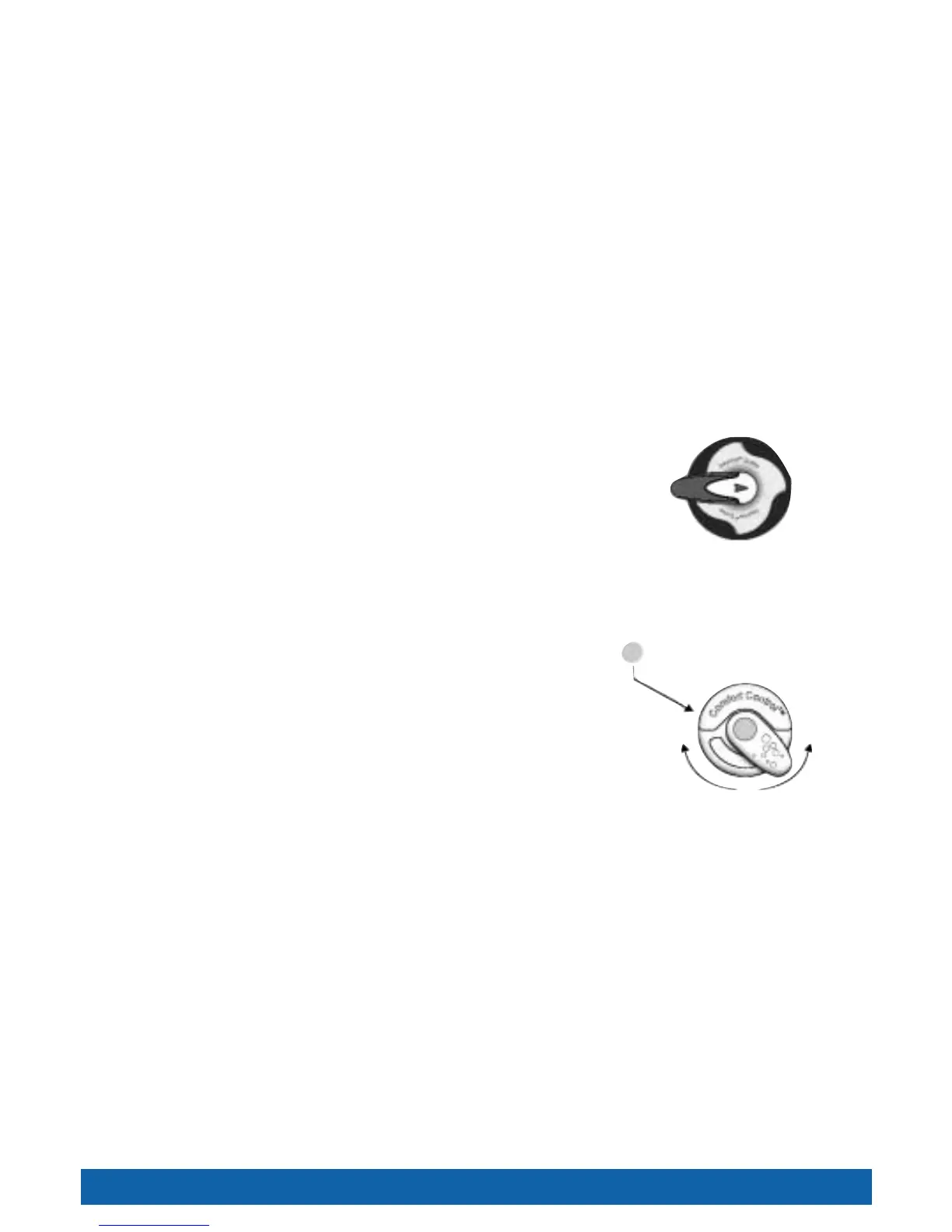
system, you can control the massaging action of
your spa. Using the SmartJet
®
lever, the jets are activated in sets, known as jet systems.
On the Vanguard
™
, Grandee
®
, Landmark
®
, and Jetsetter
®
, each SmartJet
®
lever controls two jet
systems. To access a jet system, simply turn the SmartJet
®
lever to the 3 o’clock or 9 o’clock
position. On the Sovereign
®
and Prodigy
®
, the single SmartJet
®
lever has four positions to
access the four jet systems. The jet systems are selected by turning the SmartJet
®
lever to the 3, 6,
9 or 12 o’clock position (facing the spa). Please consult the jet system menus on the following pages to
determine which jets are activated with each SmartJet
®
lever position. Or just jump in and play–turn the
lever(s) and see what happens.
COMFORT CONTROL
®
SYSTEM
The Comfort Control
®
system allows you to control the intensity of the massage at each jet by
adjusting the mixture of air and water. Jets with an adjustable faceplate are controlled by
turning the faceplate clockwise for a stronger flow, counterclockwise for a softer flow. Jets
without an adjustable faceplate are controlled by a Comfort Control
®
lever. The Precision
®
jets are controlled by dark teal, forest green or blue Comfort Control
®
levers. The Moto-
Massage
®
jet is controlled by seafoam green or light grey Comfort Control
®
levers. The
JetStream
®
jet is controlled by a steel blue or dark grey lever. The DreamJet
®
Comfort
Control
®
lever is controlled by a dark teal, forest green or blue Comfort Control
®
lever.
NOTE: The intensity of the JetStream
®
jets in the footwell can not be altered.
Turn the Comfort Control
®
lever clockwise to increase the intensity of the jet and counterclockwise to decrease the
intensity.
JETS
MOTO-MASSAGE
®
JET (Not available on Prodigy
®
)
The Moto-Massage
®
jet automatically travels up and down in a sweeping motion, simulating the natural stroking effects of
a manual massage. The intensity and speed of the Moto-Massage
®
jet may be adjusted by turning the Comfort Control
®
lever with the seafoam green or light grey dot.
The Moto-Massage
®
jet has been factory adjusted to provide maximum hydromassage, and to achieve full vertical travel
with its Comfort Control
®
lever in the full air volume position. Should the Moto-Massage
®
jet not achieve full vertical travel
and the problem is not a closed air control valve or clogged filter cartridge, then your Hot Spring
®
Spa Service Center
should be contacted.
SERVICE NOTE: A slow or non-moving Moto-Massage
®
jet may indicate that the filter cartridge pores are obstructed with
dirt, body oils, or calcification. Follow the filter cartridge cleaning procedures in the Spa Care and Maintenance section of
this manual.
ACCESSORY NOTE: For a different-feeling massage, ask your dealer about the HydroPulse
™
option, an alternative
faceplate for your Moto-Massage
®
jet.
12 o’clock
3 o’clock9 o’clock
6 o’clock
Dot color indicates which jets are controlled
Increase Air
Volume
Decrease Air
Volume




 To Next Page