HP StorageWorks Disk System 21208
Components of the Disk System
Front Panel
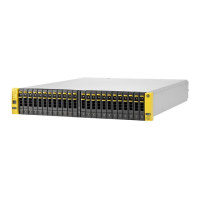
The disk modules can be accessed from the front of the disk system. It can accept up
to 4 low profile disk drives. If your storage system contains less than 4 disk modules,
the remaining empty slots contain filler panels. These filler panels (part number
A6198-60002) ensure that the proper cooling is maintained within the storage system.
Remove filler panels only when a disk module is added to the system.
Disk Module LEDs
Each disk module has two LEDs: an amber LED on the top (see Figure 1) and a green
LED on the bottom. The amber LED is not operational. The green LED provides disk
module status information as listed in Table 6.
FIGURE 1
Disk Module LEDs
TABLE 1 Disk LED Activity Definitions
System Power LED
The System Power LED (see Figure 2) gives diagnostic information about the disk
system operation. Refer to Table 2 on page 9 for more information.
LED Activity Indication
Blinking Disk activity
On solid for
approximately 1 second
Bus reset
Off Disk is idle or off
Disk Module
LEDs
Amber LED (not used)
Green LED




 To Next Page