EasyManua.ls Logo

HP 3468A - Page 50

HP 3468A
114 pages
Print Icon
To Next Page IconTo Next Page
To Previous Page IconTo Previous Page
Loading...
Writi
Programs
(Cont'd)
The
second
line
sets
up
a
string
of
commands
which
is
sent
to
the
3468A
by
the
OUTA
command
of
line
03.
Line
04
is
used
to
input
the
measured
ac
voltage
to
the
calculator;
line
O5
ends
the
program.
Programs
such
as
this
are
very
easy
to
write
if
the
3468A
is
the
only
device
in
the
loop
with
the
calculator.
Often
times,
however,
you'll
want
to
include
a
printer/plotter
and
a
mass
storage
cassette
drive
along
with
the
3468A.
In
such
instances,
the
calculator
interface
module
should
be
initialized
and
the
3468A
selected
and
put
in
the
remote
mode.
Initialization
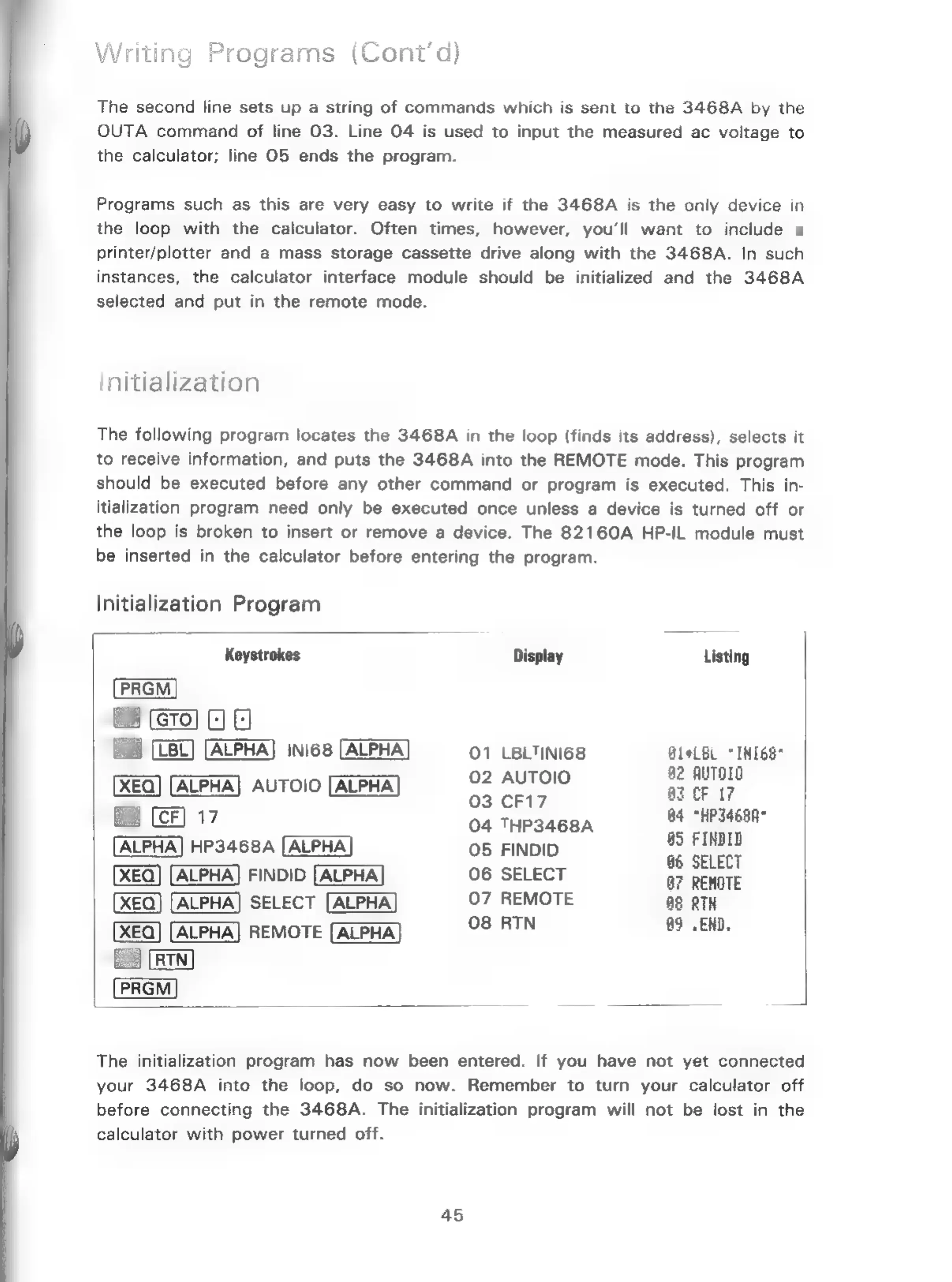
The
following
program
locates
the
3468A
in
the
loop
(finds
its
address),
selects
it
to
receive
information,
and
puts
the
3468A
into
the
REMOTE
mode.
This
program
should
be
executed
before
any
other
command
or
program
is
executed.
This
in-
itialization
program
need
only
be
executed
once
unless
a
device
is
turned
off
or
the
loop
is
broken
to
insert
or
remove
a
device.
The
82160A
HP-IL
module
must
be
inserted
in
the
calculator
before
entering
the
program.
Initialization
Program
Keystrokes
Display
Listing
PRGM
Boa
ALPHA]
INI68
[ALPHA
01
LBLTINI68
BleLBL
“INI6S*
ee
02
AUTOIO
b2
AuTOIO
XEQ]
[ALPHA]
AUTOIO
by
GELS
az
CF
17
[CF]
17
04
THP3468A
af
ane
ALPHA]
HP3468A
[ALPHA
05
FINDID
*
ae
XEQ]
[ALPHA]
FINDID
06
SELECT
a7
REMOTE
XEQ)
[ALPHA]
SELECT
[ALPHA]
07
REMOTE
88
RTH
XEQ]
[ALPHA]
REMOTE
[ALPHA
Ce
BIN
a2
2EuT
RIN
The
initialization
program
has
now
been
entered.
If
you
have
not
yet
connected
your
3468A
into
the
loop,
do
so
now.
Remember
to
turn
your
calculator
off
before
connecting
the
3468A.
The
initialization
program
will
not
be
lost
in
the
calculator
with
power
turned
off.
45

Related product manuals