3. Turn off the computer properly through the operating system, then turn off any external devices.
4. Disconnect the power cord from the power outlet and disconnect any external devices.
CAUTION: Regardless of the power-on state, voltage is always present on the system board as
long as the system is plugged into an active AC outlet. You must disconnect the power cord to
avoid damage to the internal components of the computer.
5. Remove the access panel and front bezel.
6. If you are installing a drive in a bay covered by a bezel blank, remove the front bezel then remove
the bezel blank. See
Removing a Bezel Blank on page 11 for more information.
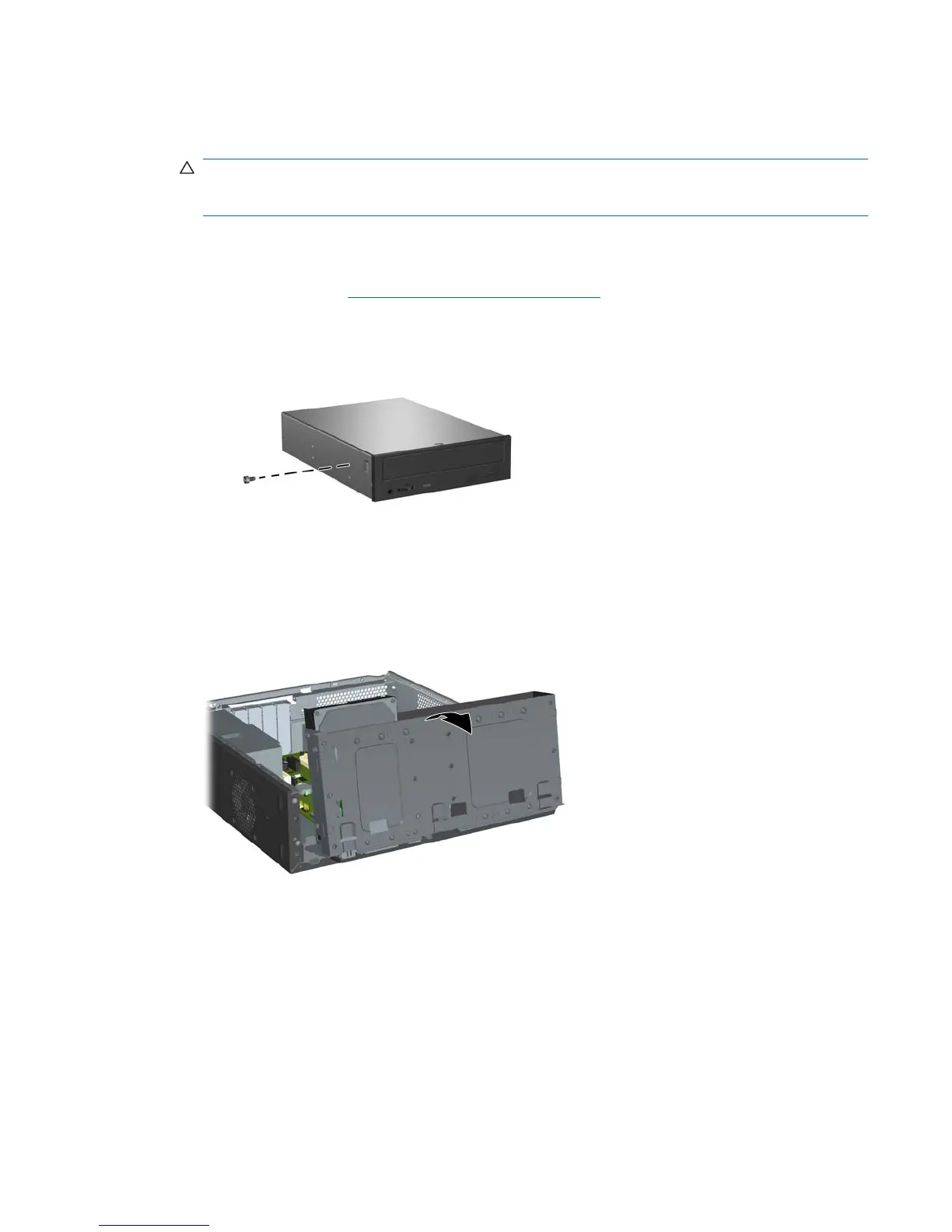
7. Install the guide screw in the front top hole on the left side of the drive.
Figure 2-23 Installing the Guide Screw in the Optical Drive
8. Rotate the drive cage all the way up.
Figure 2-24 Rotating the Drive Cage Up
9. Align the guide screw on the drive with the slot on the chassis. Slide the optical drive into the drive
bay until the two screw holes on the right side of the drive line up with the two screw holes on the
right side of the drive cage (1).
ENWW Installing Additional Drives 29







 To Next Page