Getting started2
Before setting up your Poly Studio Base Kit G9 Plus, ensure you have the required licenses.
Required Microsoft Teams Rooms license
You must have a Microsoft Teams Rooms license to set up your Poly Studio Base Kit G9 Plus.
For information on required licenses and dependencies, visit Teams Meeting Room Licensing.
Required Microsoft Teams Rooms account
You must have a Microsoft Teams Rooms account to set up your Poly Studio Base Kit G9 Plus.
For information on setting up your Microsoft Teams Rooms account, visit Configure accounts for
Microsoft Teams Rooms.
Preparing your environment for Microsoft Teams Rooms
Before setting up your Poly Studio Base Kit G9 Plus, verify that your network is ready.
For information on verifying that your network is ready for Microsoft Teams, visit Prepare your
organization's network for Microsoft Teams.
Overview of system hardware
The figures and tables in the following topics provide information about hardware features available on
your system.
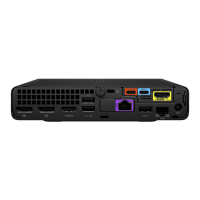
HP Mini IP Conferencing PC system ports
The following illustration and table explain the ports on the back panel of your HP Mini IP Conferencing
PC.
2
Chapter 2 Getting started


 To Next Page