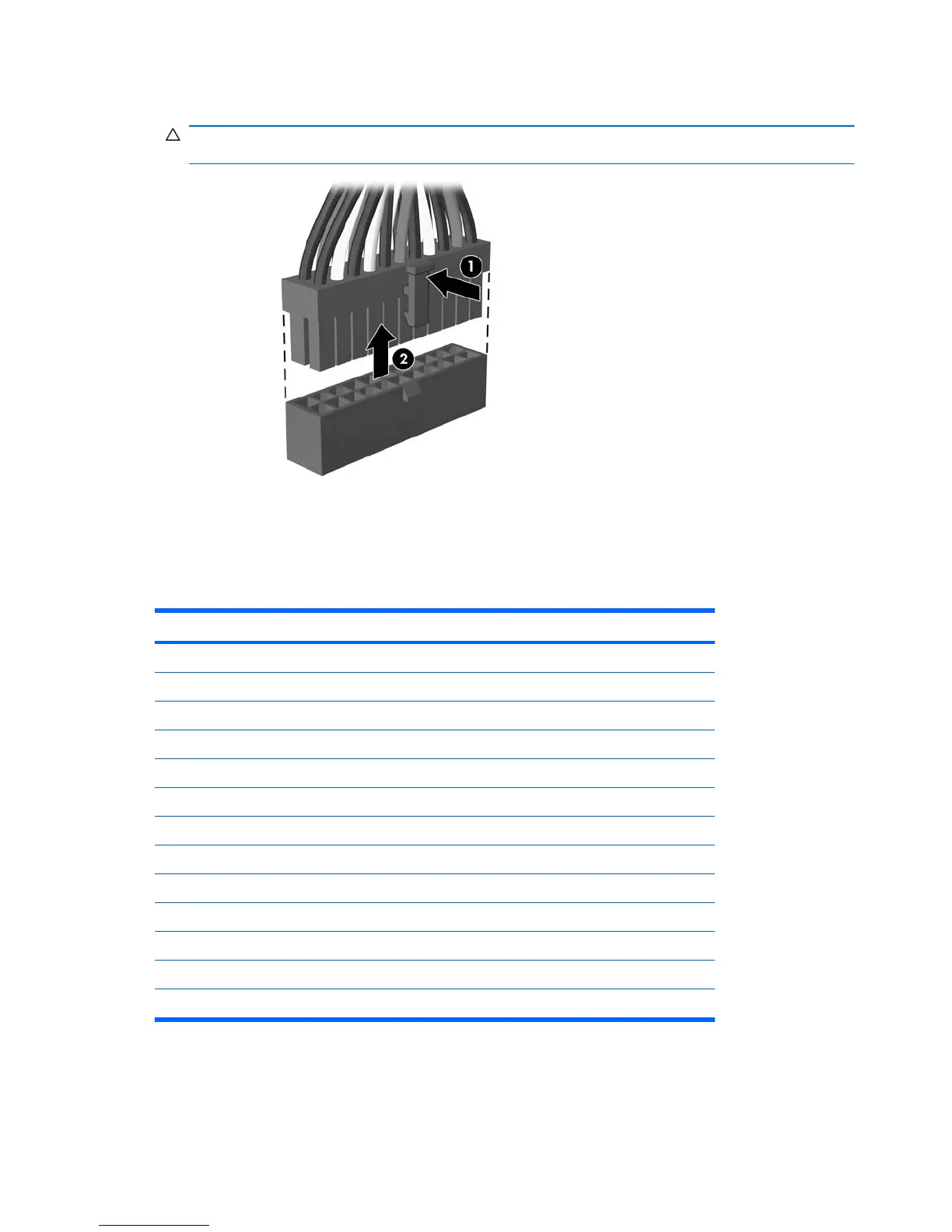
2. Grasp the cable end of the connector and pull it straight up (2).
CAUTION: Always pull the connector - NEVER pull on the cable. Pulling on the cable could
damage the cable and result in a failed power supply.
Cable Connections
System board connectors are color-coded to make it easier to find the proper connection.
Connector Name Connector Color Description
PWR white Power supply, 24-pin
PWRCPU white Power supply, 4-pin
CHFAN1 brown Chassis fan
CPUFAN white Heat sink fan
MEDIA black Media card reader
SPKR white Speaker
JFP1 black Power switch
FRNT AUD yellow Front I/O audio
FRNT USB1 white Front I/O USB
SATA1 dark blue Primary hard drive
SATA2 white Primary optical drive
SATA3 light blue Second hard drive
SATA4 orange Second optical drive
38 Chapter 6 Removal and Replacement Procedures Microtower (MT) Chassis







 To Next Page