6
Installing the Module
4. Reset the switch only if you have installed a module in place of a different
type of module. (See “Resetting the Switch” on page 12 for more informa-
tion about when the switch must be reset.)
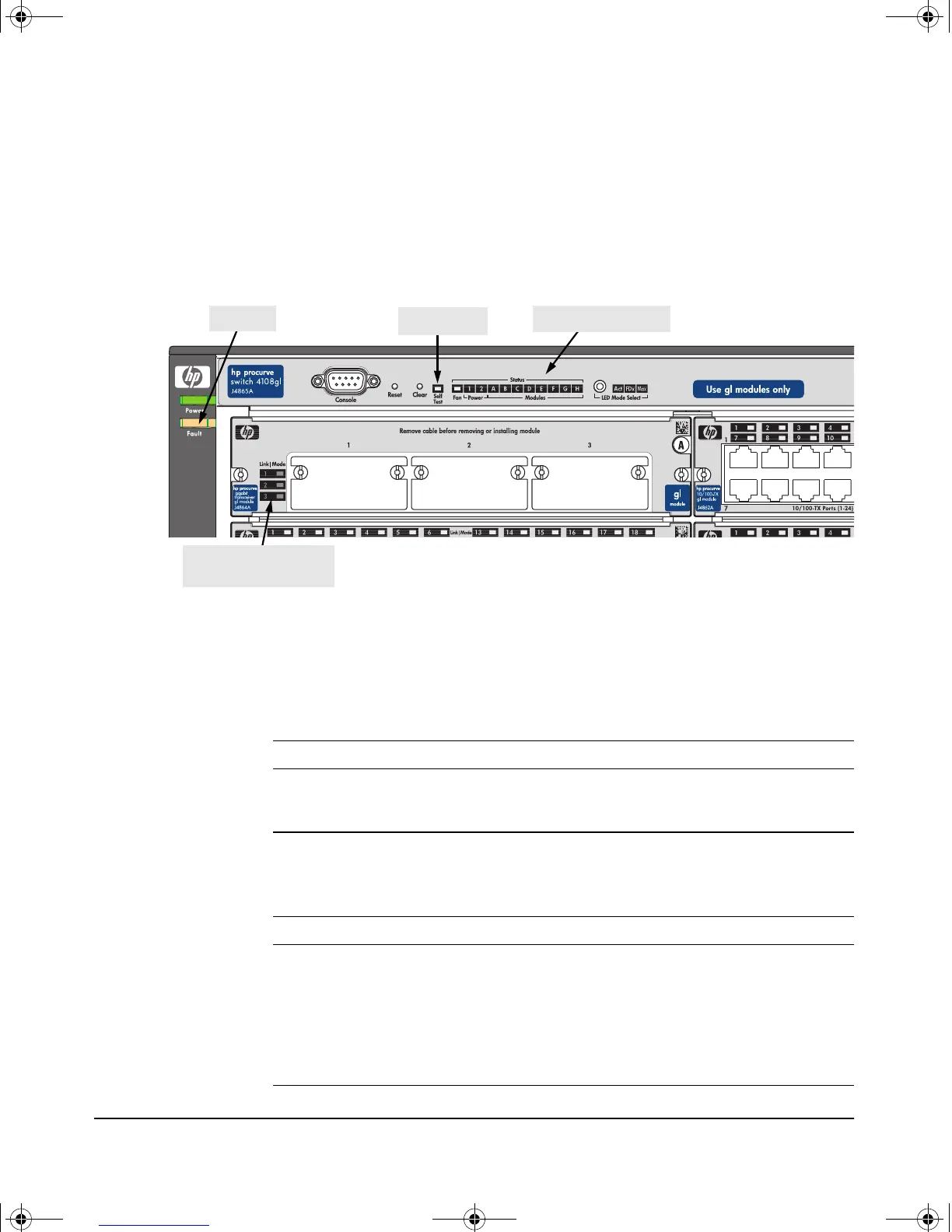
5. Verify the module is installed correctly. Observe the Module Status LED
for the slot in which the module is being installed, and the Self Test and
Fault LEDs on the switch to verify that the module is installed properly.
When the module is installed properly and the switch is powered on, or
the module is installed when the switch already has power, the module
undergoes a self test that takes a few seconds. You can use the LEDs to
determine that the module is installed properly and has passed the self
test, as described in the “LED Behavior” table below.
LED Behavior
Self Test LED
Module Status LEDs
Fault LED
LED Display for a Properly Installed Module
Module Status (for the slot in which you are installing the module) Goes ON as soon
as the module is installed and the switch is powered on, and stays
ON steadily.
Self Test ON briefly while the module is being tested, then OFF.
Note: If the switch was powered off while the module was installed,
when the switch is powered on, the Self Test LED will stay ON for
the duration of the whole switch self test.
Fault OFF
Link and Mode (on
the modules)
For a module that is installed while the switch is powered on, all the
Link and Mode LEDs on the module go ON for approximately 15 to
20 seconds, then OFF for 5 to 10 seconds depending on the module.
Then, the Self Test LED on the switch goes OFF.
If the module is already installed when the switch is powered on or
reset, this process occurs approximately 30 seconds after the
power on or reset, during which the chassis is being tested.
Module Link and Mode
LEDs
gamma-mod.book Page 6 Friday, April 6, 2001 10:23 PM










 To Next Page