Keyboard base component replacement procedures
CAUTION: Keyboard base components described in this chapter should only be accessed by an authorized
service provider. Accessing these parts can damage the keyboard base and void the warranty.
This chapter provides removal and replacement procedures for authorized service provider only parts.
There are as many as 63 screws that must be removed, replaced, and/or loosened when servicing
the keyboard base. Make special note of each screw size and location during removal and replacement.
Bottom cover
Description Spare part number
Bottom cover (includes rubber feet) 742102-001
Before disassembling the keyboard base, follow these steps:
1. Turn off the tablet and keyboard base. If you are unsure whether the tablet and keyboard base are off
or in Hibernation, turn the tablet on, and then shut it down through the operating system.
2. Disconnect the power from the tablet and keyboard base by unplugging the power cord from the tablet
and keyboard base.
3. Disconnect the tablet from the keyboard base.
Remove the bottom cover:
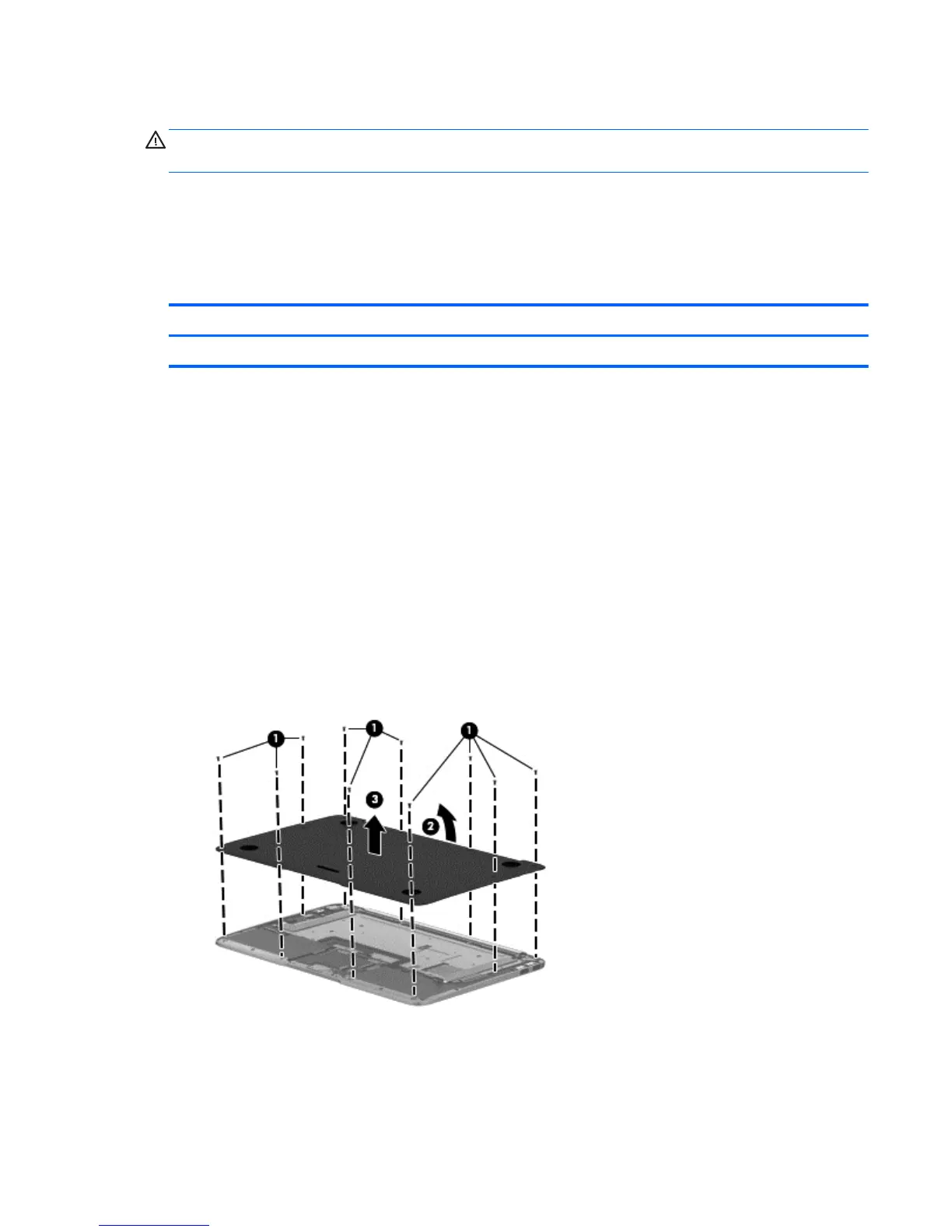
1. Turn the keyboard base upside down with the front toward you.
2. Remove the ten Phillips PM2.0×4.0 screws (1) that secure the bottom cover to the keyboard base.
3. Lift the rear edge of the bottom cover (2) until the left and right sides detach from the keyboard base.
4. Remove the bottom cover (3).
Reverse this procedure to install the bottom cover.
Removal and replacement procedures 65










 To Next Page