NEPTUNE
EN - 24
1. Select position Lo
2. Press key MODE/MXMNPK and select option “AUTO”
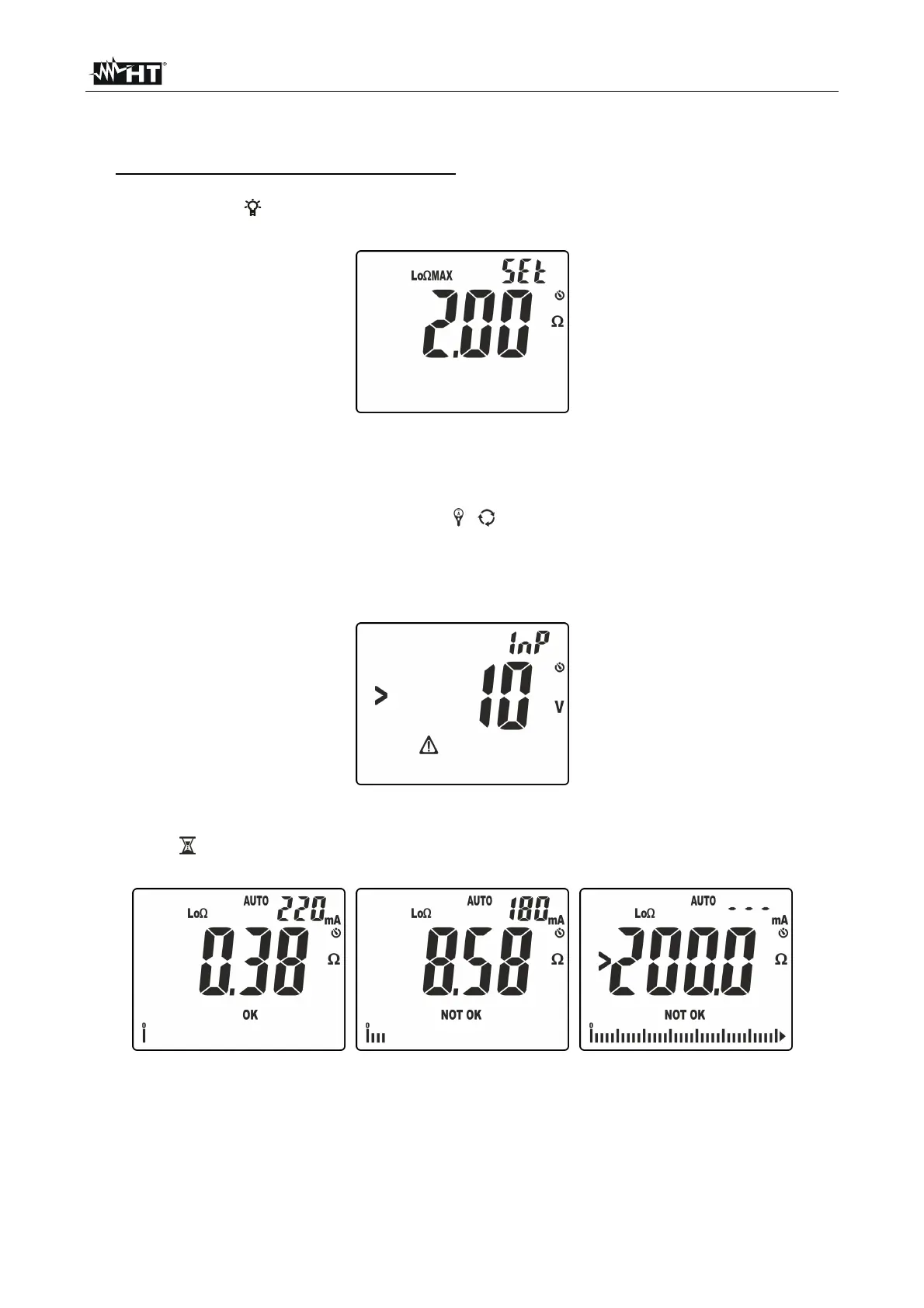
3. Press and hold key VTEST/LIM (>2s) to set the maximum limit threshold for
measurement. The symbol “Set” flashes on the display.
4. Press keys / or /ZERO to select the value in the range: 0.05 ÷ 9.99 (see Fig.
26).
Fig. 26: Setting the limit threshold for continuity test
5. Press key GO/HOLD to confirm and quit the setting section. The buzzer gives a short
continuous sound.
6. If necessary, compensate the test cables (see § 5.7.1).
7. Insert the red lead into input terminal V /+ and the black lead into input terminal
COM/, and connect the instrument to the system to be tested (see Fig. 25).
8. Press key GO/HOLD to activate the test. The following screen may appear on the
display to signal the presence of a voltage >10V found on the input terminals,
preventing the test to be carried out.
Fig. 27: Presence of voltage on the input terminals
9. In case no anomalous conditions are present, the instrument carries out the test and
symbol
flashes on the display. At the end of the test, the following screens appear on
the display.
Fig. 28: Results of continuity test in AUTO mode
10. In the screen in Fig. 28 – left side, a positive test result “OK” is shown (value lower than
the set threshold and test current >200mA). In the screen in Fig. 28
– middle, a
negative test result “NOT OK” is shown (value higher than the set threshold and test
current <200mA). In the screen in Fig. 28 – right side, a negative test result “NOT OK” is
shown, corresponding to the out-of-range condition (symbol “>200.0”).



 To Next Page