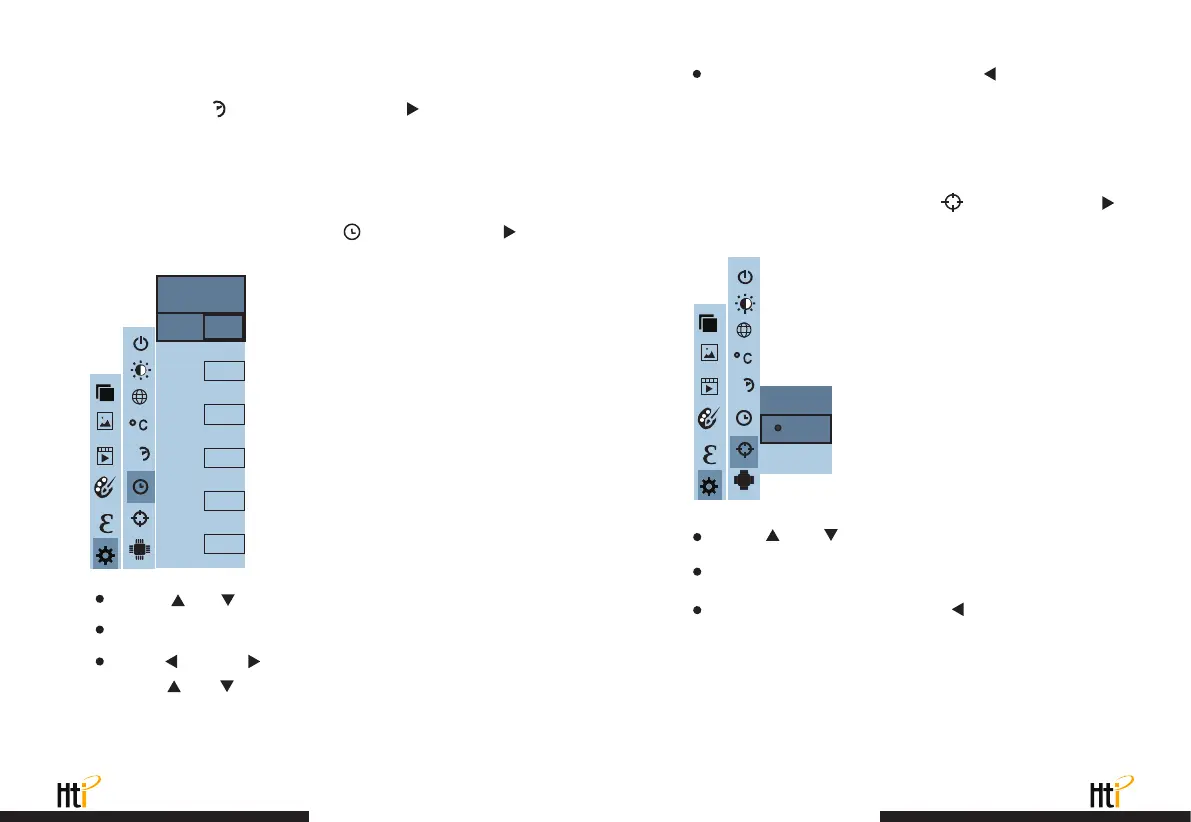
6.7. Time setting
6.8. Enable/disable of the highest and lowest
temperature cursor
Press
“ ”
/
“ ”
to select year/month/day/hour/minute.
After selecting, press “ SELECT ” key to enter the edit state.
Press
“ ”
and
“ ”
keys to select the figure to be changed.
Press
“ ”
/
“ ”
key to change the value. After completing the
change, press “ ENTER ” to enter.
After the time setting is completed, press
“ ”
key to return.
Press “ MENU ” exit from the menu.
As shown in the figure, after selecting
“ ”
(spot), press the
“ ”
button in the navigation key to enter the cold hotspot setting.
As shown in the figure, after selecting
“ ”
(set time), press
“ ”
in the navigation key to enter the setting time.
Press
“ ”
/
“ ”
key to select “off” or “on” the option.
Then press “ SELECT ” key to determine selection.
After the setting is completed,press
“ ”
key to return. Press
“ MENU ” key to exit from the menu.
www.xintest.com.cn
31
www.xintest.com.cn
32
After you select
“ ”
(time format), press the
“ ”
key in the
navigation key to enter the time format setting. Can be set to 24 hours
or 12 hours.
6.6. Time format setting
24h
Year
Month
Day
Hour
Minute
2020
10
26
03
10
Second
54
Set time
24h
Spot
Off
On
24h



 To Next Page