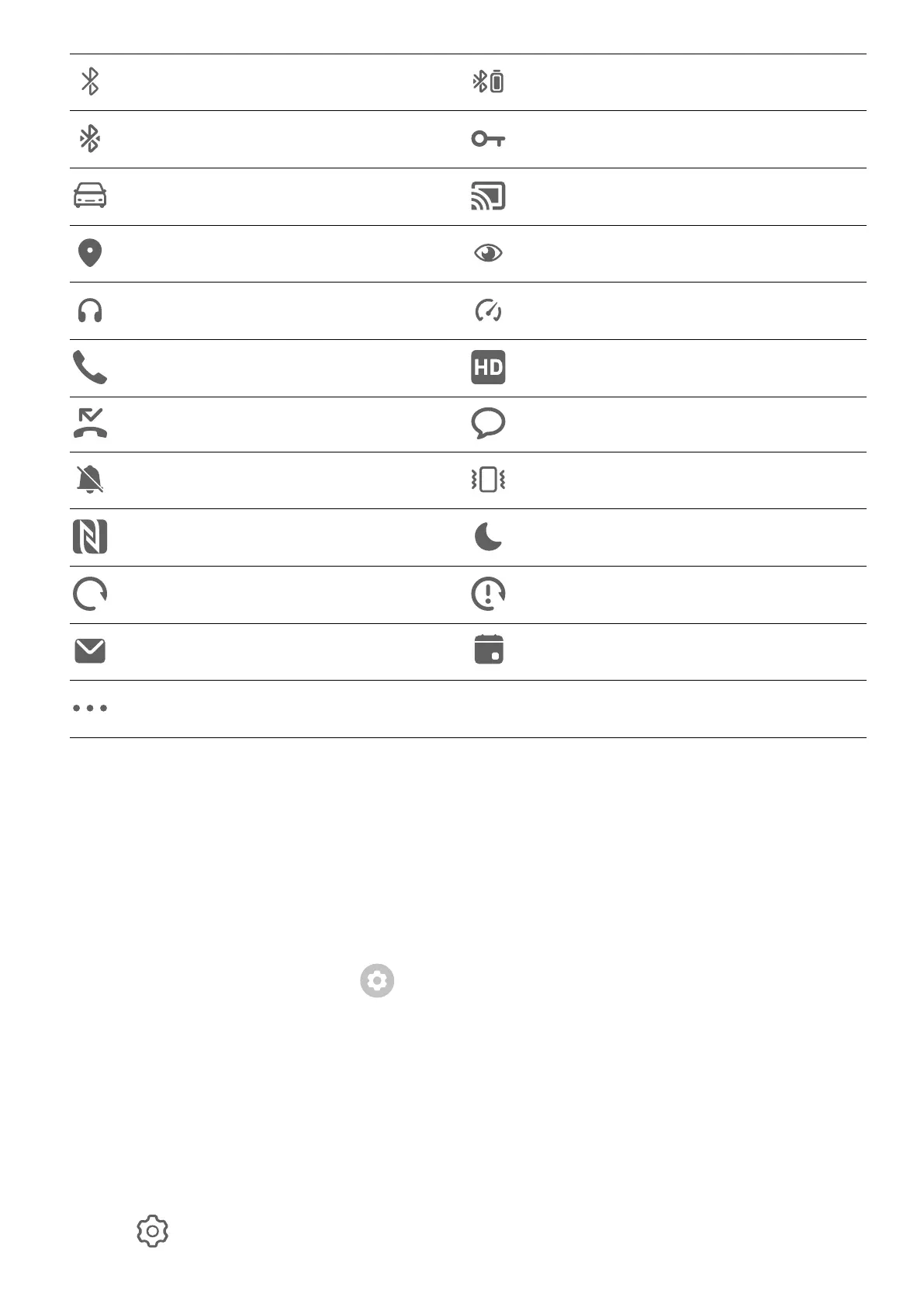
Bluetooth enabled Bluetooth device battery
Bluetooth device connected VPN connected
Driving mode enabled Projection device connected
Location service enabled Eye Comfort enabled
Headset connected Performance mode enabled
Calling VoLTE enabled
Missed call New message
Silent mode Vibration pattern
NFC enabled Do Not Disturb mode enabled
Syncing data Data syncing failed
New email Event reminder
More notications
Manage the Notications and Status Bar
Pin App Notications to the Top
You can pin app notications to the top of the notication panel in either of the following
ways:
• Swipe down from the upper left edge of the screen to display the notication panel, swipe
left on a notication, and touch > Pin to top.
• Go to Settings > Notications & status bar, locate and touch the app for which you wish
to pin notications, and enable Pin to top.
Disable App Notications
If you do not want to be disturbed by notications from an app, perform either of the
following:
• After you receive a notication from the app, swipe left on it in the notication panel, and
go to > Disable notications.
Settings
108



 To Next Page