Adjust the Blue Light Filter in Eye Comfort Mode
Go to Settings > Display & brightness > Eye Comfort, enable Enable all day or set up
Scheduled, and adjust the slider under Filter level to customize how much blue light you
would like to be ltered.
Notications & status bar
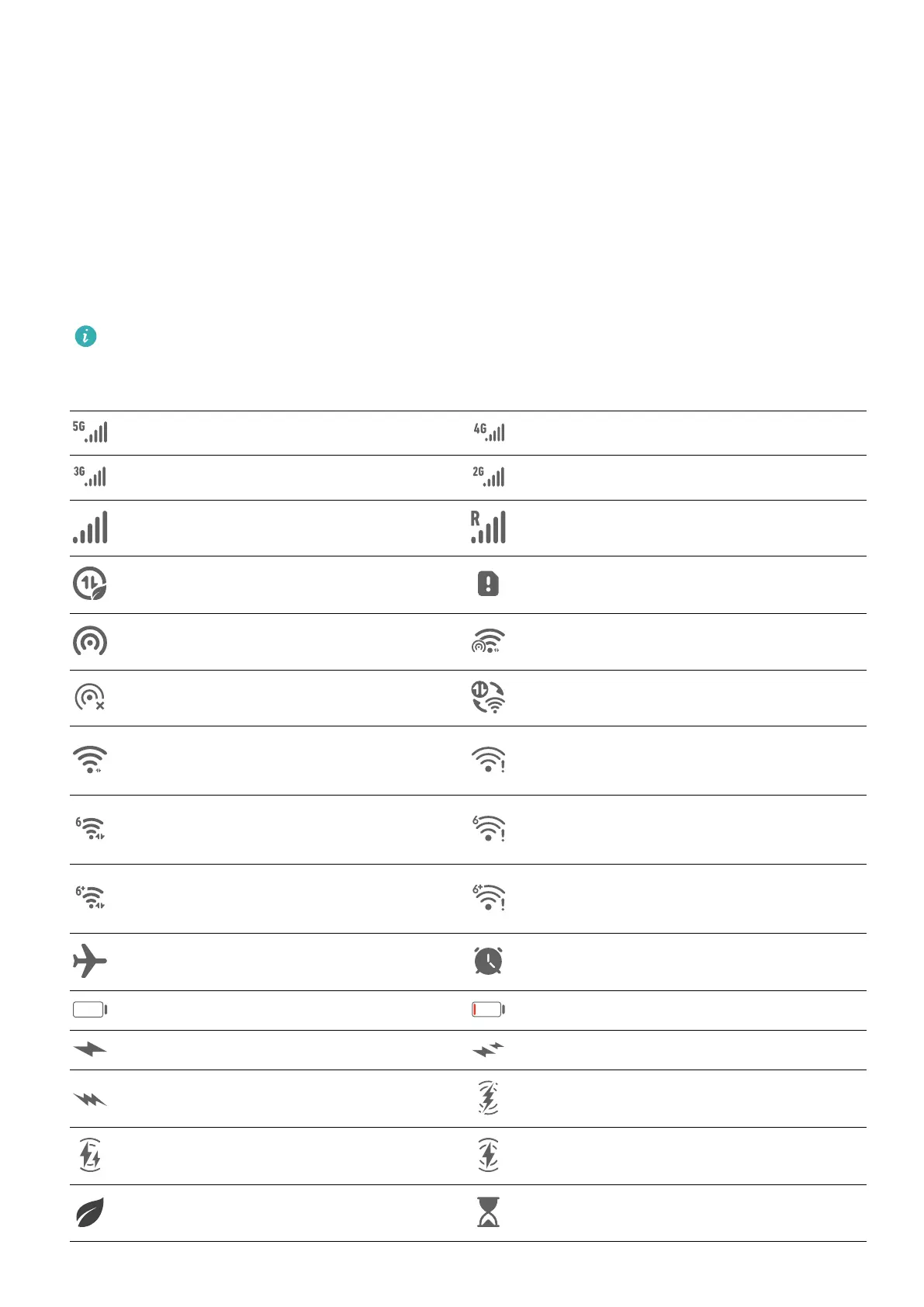
Notication and Status Icons
Network status icons may vary depending on your region or network service provider.
Supported features vary depending on the device model. Some of the following icons
may not be relevant to your phone.
5G network connected 4G network connected
3G network connected 2G network connected
Full signal strength Roaming
Data saver enabled No SIM card inserted
Hotspot enabled Hotspot connected
Hotspot disconnected Switching networks via Wi-Fi+
Wi-Fi connected
Wi-Fi network is faulty, unable to
connect to the Internet
Wi-Fi 6 connected
Wi-Fi 6 network is faulty, unable
to connect to the Internet
Wi-Fi 6+ connected
Wi-Fi 6+ network is faulty, unable
to connect to the Internet
Airplane mode enabled Alarm set
Battery empty Low battery
Charging Fast charging
Super charging Wireless super charging
Wireless fast charging Regular wireless charging
Power Saving mode enabled Digital Balance enabled
Settings
107



 To Next Page