26
(Optional) Installing the Cap (Applicable to Upflow Units)
7.10
It takes two persons to install the cap using a 2 m step ladder.
Before installing the cap, attach the thermal insulation foam in the accessories to the top
beam of the smart cooling product, and ensure that the reserved holes in the thermal
insulation foam are aligned with the holes in the beam. Check that the cap is intact and free
from scratches, that the sheet metal is not bent, and that the screws are secure.
Before installing the cap, reserve space on the top of the indoor unit. The height of the
reserved space must be greater than that of the cap.
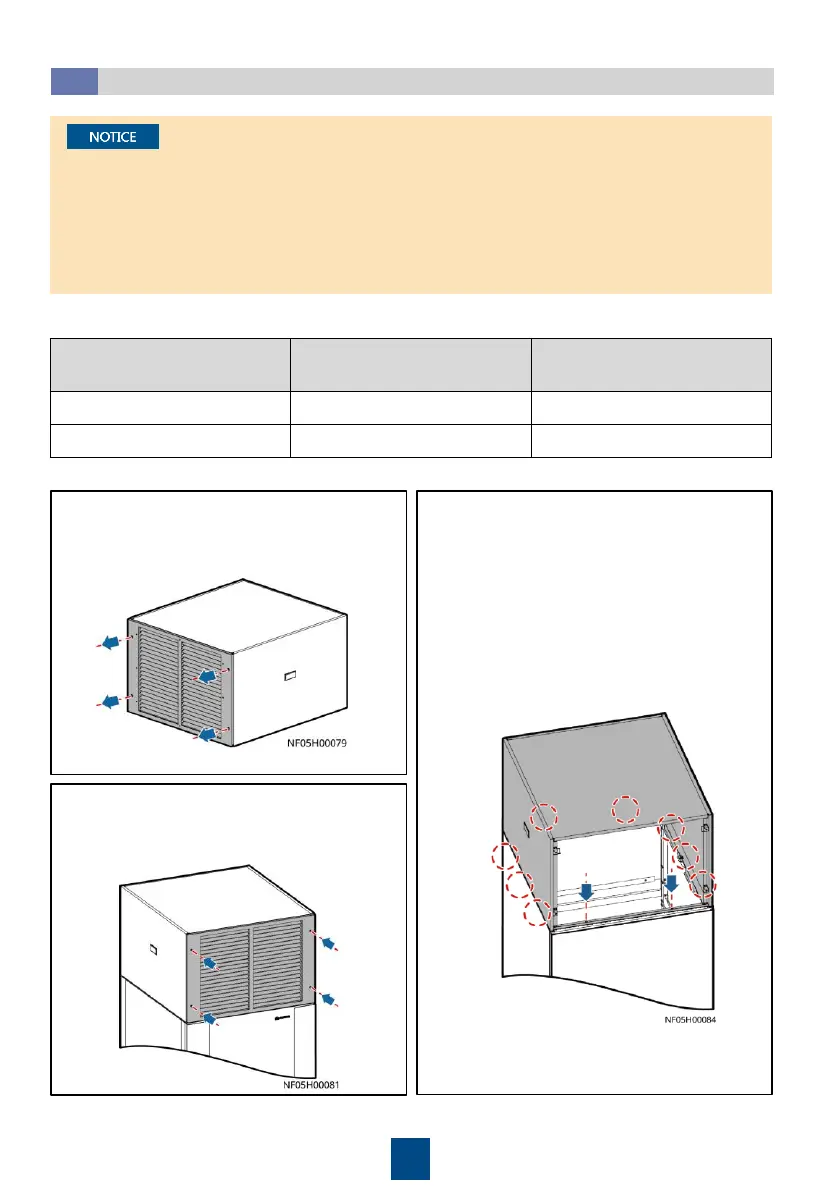
1. Remove the cap front panel using a Phillips
screwdriver. Place the cap on the top of the
cabinet.
2. Secure the cap using M5 tapping screws.
3. Secure the cap front panel to the frame, and
adjust the angle of the front panel blade.
• 900 mm wide indoor unit: 2 PCS
respectively on the front and the
rear, and 3 PCS respectively on the
left and right
• 1100 mm wide indoor unit: 4 PCS
respectively on the front and the
rear, and 3 PCS respectively on the
left and right
Indoor Unit Model
Indoor Unit Dimensions (H x
W x D) (mm)
Cap Dimensions (H x W x D)
(mm)
NetCol8000-A045U 2000 x 900 x 900 600 x 900 x 900
NetCol8000-A060U 2000 x 1100 x 1000 600 x 1100 x 1000
Cap dimensions







 To Next Page