Quick Start
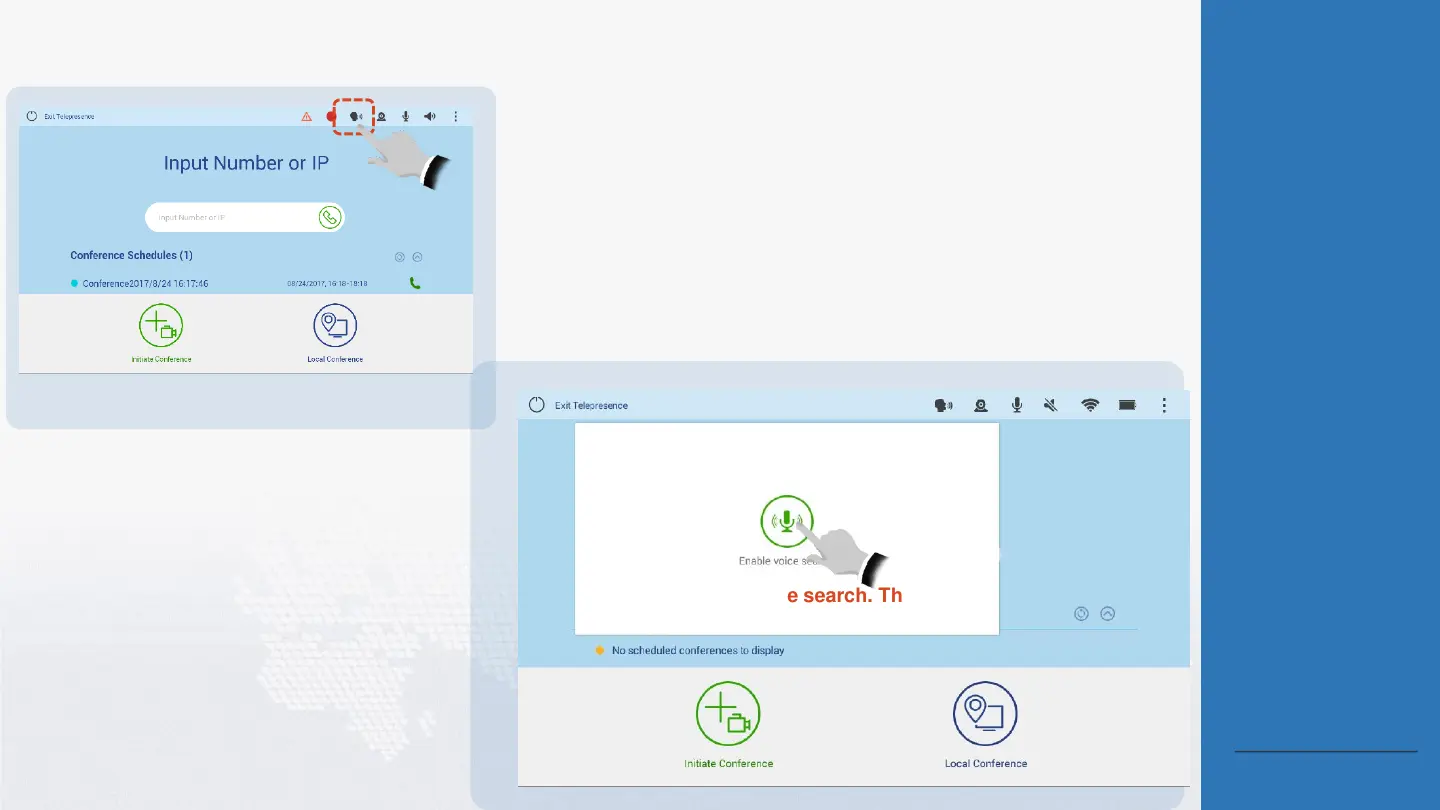
Perform Voice Dialing
1
Tap the Voice
Dialing icon.
Tap Enable voice search. Then speak
the name of a site or conference.
2
About Voice Dialing
To enable the endpoint accurately
recognize your desired site or
conference, when using voice
dialing, note that:
Speak the site or conference
name in the standard
English, rather than dialects.
Speak the full name of the
site/conference you want to
call/join. Keyword-based
recognition or fuzzy search is
not supported.
The site/conference you want
to call/join using voice dialing
must meet the following
requirements:
The site is in the address
book and online. Its name
contains a maximum of 64
characters and does not
contain any special
characters (for example,
@ # %).
The conference is in
progress.
The conference is in the
Favorite Conferences list.
Voice dialing can recognize
words, letters, digits, a
combination of words and digits,
and a combination of letters and
digits.
Back to Contents





 To Next Page